1. 环境搭建与第一个Qt Quick程序
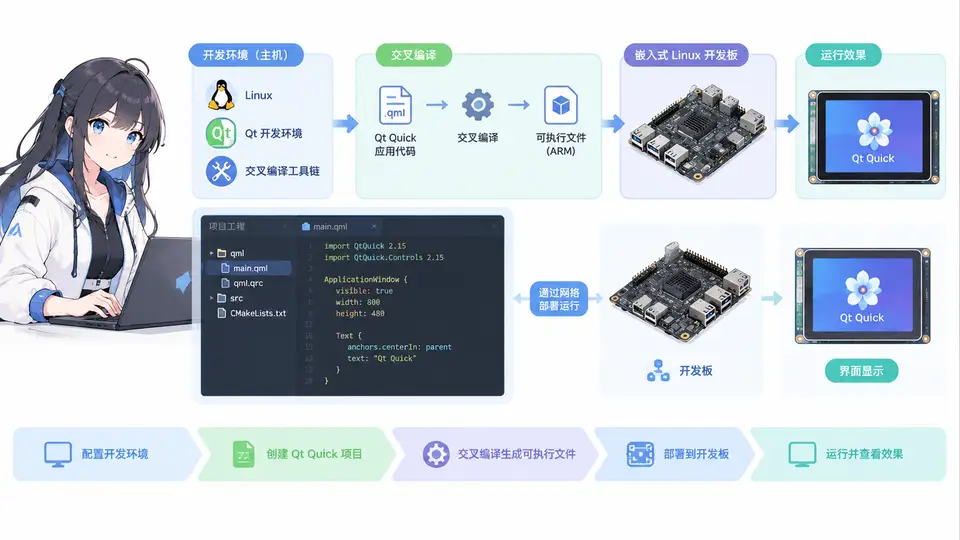
任务目标
在嵌入式Linux开发板上运行第一个Qt Quick程序。本案例以i.MX6ULL开发板(Cortex-A7内核)为硬件平台,主机为Ubuntu 20.04 x64,完成Qt 5.15.2交叉编译环境搭建,并编译一个显示矩形与文本的Qt Quick程序,部署到开发板验证运行。
环境与依赖
- 主机:Ubuntu 20.04 x64,已安装build-essential、python3
- 交叉编译器:arm-linux-gnueabihf-gcc 9.4(安装:
sudo apt install g++-arm-linux-gnueabihf) - Qt源码:qt-everywhere-opensource-src-5.15.2.tar.xz(约500MB,从Qt官网下载)
- 开发板文件系统:已挂载至主机
/opt/rootfs(含Linux内核模块与依赖库)
交叉编译Qt库
解压Qt源码后创建独立构建目录,配置交叉编译。关键配置项如下:
mkdir /opt/qt-5.15.2-arm && cd /opt/qt-5.15.2-arm
tar xf qt-everywhere-opensource-src-5.15.2.tar.xz -C /opt/qt-5.15.2-arm
cd /opt/qt-5.15.2-arm/qt-everywhere-src-5.15.2

./configure -prefix /opt/qt-5.15.2-arm/install \
  -xplatform linux-arm-gnueabihf-g++ \
  -sysroot /opt/rootfs \
  -opensource -confirm-license -release \
  -no-opengl -eglfs -linuxfb \
  -skip qtwebengine -skip qtdeclarative -skip qtmultimedia \
  -nomake examples -nomake tests \
  -no-xcb -no-gtk

make -j$(nproc) && make install注意:-skip qtdeclarative 仅用于加速首次编译,本案例需要Qt Quick模块,因此实际编译时不要跳过qtdeclarative。正确配置应移除该skip项。编译耗时约2~3小时,完成后Qt库安装至 /opt/qt-5.15.2-arm/install。
创建Qt Quick工程
在主机创建工程目录 hello_quick,包含以下三个文件:
hello_quick/
├── main.cpp
├── main.qml
└── hello_quick.promain.cpp:
#include <QGuiApplication>
#include <QQmlApplicationEngine>

int main(int argc, char *argv[])
{
    QGuiApplication app(argc, argv);
    QQmlApplicationEngine engine;
    engine.load(QUrl(QStringLiteral("qrc:/main.qml")));
    if (engine.rootObjects().isEmpty())
        return -1;
    return app.exec();
}main.qml:
import QtQuick 2.15
import QtQuick.Window 2.15

Window {
    width: 480
    height: 272
    visible: true
    title: "Hello Qt Quick"

    Rectangle {
        anchors.centerIn: parent
        width: 200
        height: 100
        color: "#4CAF50"
        radius: 8

        Text {
            anchors.centerIn: parent
            text: "Hello, i.MX6ULL!"
            font.pixelSize: 20
            color: "white"
        }
    }
}hello_quick.pro:
QT += quick qml
CONFIG += c++11
TARGET = hello_quick
TEMPLATE = app
SOURCES += main.cpp
RESOURCES += qml.qrc
创建资源文件 qml.qrc:
<RCC>
    <qresource prefix="/">
        <file>main.qml</file>
    </qresource>
</RCC>
编译与部署
cd hello_quick
/opt/qt-5.15.2-arm/install/bin/qmake
make -j$(nproc)
生成的可执行文件 hello_quick 复制到开发板:
scp hello_quick root@<开发板IP>:/root/开发板上需设置Qt运行环境变量(假设Qt库已复制至 /opt/qt):
export QT_QPA_PLATFORM=linuxfb
export LD_LIBRARY_PATH=/opt/qt/lib:$LD_LIBRARY_PATH
export QT_QPA_FB_DRM=1   # 若使用DRM显示,否则可省略
./hello_quick
验证方法
程序运行后,开发板LCD屏幕应显示一个绿色圆角矩形,中央有白色文字“Hello, i.MX6ULL!”。若屏幕无输出,按以下顺序排查:
- 执行
echo $QT_QPA_PLATFORM确认平台插件为linuxfb; - 检查
ls /dev/fb0是否存在,确认framebuffer设备可用; - 运行
ldd ./hello_quick确认所有Qt动态库均已找到。
程序正常退出(无报错信息)且屏幕显示预期图形,即判定通过。
上图展示了从主机交叉编译到开发板运行的完整流程。若需在LCD上显示不同内容,仅需修改 main.qml 中的文本与颜色属性后重新编译。