2. 使用接口约束对象结构并实现数据校验
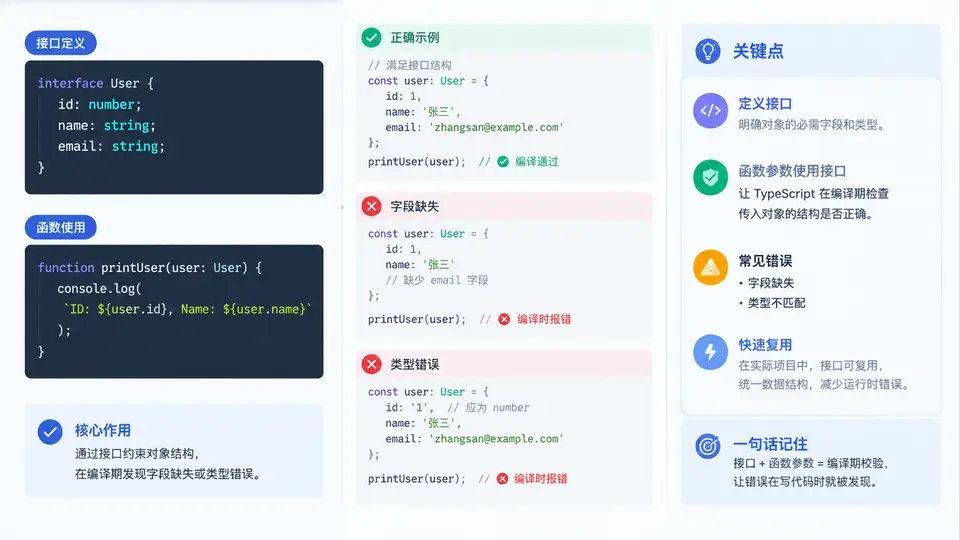
为什么需要接口约束对象结构
在 TypeScript 中,对象字面量很容易写错字段名或漏掉字段,而普通函数参数若用 any 或宽泛类型接收,错误只能在运行时暴露。接口(interface)用于描述对象应具备的字段名、字段类型以及可选/只读属性,让编译器在开发阶段就检查对象结构。
下面定义一个描述用户对象的接口,并编写接收该接口类型的校验函数。
// user.ts
interface User {
  readonly id: number;      // 只读,创建后不可修改
  name: string;             // 必填
  age: number;              // 必填
  email?: string;           // 可选
}

// 接收 User 接口类型,返回校验结果
function validateUser(user: User): string[] {
  const errors: string[] = [];

  if (user.name.trim().length === 0) {
    errors.push("name 不能为空");
  }
  if (user.age < 0 || user.age > 150) {
    errors.push("age 必须在 0~150 之间");
  }
  if (user.email !== undefined && !user.email.includes("@")) {
    errors.push("email 格式不正确");
  }

  return errors;
}

// 正确对象:编译通过
const u1: User = { id: 1, name: "Alice", age: 28, email: "alice@example.com" };
console.log(validateUser(u1)); // []

// 错误对象:编译期即报错
// const u2: User = { id: 2, name: "Bob" };
//   类型 "{ id: number; name: string; }" 缺少属性 "age"

// const u3: User = { id: 3, name: "Carol", age: "30" };
//   不能将类型 "string" 分配给类型 "number"
接口只存在于编译期,编译后的 JavaScript 中不会保留
interface User,因此运行时校验仍需在函数内部手动编写。编译期检查与运行时校验的分工
接口负责“结构是否匹配”,函数内部逻辑负责“值是否合法”。两者结合才能既防止字段缺失/类型错误,又防止业务规则错误。下图展示从对象字面量到最终校验结果的完整链路,以及编译期与运行时的分界。
关键检查点与常见错误
| 错误写法 | 编译器提示 | 修正方式 |
|---|---|---|
{ id: 2, name: "Bob" } | 缺少属性 "age" | 补上 age: number |
{ id: 3, name: "Carol", age: "30" } | 不能将 string 分配给 number | 改为 age: 30 |
user.id = 99 | 无法分配到 "id",因为它是只读属性 | 去掉 readonly 或不在外部修改 |
{ id: 4, name: "Dave", age: 25, phone: "123" } | 对象字面量只能指定已知属性 | 删除多余字段或在接口中声明 |
接口的“多余属性检查”只对对象字面量直接赋值生效。若先把对象赋给一个变量再传入,多余字段不会报错,这是 TypeScript 的结构化类型特性,不是 bug。
验证方式
- 运行
npx tsc --noEmit user.ts,确认正确对象无报错。 - 取消注释
u2或u3,再次运行,观察编译器给出的字段缺失或类型不匹配提示。 - 编译为 JavaScript 后运行
node user.js,确认validateUser(u1)输出空数组。 - 构造
age: 200或email: "bad"的对象,观察运行时返回的错误信息。