1. 搭建TypeScript开发环境并编译首个程序
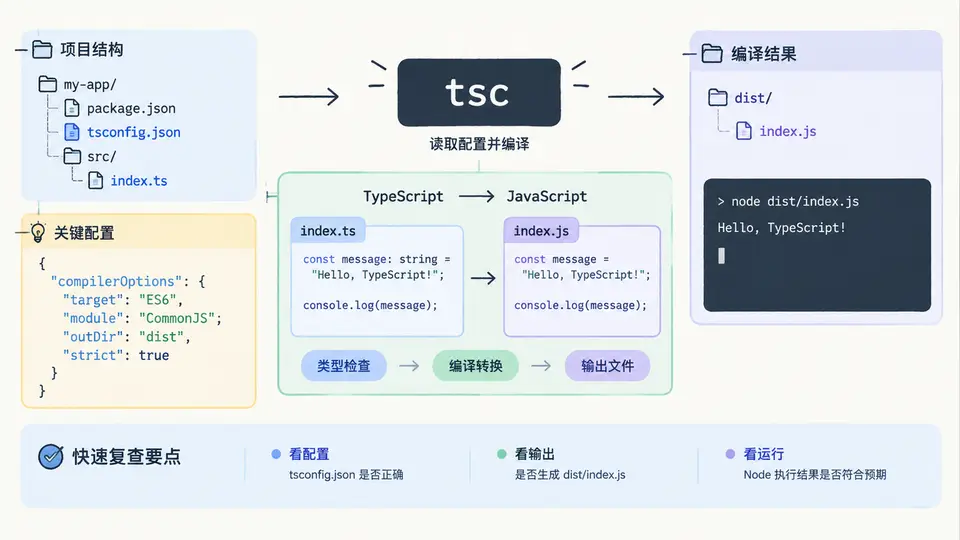
环境准备与项目初始化
TypeScript 的编译流程依赖 Node.js 运行时提供的 npm 包管理器。先确认本机已安装 Node.js(建议 18 LTS 及以上),然后在空目录中初始化项目并安装 TypeScript 编译器。
# 1. 确认 Node 与 npm 可用
node -v
npm -v

# 2. 创建项目目录并进入
mkdir ts-first-demo && cd ts-first-demo

# 3. 生成 package.json(-y 使用默认值)
npm init -y

# 4. 将 TypeScript 安装为开发依赖
npm install --save-dev typescript

# 5. 验证 tsc 可执行
npx tsc -v
安装完成后,项目根目录会出现 node_modules/ 与 package.json,其中 devDependencies 记录了 TypeScript 版本。使用 npx tsc 可调用本地安装的编译器,避免依赖全局版本。
生成并配置 tsconfig.json
用 npx tsc --init 生成默认配置,再按最小可用原则修改关键字段。下面是一份适合本案例的配置,重点控制输入范围、输出目录与目标语法版本。
{
  "compilerOptions": {
    "target": "ES2020",
    "module": "commonjs",
    "rootDir": "./src",
    "outDir": "./dist",
    "strict": true,
    "esModuleInterop": true,
    "skipLibCheck": true,
    "sourceMap": true
  },
  "include": ["src/**/*.ts"]
}| 字段 | 作用 | 本案例取值 |
|---|---|---|
target | 输出 JS 的语法版本 | ES2020 |
module | 模块系统 | commonjs(Node 直接运行) |
rootDir | 源码根目录 | ./src |
outDir | 编译产物目录 | ./dist |
strict | 开启严格类型检查 | true |
sourceMap | 生成调试映射 | true |
若
include 未指定,编译器会扫描整个项目目录,可能把 node_modules 中的声明文件也纳入,导致编译变慢或报错。显式限定 src/**/*.ts 是更稳妥的做法。编写带类型标注的源文件
在 src/ 下新建 index.ts,用基础类型标注声明变量与函数参数,让编译器在编译期就能发现类型不匹配。
// src/index.ts
const projectName: string = "ts-first-demo";
const version: number = 1;
const isReady: boolean = true;

function greet(name: string, count: number): string {
  return `[${projectName} v${version}] Hello, ${name}! (${count})`;
}

const message: string = greet("TypeScript", 1);
console.log(message);
console.log("ready:", isReady);
这里 name: string、count: number 与返回值 : string 都是显式类型标注。若把 greet("TypeScript", "1") 中的第二个参数写成字符串,tsc 会直接报错并阻止生成 JS,这正是类型检查的价值。
编译与运行验证
执行编译命令,观察 dist/ 目录中生成的 JavaScript 文件,再用 Node 运行它。
# 编译(读取 tsconfig.json)
npx tsc

# 查看产物
ls dist

# 运行编译后的 JS
node dist/index.js
预期输出:
[ts-first-demo v1] Hello, TypeScript! (1)
ready: true
如果 dist/index.js 不存在,优先检查 rootDir 与 include 是否指向了 src;如果运行时报 Cannot find module,检查 module 是否为 commonjs。编译通过且 Node 输出与预期一致,即完成本案例的验证闭环。
可复用的初始化检查清单
| 检查项 | 命令 / 位置 | 通过标准 |
|---|---|---|
| Node 与 npm 可用 | node -v / npm -v | 均输出版本号 |
| TypeScript 已安装 | npx tsc -v | 输出 tsc 版本 |
| 配置输入输出 | tsconfig.json | rootDir=./src,outDir=./dist |
| 源码存在 | src/index.ts | 含基础类型标注 |
| 编译成功 | npx tsc | 无报错,dist 生成 index.js |
| 运行输出正确 | node dist/index.js | 打印问候语与 ready: true |
不要用
node src/index.ts 直接运行源码。Node 默认不识别 TypeScript 的类型标注语法,必须先经 tsc 编译为 JavaScript,或使用额外的运行时加载器。