3. EKS Fargate Profile配置与Pod调度验证
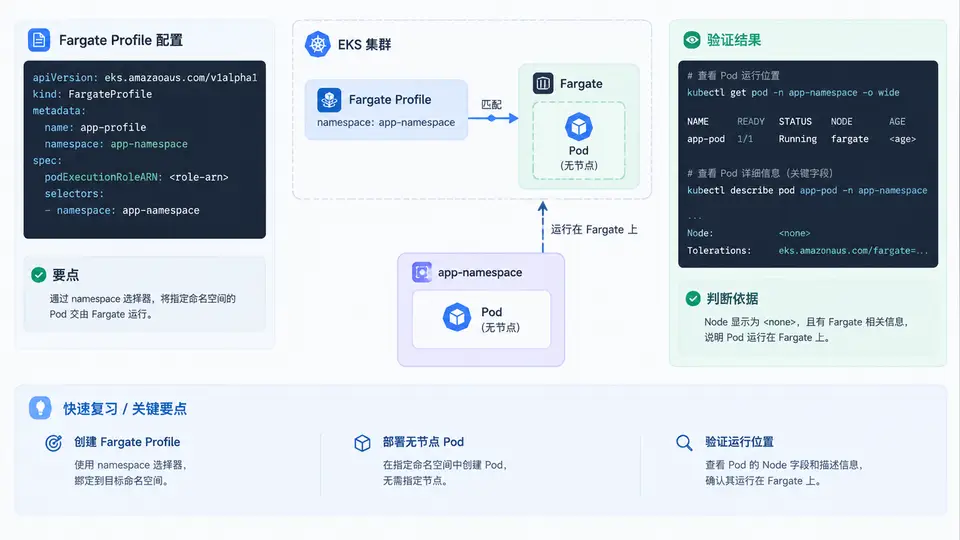
Fargate Profile 与 Pod 调度的匹配逻辑
Fargate Profile 是 EKS 中把 Pod 调度到 Fargate 的“准入规则”。它由三部分组成:cluster(所属集群)、podExecutionRoleArn(Fargate 节点上 kubelet 与 CNI 使用的 IAM 角色)、以及 selectors(命名空间 + 可选标签)。只有 Pod 的命名空间和标签同时命中某个 selector,才会被 Fargate 调度器接管;否则 Pod 会回到 EC2 节点组或保持 Pending。
关键约束:Fargate Profile 的 selector 只支持 namespace 和 labels,不支持 nodeSelector、affinity、tolerations 等节点级字段;Fargate Pod 也不支持 DaemonSet、HostNetwork、HostPath、privileged 等特性。因此验证调度的核心是确认 Pod 的 spec.nodeName 指向一个 fargate-* 虚拟节点,且节点标签包含 eks.amazonaws.com/compute-type=fargate。
创建 Fargate Profile
使用 eksctl 创建最直接,它会自动创建并绑定 podExecutionRole。以下命令为命名空间 app-ns 创建 Profile,并只接管带 tier=web 标签的 Pod:
eksctl create fargateprofile \
  --cluster eks-prod \
  --name fp-app-ns \
  --namespace app-ns \
  --labels tier=web \
  --region ap-southeast-1
若使用 AWS CLI,需要先准备信任策略并创建角色,再创建 Profile:
# 1. 创建 podExecutionRole 信任策略
cat > fargate-trust.json <<'EOF'
{
  "Version": "2012-10-17",
  "Statement": [{
    "Effect": "Allow",
    "Principal": { "Service": "eks-fargate-pods.amazonaws.com" },
    "Action": "sts:AssumeRole"
  }]
}
EOF

aws iam create-role \
  --role-name eks-fargate-pod-role \
  --assume-role-policy-document file://fargate-trust.json

aws iam attach-role-policy \
  --role-name eks-fargate-pod-role \
  --policy-arn arn:aws:iam::aws:policy/AmazonEKSFargatePodExecutionRolePolicy

# 2. 创建 Fargate Profile
aws eks create-fargate-profile \
  --cluster-name eks-prod \
  --fargate-profile-name fp-app-ns \
  --pod-execution-role-arn arn:aws:iam::123456789012:role/eks-fargate-pod-role \
  --selectors namespace=app-ns,labels={tier=web} \
--region ap-southeast-1CREATING 变为 ACTIVE 后才可调度。可用 aws eks describe-fargate-profile 或 eksctl get fargateprofile 查看状态。部署无节点 Pod 并验证
创建命名空间并部署一个带 tier=web 标签的 Deployment。注意:Fargate 不支持 DaemonSet,因此这里用 Deployment 验证:
kubectl create namespace app-ns

cat <<'EOF' | kubectl apply -f -
apiVersion: apps/v1
kind: Deployment
metadata:
  name: web
  namespace: app-ns
spec:
  replicas: 2
  selector:
    matchLabels:
      app: web
      tier: web
  template:
    metadata:
      labels:
        app: web
        tier: web
    spec:
      containers:
      - name: nginx
        image: public.ecr.aws/nginx/nginx:1.25
        ports:
        - containerPort: 80
        resources:
          requests:
            cpu: "250m"
            memory: "512Mi"
EOF
等待 Pod 就绪后,用以下命令确认调度位置:
kubectl get pod -n app-ns -o wide
kubectl get node -l eks.amazonaws.com/compute-type=fargate
kubectl describe pod -n app-ns -l tier=web | grep -E "Node:|Node-Selectors"
预期结果:Pod 的 NODE 列显示 fargate-ip-10-0-x-x.ap-southeast-1.compute.internal,且 kubectl get node 能看到对应的 Fargate 虚拟节点。若 Pod 落在 EC2 节点上,说明 selector 未命中,需检查命名空间和标签是否与 Profile 完全一致。
快速复查清单
| 检查项 | 命令 / 判据 | 通过标准 |
|---|---|---|
| Profile 状态 | aws eks describe-fargate-profile --query 'fargateProfile.status' | ACTIVE |
| Selector 匹配 | 对比 Profile selectors 与 Pod namespace/labels | 命名空间与标签均命中 |
| Pod 调度节点 | kubectl get pod -n app-ns -o wide | NODE 以 fargate- 开头 |
| 节点标签 | kubectl get node -l eks.amazonaws.com/compute-type=fargate | 存在对应虚拟节点 |
| Pod 状态 | kubectl get pod -n app-ns | Running 且 READY 1/1 |
AmazonEC2ContainerRegistryReadOnly。日志需通过 Fluent Bit 转发到 CloudWatch,Fargate 节点本身不保留日志。