3. 实现请求体解析中间件处理 JSON 与表单
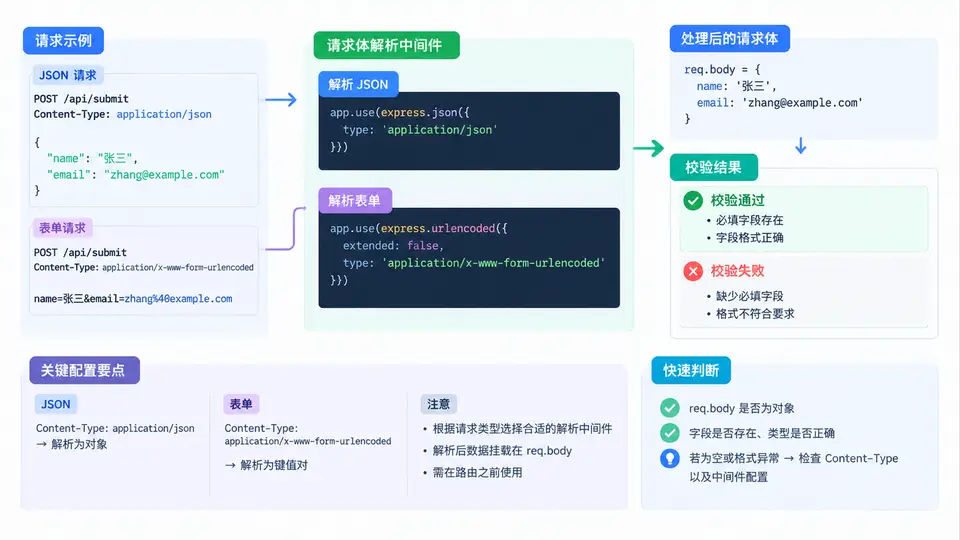
请求体解析的核心问题
HTTP 请求体是字节流,Node.js 的 http 模块不会自动把它变成对象。Express 的 express.json() 和 express.urlencoded() 中间件负责读取流、按 Content-Type 选择解析器、把结果挂到 req.body,并在解析失败时返回 400。理解这条数据链,才能正确配置和排错。
配置两个解析中间件
Express 4.16+ 内置了 express.json() 和 express.urlencoded(),无需额外安装 body-parser。两者都必须在路由之前注册,否则 req.body 为 undefined。
const express = require('express');
const app = express();

// 解析 JSON 请求体,限制 100kb
app.use(express.json({ limit: '100kb' }));

// 解析表单请求体,extended:false 使用 querystring,true 使用 qs
app.use(express.urlencoded({ extended: false, limit: '100kb' }));

app.post('/api/register', (req, res) => {
  const { username, age } = req.body;

  // 校验:字段存在且类型正确
  const errors = [];
  if (!username || typeof username !== 'string') {
    errors.push('username 必填且为字符串');
  }
  const ageNum = Number(age);
  if (!Number.isInteger(ageNum) || ageNum <= 0) {
    errors.push('age 必须为正整数');
  }

  if (errors.length > 0) {
    return res.status(400).json({ ok: false, errors });
  }
  res.json({ ok: true, data: { username, age: ageNum } });
});

app.listen(3000);
验证两种 Content-Type
用 curl 分别发送 JSON 和表单,观察 req.body 的类型差异:
# JSON 请求
curl -X POST http://localhost:3000/api/register \
  -H "Content-Type: application/json" \
  -d '{"username":"alice","age":25}'
# 返回 {"ok":true,"data":{"username":"alice","age":25}}

# 表单请求
curl -X POST http://localhost:3000/api/register \
  -H "Content-Type: application/x-www-form-urlencoded" \
  -d "username=bob&age=30"
# 返回 {"ok":true,"data":{"username":"bob","age":30}}

# 缺少 Content-Type
curl -X POST http://localhost:3000/api/register -d '{"username":"x"}'
# req.body 为空对象,返回 400 校验错误
常见坑:表单解析后所有值都是字符串,
age 得到 "25" 而非 25。必须用 Number() 或 parseInt() 转换后再校验。JSON 解析则保留原始类型,但要注意 null 和缺失字段的区别。
校验结果判断表
| 请求体 | Content-Type | req.body | 校验结果 |
|---|---|---|---|
| {"username":"alice","age":25} | application/json | {username:'alice',age:25} | 通过 |
| username=bob&age=30 | x-www-form-urlencoded | {username:'bob',age:'30'} | 通过(age 转数字后) |
| {"username":"","age":-1} | application/json | {username:'',age:-1} | 400:username 为空、age 非正 |
| {"username":"x"} | application/json | {username:'x'} | 400:age 缺失 |
| 非法 JSON 字符串 | application/json | 解析失败 | 400:中间件直接拦截 |
排错顺序:① 确认中间件注册在路由之前;② 检查请求头
Content-Type 是否与中间件匹配;③ 表单场景检查是否做了字符串到数字的转换;④ 用 console.log(req.body) 确认解析结果再写校验逻辑。