1. 搭建最小 HTTP 服务并返回 JSON
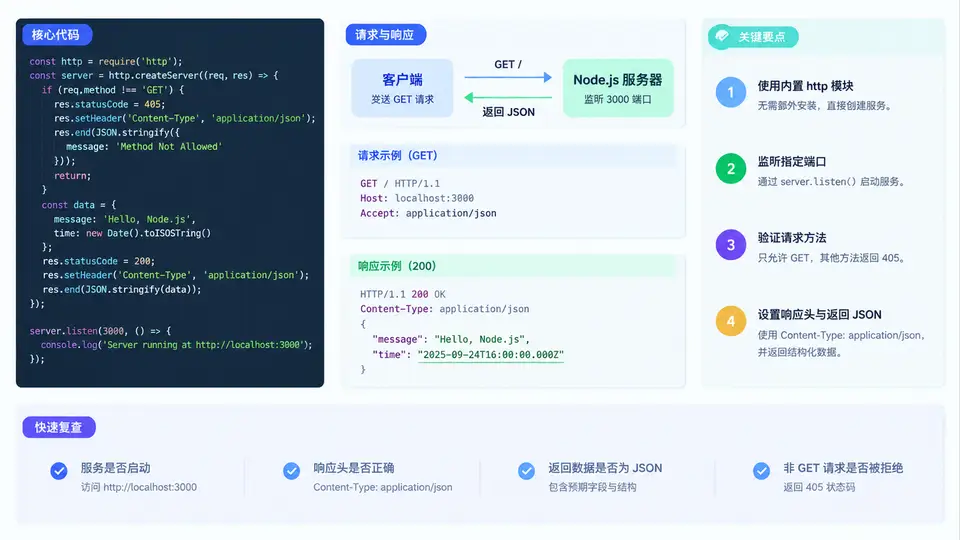
用内置 http 模块起一个最小 JSON 接口
本例只依赖 Node.js 内置模块,不引入任何第三方包。核心对象是 http.createServer() 返回的 Server 实例,以及每次请求触发的 IncomingMessage(请求对象)和 ServerResponse(响应对象)。任务边界很明确:监听一个端口,对 GET /api/health 返回结构化 JSON,并显式设置响应头。
关键实现
创建文件 server.js,完整代码如下。它包含端口定义、请求方法判断、路径判断、响应头设置与响应体序列化,可直接运行。
const http = require('http');

const HOST = '127.0.0.1';
const PORT = 3000;

const server = http.createServer((req, res) => {
  // 1. 只处理 GET,其余方法返回 405
  if (req.method !== 'GET') {
    res.writeHead(405, {
      'Content-Type': 'application/json; charset=utf-8',
      'Allow': 'GET'
    });
    res.end(JSON.stringify({ ok: false, error: 'Method Not Allowed' }));
    return;
  }

  // 2. 只处理 /api/health,其余路径返回 404
  if (req.url !== '/api/health') {
    res.writeHead(404, {
      'Content-Type': 'application/json; charset=utf-8'
    });
    res.end(JSON.stringify({ ok: false, error: 'Not Found' }));
    return;
  }

  // 3. 正常响应:显式设置状态码与响应头
  const payload = {
    ok: true,
    service: 'minimal-http',
    method: req.method,
    path: req.url,
    timestamp: new Date().toISOString()
  };
  const body = JSON.stringify(payload);

  res.writeHead(200, {
    'Content-Type': 'application/json; charset=utf-8',
    'Content-Length': Buffer.byteLength(body),
    'X-Powered-By': 'node-http'
  });
  res.end(body);
});

server.listen(PORT, HOST, () => {
  console.log(`Server running at http://${HOST}:${PORT}/`);
});
三个判断分支的顺序很重要:先判方法,再判路径。这样
POST /api/health 会得到 405 而不是 404,语义更准确。请求处理与响应头设置关系
下图把一次请求进入服务后的判断链、各分支的状态码与响应头设置、以及最终响应体结构放在同一张关系图中,便于对照代码理解。
运行与验证
启动服务:
node server.js
# 输出:Server running at http://127.0.0.1:3000/
用 curl 验证正常路径,重点观察状态行与响应头:
curl -i http://127.0.0.1:3000/api/health
预期输出(示例):
HTTP/1.1 200 OK
Content-Type: application/json; charset=utf-8
Content-Length: 118
X-Powered-By: node-http
Date: ...

{"ok":true,"service":"minimal-http","method":"GET","path":"/api/health","timestamp":"..."}
再验证两个异常分支:
curl -i -X POST http://127.0.0.1:3000/api/health   # 期望 405,且 Allow: GET
curl -i http://127.0.0.1:3000/nope                 # 期望 404
如果 curl 返回的 Content-Type 是
text/plain 或缺失,说明 writeHead 中的响应头没有生效,检查是否在 end() 之后才调用 writeHead,或是否把响应头对象写成了数组。结果判读对照
| 请求 | 状态码 | 关键响应头 | 响应体 ok 字段 |
|---|---|---|---|
| GET /api/health | 200 | Content-Type: application/json; charset=utf-8 | true |
| POST /api/health | 405 | Allow: GET | false |
| GET /nope | 404 | Content-Type: application/json; charset=utf-8 | false |
可直接复用的检查清单
- 端口是否被占用:启动报
EADDRINUSE时换端口或结束占用进程。 - 是否显式设置了
Content-Type: application/json; charset=utf-8。 Content-Length是否用Buffer.byteLength(body)计算。- 方法判断是否在路径判断之前,保证 405 语义正确。
- 每个分支是否都调用了
res.end(),避免请求挂起。 - 是否用
curl -i确认了状态行与响应头,而不只看响应体。