1. Build the MPDB Barrier and Trolley Basel
Baseline Model Scope and Assembly Strategy
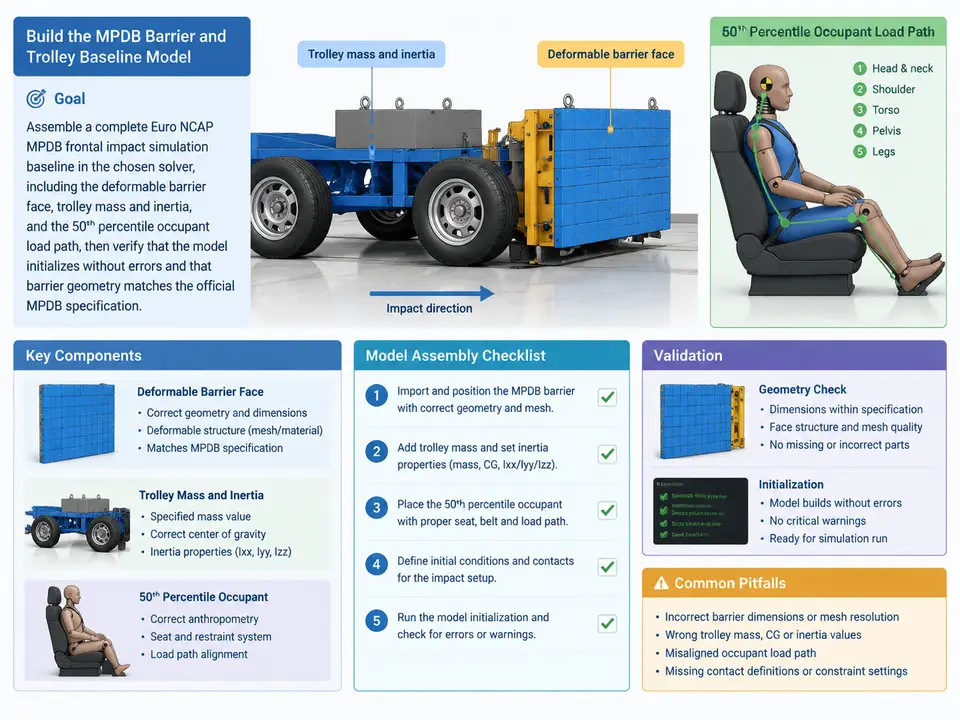
The first case in this series establishes a runnable, geometry-correct MPDB baseline — not a calibrated one. The distinction matters: barrier face material tuning is deferred to Case 2, and vehicle-to-barrier alignment/contact setup is deferred to Case 3. Here the deliverable is a solver deck that (a) contains the deformable barrier face built to the official MPDB envelope, (b) carries the trolley mass and inertia properties, and (c) includes a 50th percentile occupant load path so that subsequent cases can attach instrumentation and evaluate restraint performance. The model must initialize cleanly and the barrier geometry must be dimensionally verifiable against the specification.
The Euro NCAP MPDB (Mobile Progressive Deformable Barrier) test uses a 1,400 kg trolley impacting a stationary vehicle at 50 km/h with 50% overlap. The barrier face itself is a honeycomb/aluminium cell block with a defined frontal area and depth, mounted on the trolley via a rigid backing plate. Getting the baseline right means the barrier face envelope, the trolley CG and inertia tensor, and the occupant load path reference frame all agree before any material calibration begins.
Barrier Face Geometry and Trolley Definition
The barrier face is modelled as a block of deformable solid or shell elements with the following nominal envelope (values consistent with the published MPDB specification; confirm against your solver's unit system):
| Parameter | Nominal value | Notes |
|---|---|---|
| Barrier face width | 1000 mm | Full frontal width of deformable block |
| Barrier face height | 540 mm | Vertical extent of cell block |
| Barrier face depth | 450 mm | Crush depth along impact axis |
| Trolley mass | 1400 kg | Total moving mass incl. barrier face |
| Impact velocity | 50 km/h (13.89 m/s) | Along vehicle longitudinal axis |
| Overlap | 50% | Deferred to Case 3 for alignment |
Model the barrier face with a structured hex mesh so that cell-level stiffness (Case 2) can be assigned per cell group later. A 10 mm nominal element edge length gives roughly 100 × 54 × 45 elements — acceptable for a baseline. Assign a placeholder elastic-plastic material now; the calibrated honeycomb model replaces it in Case 2. The trolley is a rigid body (or rigid body with a deformable backing plate) carrying the 1400 kg mass and an inertia tensor consistent with a compact car-class trolley. Set the trolley CG at the geometric centre of the barrier face backing plate unless your specification drawing states otherwise.
Occupant Load Path Reference
The 50th percentile occupant load path is a simplified representation: a seat reference point, a steering wheel or knee bolster contact surface, and a belt/airbag load path stub. For a baseline model, represent the occupant as a lumped-mass or a rigid-body dummy placeholder positioned at the 50th percentile H-point relative to the vehicle reference frame. The purpose is to establish the coordinate frame and attachment points so that later cases can add restraint models without re-deriving the load path. Do not attempt to validate occupant kinematics here — that is out of scope for Case 1.
Building the Deck and Verifying Initialization
The assembly order below is solver-agnostic in logic; adapt keyword syntax to your chosen solver (LS-DYNA, Radioss, or PAM-CRASH). The key is that each block is independently checkable before the next is added.
- Units and control block. Declare a consistent unit system (e.g., mm–kg–ms–kN) and set termination time to at least 150 ms to cover the full MPDB event. Set a stable time-step control and enable mass scaling only if the smallest element dictates it — record the added mass so it does not corrupt the 1400 kg trolley total.
- Barrier face mesh. Generate the structured hex block at 1000 × 540 × 450 mm with 10 mm edges. Assign a placeholder elastic-plastic material (e.g., density 50 kg/m³, E = 50 MPa, yield 0.5 MPa) purely so the model runs; this is explicitly a placeholder, not a calibrated honeycomb.
- Trolley rigid body. Define a rigid part for the trolley structure and backing plate. Assign mass 1400 kg minus the barrier face mass, and an inertia tensor. Attach the barrier face to the backing plate with a tied contact or rigid link.
- Initial velocity. Apply 13.89 m/s along the impact axis to the trolley rigid body (and the barrier face, since it is tied). The vehicle remains stationary.
- Occupant load path. Create a reference node at the 50th percentile H-point, attach a lumped mass (e.g., 78 kg), and define belt/airbag attachment stubs as rigid links to the vehicle reference frame. This is a frame-establishment step, not a restraint model.
- Output requests. Request barrier face force (via a cross-section or contact force), trolley acceleration, and occupant reference node displacement. These outputs feed Cases 2 and 3.
Verification Criteria and Failure Symptoms
A correct baseline initializes with zero errors and passes the following checks. Treat any failure as a blocker before moving to Case 2.
| Check | Pass criterion | Typical failure symptom |
|---|---|---|
| Barrier envelope | Bounding box = 1000 × 540 × 450 mm (±1 mm) | Mesh scaled by wrong unit factor; bounding box off by 1000× |
| Trolley mass | Total moving mass = 1400 kg (±1%) | Mass scaling or missing barrier mass; solver reports 1380 or 1450 kg |
| Initial velocity | 13.89 m/s on all trolley nodes | Velocity applied to barrier only; trolley stationary at t=0 |
| Initial penetration | Zero penetrations between barrier and vehicle | Negative initial gap; solver warns of contact penetration at t=0 |
| Occupant frame | H-point node present and attached | Orphan node; no output in occupant displacement channel |
| Termination | Runs to 150 ms without negative-volume error | Element inversion in barrier face; reduce time step or remesh |
If the model initializes but the barrier face inverts within the first few milliseconds, the placeholder material is too soft for the 10 mm mesh — increase the placeholder yield slightly or refine the mesh locally. This is a numerical stability fix, not a calibration; the real material model arrives in Case 2. Once all six checks pass, the baseline is ready for barrier-only calibration.