1. Configure a Crash DAQ Channel for a 50 g
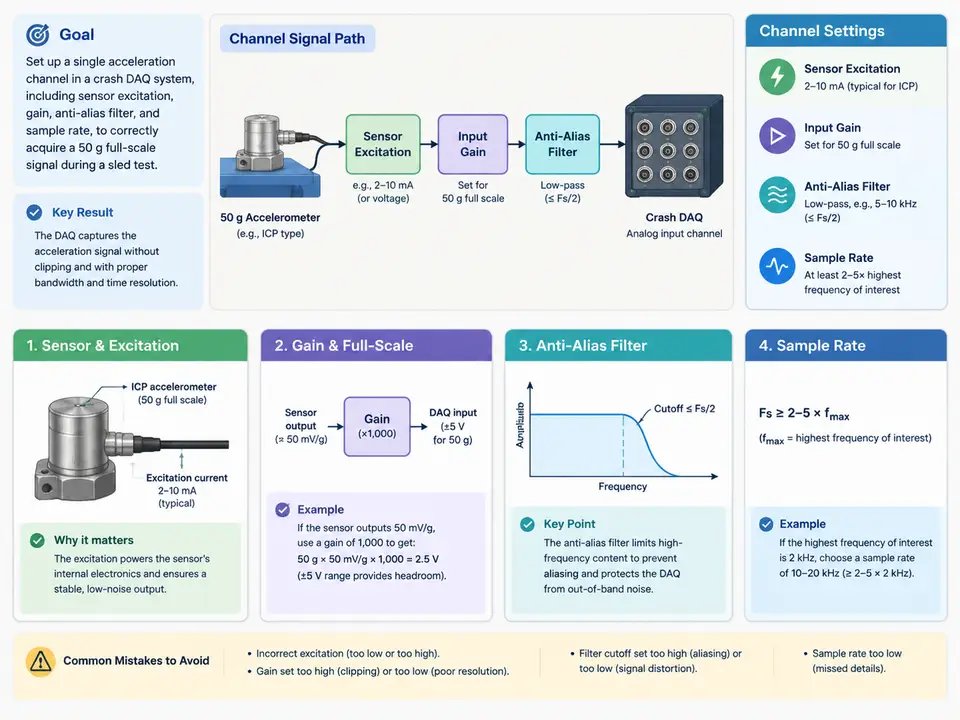
Channel Definition for a 50 g Sled-Test Accelerometer
This case configures one piezoelectric (charge-mode) accelerometer channel on a crash DAQ system for a sled test. The sensor is a 50 g full-scale single-axis accelerometer with a nominal sensitivity of 10.0 pC/g and a mounted resonance above 30 kHz. The DAQ front end is a charge amplifier module with selectable gain, a programmable anti-alias low-pass filter, and a per-channel sample rate. The goal is a channel that saturates only above 50 g, keeps the signal band well inside the anti-alias corner, and samples fast enough that the digital CFC filter applied later in post-processing is not limited by the acquisition.
Design Targets Before Touching the Software
Four parameters must be chosen together, because each one constrains the others. Work them out on paper first, then enter them into the channel setup.
- Full-scale and gain. The sensor's 50 g range maps to 500 pC at full scale (10.0 pC/g × 50 g). The charge amplifier converts charge to voltage with a feedback capacitor; the module's gain setting is expressed as mV/pC. Choose a gain so that 500 pC produces a voltage just under the ADC input range, leaving 10–20 % headroom for overload and for the amplifier's own offset.
- Excitation / coupling. A charge-mode sensor needs no constant-current excitation; the "excitation" setting on this channel is the charge amplifier's input coupling and its bias/zeroing behaviour. Set coupling to AC (charge mode) and enable the module's auto-zero so the DC bias of the charge amp does not eat into the ADC range.
- Anti-alias filter. The corner must sit above the highest frequency of interest but below the Nyquist frequency of the chosen sample rate. For a body-mounted accelerometer in a sled test, the meaningful band is roughly DC to 3 kHz; set the anti-alias corner to 10 kHz with a steep (e.g. 8th-order) response so that content near Nyquist is attenuated before digitisation.
- Sample rate. Pick a rate that gives comfortable oversampling relative to the anti-alias corner. A rate of 100 kS/s gives a Nyquist of 50 kHz, five times the 10 kHz corner, and leaves room for the CFC digital filter in post-processing without the acquisition itself becoming the bandwidth limit.
Worked Parameter Set
The table below is a concrete, self-consistent starting point for this channel. The numbers are a teaching example chosen to satisfy the constraints above; confirm the actual ADC input range and charge-amp gain steps against your module's datasheet before committing.
| Parameter | Value | Rationale |
|---|---|---|
| Sensor sensitivity | 10.0 pC/g | From calibration certificate |
| Full-scale acceleration | 50 g | Sensor range; channel must not clip below this |
| Full-scale charge | 500 pC | 10.0 pC/g × 50 g |
| Charge-amp gain | 10 mV/pC | 500 pC → 5.0 V at full scale |
| ADC input range | ±5 V (10 V span) | 5.0 V sits at ~100 %; use 8 mV/pC if more headroom is required |
| Coupling | AC / charge mode | Piezoelectric sensor, no DC response needed |
| Auto-zero | Enabled before run | Removes charge-amp bias from the ADC window |
| Anti-alias filter | 10 kHz, 8th-order low-pass | Above 3 kHz band of interest, below Nyquist |
| Sample rate | 100 kS/s | Nyquist 50 kHz, 5× the anti-alias corner |
With 10 mV/pC the channel reaches 5.0 V at exactly 50 g, which is the sensor's full scale but leaves no margin for the amplifier offset or for a slightly over-range event. A safer choice is 8 mV/pC: 500 pC × 8 mV/pC = 4.0 V, giving 20 % headroom to the ±5 V ADC limit while still resolving small accelerations. The trade-off is reduced resolution at low g; for a sled test where the peak is the quantity of interest, the headroom is usually worth more than the extra bits at 0.1 g.
Entering and Verifying the Channel
Configure the channel in the DAQ software in this order, because later settings depend on earlier ones:
- Create the channel, assign it the accelerometer's serial number, and enter the sensitivity (10.0 pC/g) and the physical unit (g).
- Set the input mode to charge/AC coupling and enable auto-zero. Run auto-zero with the sensor at rest and confirm the displayed offset is near zero counts.
- Set the charge-amp gain to 8 mV/pC and the anti-alias filter to 10 kHz, 8th-order.
- Set the sample rate to 100 kS/s and confirm the software reports a Nyquist of 50 kHz with no filter-corner warning.
- Apply a known static check: with the sensor inverted in the earth's gravity field, the channel should read approximately −1 g (and +1 g upright). This is a coarse but immediate sanity check on gain sign and scaling before the sled run.
How the Settings Interact
The SVG below shows the signal chain for this channel and where each setting acts. The key relationships to read from it: the sensor's charge output is scaled by the charge-amp gain into a voltage, the anti-alias filter limits the band before the ADC, and the sample rate sets the Nyquist limit that the anti-alias corner must stay below. The post-processing CFC filter is shown downstream so you can see that acquisition bandwidth must exceed the CFC band.
Verification and Common Failure Symptoms
Before the sled run, verify the channel with two checks that do not require the sled:
- Static gravity check. Upright, the channel should read about +1 g; inverted, about −1 g. A reading of roughly 0 g in both orientations points to a coupling or charge-amp fault; a reading that clips at the ADC rail points to excessive gain.
- Tap test. A light tap on the mounted sensor should produce a short, decaying transient that does not clip and that settles back to the pre-tap baseline. If the transient rings for a long time, suspect a loose mount or a cable resonance; if it clips, reduce the charge-amp gain.
Typical symptoms and their likely causes: a flat-line channel usually means the charge amp is in the wrong coupling mode or the cable is open; a channel that reads a large constant offset after auto-zero usually has a saturated charge amp from a bias or triboelectric cable effect; a channel that looks correct statically but shows suspicious high-frequency content during the run usually has the anti-alias corner set too high relative to the sample rate, letting energy fold back. In each case, re-check the parameter set against the table above before changing anything else.