1. Import and Consolidate CAE Solver Output
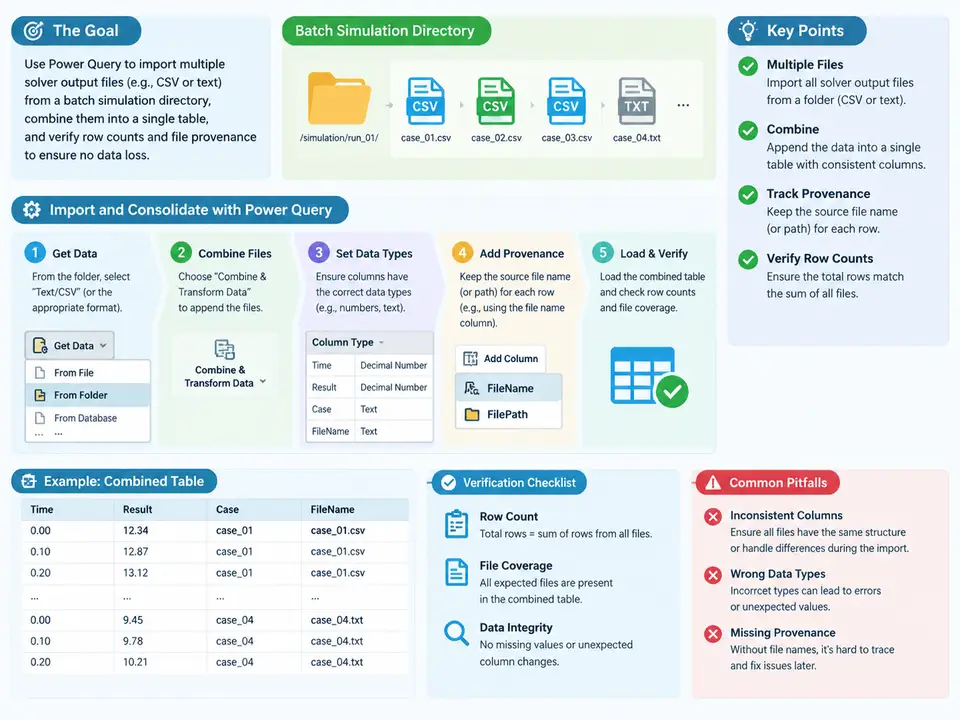
Why batch consolidation is a provenance problem, not just a merge
A CAE batch run typically produces one output file per load case, per solver invocation, or per design point. Each file carries the same nominal schema (node ID, element ID, stress components, displacement, time step), but the file name, directory, and embedded header are the only reliable record of which run produced which row. If you simply stack the files and drop the metadata, you get a table that is numerically correct but analytically useless: you can no longer attribute a peak stress to a load case, and you cannot prove that all expected files were ingested.
Power Query solves this cleanly because the Folder.Files connector returns a table of file metadata (name, folder path, date modified, size) alongside a content column. The consolidation pattern is therefore: enumerate files → attach provenance columns → expand content → combine → reconcile against the expected file manifest. The provenance columns survive the merge, so every output row can be traced back to its source file.
Reference batch layout and expected inputs
Assume a solver (any CSV/text-emitting structural solver) writes results into a run directory. A representative layout for this example:
D:\cae\runs\LC01\results.csv
D:\cae\runs\LC02\results.csv
D:\cae\runs\LC03\results.csv
D:\cae\runs\LC04\results.csv
D:\cae\runs\LC05\results.csv
Each results.csv has a header row and data rows such as:
node_id,element_id,sx_MPa,sy_MPa,sz_MPa,vm_MPa,ux_mm,uy_mm,uz_mm,time_s
101,9001,182.4,44.1,12.7,171.9,0.021,0.004,0.000,1.0
102,9002,176.8,39.5,11.2,166.3,0.019,0.003,0.000,1.0
The load case identity lives in the folder name (LC01…LC05), not in the file content. That is the provenance key we must capture. The expected manifest is five files; the verification step must confirm five files were read and that the combined row count equals the sum of per-file row counts.
Building the query in Power Query
Start from Data → Get Data → From File → From Folder and point at D:\cae\runs. In the navigator, choose Combine & Transform (or Transform Data to build it manually). The generated query has a structure like this — the key point is that Source keeps the metadata columns and Content holds the raw bytes:
let
    Source = Folder.Files("D:\cae\runs"),
    KeepCsv = Table.SelectRows(Source,
        each [Extension] = ".csv"),
    AddLoadCase = Table.AddColumn(KeepCsv, "LoadCase",
        each Text.BeforeDelimiter([Folder Path], "\", {0, RelativePosition.FromEnd}),
        type text),
    AddSourceFile = Table.AddColumn(AddLoadCase, "SourceFile",
        each [Name], type text),
    AddModified = Table.AddColumn(AddSourceFile, "FileModified",
        each [Date modified], type datetime),
    Parsed = Table.AddColumn(AddModified, "Parsed",
        each Csv.Document([Content], [Delimiter = ",", Encoding = 65001, QuoteStyle = QuoteStyle.Csv])),
    Promoted = Table.AddColumn(Parsed, "WithHeader",
        each Table.PromoteHeaders([Parsed], [PromoteAllScalars = true])),
    Expanded = Table.ExpandTableColumn(Promoted, "WithHeader",
        {"node_id","element_id","sx_MPa","sy_MPa","sz_MPa","vm_MPa","ux_mm","uy_mm","uz_mm","time_s"}),
    Typed = Table.TransformColumnTypes(Expanded, {
        {"node_id", Int64.Type}, {"element_id", Int64.Type},
        {"sx_MPa", type number}, {"sy_MPa", type number}, {"sz_MPa", type number},
        {"vm_MPa", type number},
        {"ux_mm", type number}, {"uy_mm", type number}, {"uz_mm", type number},
        {"time_s", type number}}),
    Reordered = Table.ReorderColumns(Typed,
        {"LoadCase","SourceFile","FileModified","node_id","element_id",
         "sx_MPa","sy_MPa","sz_MPa","vm_MPa","ux_mm","uy_mm","uz_mm","time_s"})
in
    Reordered
Two details matter for correctness. First, Text.BeforeDelimiter([Folder Path], "\", {0, RelativePosition.FromEnd}) extracts the immediate parent folder name (LC01, LC02, …) as the load case key; if your layout nests deeper, adjust the position argument. Second, Table.PromoteHeaders is applied per file inside the expansion, so a file with a mismatched header will surface as an error rather than silently shifting columns — which is exactly the failure you want to see.
Csv.Document with Csv.Document([Content], [Delimiter = "#(tab)"]) for tab-separated output, or use Lines.FromBinary plus SplitColumn for fixed-width. The provenance columns are added before parsing, so they are unaffected by the parser choice.Verifying row counts and file provenance
Consolidation is only trustworthy if you can prove nothing was dropped. Build a small verification query that compares the combined table against the file manifest:
let
    Combined = Reordered,
    PerFile = Table.Group(Combined, {"LoadCase","SourceFile"},
        {{"Rows", each Table.RowCount(_), Int64.Type}}),
    TotalRows = Table.RowCount(Combined),
    FileCount = Table.RowCount(PerFile),
    ExpectedFiles = 5,
    Check = [
        FilesRead = FileCount,
        FilesExpected = ExpectedFiles,
        TotalRows = TotalRows,
        AllFilesPresent = FileCount = ExpectedFiles,
        NoNullLoadCase = List.IsEmpty(
            Table.SelectRows(Combined, each [LoadCase] = null or [LoadCase] = ""))
    ]
in
    Check
Expected observable results for the five-file example: FilesRead = 5, AllFilesPresent = true, NoNullLoadCase = true, and TotalRows equal to the sum of the per-file row counts shown in PerFile. If FilesRead is 4, one file was filtered out (check the Extension filter and the folder path); if NoNullLoadCase is false, the folder-name extraction returned an empty string, usually because the delimiter position is wrong for the actual path depth.
What the verification actually catches
The reconciliation query is deliberately small, but each check maps to a real failure mode in batch CAE processing:
- FilesRead vs. expected count. A solver that crashed on one load case may have written a zero-byte or partial file, or the extension filter may exclude a differently named output. Comparing the count against the manifest catches silent omissions.
- TotalRows vs. per-file sum. If a file has a trailing blank line or a repeated header mid-file, the row count will not match the sum of clean per-file counts. Grouping by
SourceFilelocalizes the discrepancy to a specific file. - Null load case. The folder-name extraction is the only link between a row and its run. A null or empty
LoadCasemeans the path depth assumption is wrong, and every downstream filter by load case will silently miss rows. - Header mismatch. Because
PromoteHeadersruns per file, a file with a renamed or reordered column produces an error at that file rather than a column shift in the combined table. This is the difference between a loud failure and a corrupt result.
SourceFile and FileModified in the output so a later reviewer can re-open the exact file that produced any row.Deliverable: consolidation verification sheet
The following table is the artifact to hand off with the consolidated query. Fill the observed column from the verification query output; the pass criteria are fixed.
| Check | Query field | Expected | Observed (example) | Pass criterion |
|---|---|---|---|---|
| Files ingested | FilesRead | 5 | 5 | equals manifest count |
| Total rows | TotalRows | Σ per-file rows | matches | exact equality |
| Load case populated | NoNullLoadCase | true | true | no null/empty LoadCase |
| Provenance columns present | SourceFile, FileModified | non-null | non-null | every row traceable |
| Schema consistency | per-file PromoteHeaders | no errors | no errors | no header-mismatch errors |
Once this sheet passes, the combined table is safe to load into the data model. The provenance columns are not decoration — they are the audit trail that makes every subsequent filter, aggregation, and peak-stress extraction attributable to a specific solver run.