1. Crash safety performance dashboards
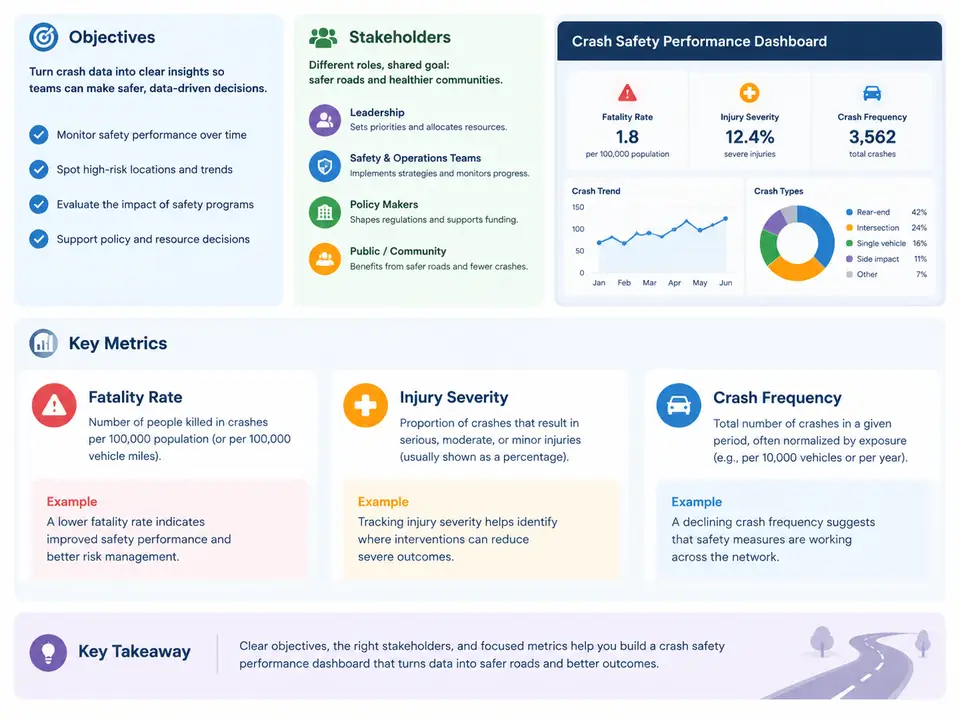
A crash safety performance dashboard is not simply a report that happens to contain crash data. It is a decision instrument: a curated, governed, and refreshable view of road-safety outcomes that lets engineers, planners, and executives see where serious injuries and fatalities are concentrated, whether interventions are working, and where limited resources should go next. In Power BI terms, the dashboard is the final layer of a pipeline that begins with crash records, vehicle and occupant data, road inventory, and exposure measures, and ends with DAX measures that translate raw counts into rates, severities, and trends. Getting the objectives and metric definitions right before building anything is what separates a dashboard that changes decisions from one that is opened once and abandoned.
What the dashboard must accomplish
Crash safety dashboards generally serve four objectives, and each imposes different requirements on the data model.
- Describe the burden. Quantify how many crashes occur, how severe they are, and who is affected. This requires consistent crash, casualty, and vehicle-level records joined at a defined grain.
- Locate the risk. Reveal concentration by corridor, intersection, jurisdiction, time of day, road class, and crash type, so that countermeasures can be targeted rather than spread thinly.
- Evaluate interventions. Compare periods before and after a treatment, or treated sites against comparison sites, using rates rather than raw counts so that changes in traffic volume do not masquerade as safety effects.
- Support accountability and communication. Provide a defensible, auditable number that can be published, briefed to leadership, or submitted to a funding body, with drill-through to the underlying records.
These objectives conflict in practice. Description favors detail and granularity; evaluation favors stability and comparability; communication favors a small number of well-defined headline figures. A workable design resolves the conflict with layered pages: an executive summary with three to five KPIs, an analytical layer with slicers and drill-through, and a data-quality or methodology page that documents definitions and exclusions.
Stakeholders and what each one actually needs
Different audiences ask different questions of the same data, and the dashboard should answer each at the right level of aggregation.
| Stakeholder | Primary question | Typical view |
|---|---|---|
| Road safety engineer | Which sites and crash types should be treated first? | Site ranking, collision diagram inputs, crash-type mix, severity distribution |
| Network / asset planner | Where does risk concentrate across the network, and how does it trend? | Corridor and jurisdiction maps, annual trends, rate per vehicle-kilometre |
| Programme or portfolio manager | Are funded treatments delivering the expected reduction? | Before/after comparison, treated vs. comparison sites, cost per serious injury avoided |
| Executive / elected official | Are we on track against our safety target? | Headline KPIs, target vs. actual, year-on-year change |
| Data steward / analyst | Is the data complete, current, and comparable? | Record counts, geocoding match rate, unknown-severity share, refresh status |
A common failure mode is building one page for everyone. Executives then see crash-type codes they cannot interpret, while engineers are given only a single aggregate number with no drill-through. Segmenting pages by stakeholder, and gating detail behind drill-through rather than cramming it onto the summary, keeps both audiences served.
The core metrics and how they are defined
Three metric families dominate crash safety reporting: frequency, severity, and fatality. Each has a count form and a rate form, and the rate form is almost always the one that supports comparison.
Crash frequency is the count of crashes in a period, usually filtered to injury crashes or to a minimum severity threshold. Raw counts are useful for workload and exposure context but are misleading for comparison, because a jurisdiction with more traffic will record more crashes regardless of how safe it is. Frequency is therefore normalized into a rate, most commonly crashes per 100 million vehicle-kilometres travelled (VKT) or per 10,000 registered vehicles. The choice of denominator must be stated explicitly, because the two produce different rankings.
Injury severity is recorded on an ordinal scale. Many jurisdictions use the KABCO scale — Killed, Suspected Serious Injury (A), Suspected Minor Injury (B), Possible Injury (C), Property Damage Only (O) — while others use the MAIS or ISS clinical scales derived from hospital data. Severity is reported as a distribution (share of casualties in each class) and as a severity ratio, for example serious injuries per 100 injury crashes. Because severity is ordinal, averaging codes is meaningless; report proportions and counts instead.
Fatality rate is the most scrutinized metric and the easiest to misstate. It can mean fatalities per 100,000 population, per 10,000 registered vehicles, or per 100 million VKT, and it can be computed per crash (fatalities per fatal crash) or per casualty. Each definition answers a different question: population-based rates support public-health comparison, VKT-based rates support network and infrastructure comparison, and per-crash ratios describe crash survivability. A credible dashboard states the definition next to the number and never mixes definitions across pages.
From definitions to DAX measures
The metric definitions above translate directly into DAX. The essential discipline is to keep base counts as simple aggregations and build every rate as a DIVIDE of two explicit measures, with a blank-handling policy. A representative pattern for a star schema with a Crashes fact table, a Casualties fact table, and a DimDate table looks like this:
Fatal Crashes =
CALCULATE (
    COUNTROWS ( Crashes ),
    Crashes[CrashSeverity] = "Fatal"
)

Fatalities =
SUM ( Casualties[IsFatality] )

Fatality Rate per 100M VKT =
DIVIDE (
    [Fatalities],
    SUM ( Exposure[VKT] ) / 100000000
)

Serious Injury Share =
DIVIDE (
    CALCULATE ( COUNTROWS ( Casualties ), Casualties[InjuryLevel] = "A" ),
    CALCULATE ( COUNTROWS ( Casualties ), Casualties[InjuryLevel] IN { "A", "B", "C" } )
)
Two implementation details matter more than they appear. First, DIVIDE returns blank rather than an error when the denominator is zero or missing, which is the correct behaviour for a rate — a corridor with no exposure data should show no rate, not a zero. Second, the exposure table must be at a grain compatible with the slicers; if VKT is only available annually by jurisdiction, then a monthly fatality-rate visual will either repeat the annual denominator or produce misleading values, and the dashboard should restrict that visual to the supported grain.
How the pieces connect
The diagram below shows the relationship between the dashboard's audiences, the metric families they consume, and the underlying data domains that feed them. It is a map of the reporting contract, not a build sequence: every arrow represents a definition that must be agreed and documented before the corresponding visual is trusted.
Practical starting point: a metric definition sheet
Before any Power BI work begins, agree on a metric definition sheet. It is short, but it prevents the most expensive rework: rebuilding measures because two teams defined "serious injury" differently. A usable version for this course's running example contains the following fields, populated with illustrative values.
| Metric | Numerator | Denominator | Grain | Exclusions |
|---|---|---|---|---|
| Fatal crashes | Crash records with severity = Fatal | — | Crash | Non-injury, PDO |
| Fatality rate (VKT) | Fatalities | VKT / 100,000,000 | Jurisdiction-year | Records with unknown location |
| Serious injury share | Casualties with KABCO = A | Casualties with KABCO in A, B, C | Casualty | Unknown injury level |
| Crash frequency rate | Injury crashes | VKT / 100,000,000 | Corridor-year | PDO-only crashes |
Two verification checks should be run against this sheet as soon as the first measures exist. First, reconcile totals: the sum of fatal crashes by jurisdiction must equal the unfiltered fatal crash count, and any difference indicates a relationship or filter problem in the model. Second, test the denominator: select a single jurisdiction and confirm that the rate equals the hand-calculated numerator divided by the stated exposure. If the dashboard's rate differs from the manual calculation, the cause is almost always a filter context issue — a slicer not propagating to the exposure table, or a many-to-one relationship filtering in the wrong direction. Catching this at the first measure is far cheaper than discovering it after the executive summary has been circulated.
With objectives, audiences, and metric definitions settled, the remaining work becomes tractable: shaping the star schema, writing the DAX measures against agreed definitions, and designing pages that answer each stakeholder's question at the right grain. The dashboard's credibility rests on the definitions established here, not on the polish of its visuals.