1. CAE simulation data lifecycle
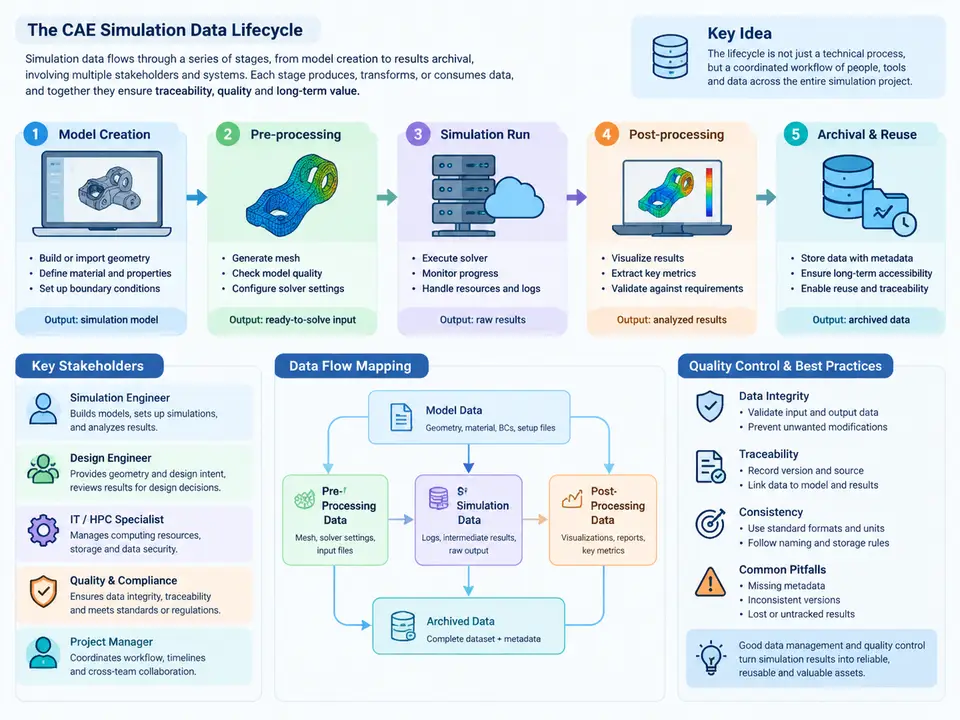
In a mature CAE organization, a simulation is never a single file. It is a chain of interdependent artifacts — geometry, meshes, solver decks, boundary-condition sets, solver logs, result databases, and the reports that interpret them — each produced by a different tool, often by a different person, and each carrying its own revision history. Simulation Data Management (SDM) exists to keep that chain traceable, reproducible, and auditable. Before we can govern this data, we must first understand its lifecycle: which stages it passes through, who touches it at each stage, and how the data physically and logically flows between them.
The Six Canonical Lifecycle Stages
Although toolchains differ, most CAE workflows can be decomposed into six stages. Each stage has a distinct primary artifact, a distinct owner, and a distinct quality gate that must be passed before the next stage begins.
| Stage | Primary artifact | Typical owner | Exit quality gate |
|---|---|---|---|
| 1. Requirements & planning | Simulation request / analysis brief | Design engineer, CAE lead | Acceptance criteria and load cases agreed |
| 2. Geometry preparation | Cleaned CAD, defeatured model | CAE pre-processor | Watertight, mid-surface/solid decision frozen |
| 3. Meshing & model setup | FE mesh, material & BC deck | CAE analyst | Mesh quality metrics and BC completeness verified |
| 4. Solver execution | Raw results, solver log, restart files | CAE analyst / HPC operator | Convergence and energy-balance checks passed |
| 5. Post-processing & interpretation | Contours, plots, extracted KPIs | CAE analyst | Results reconciled against acceptance criteria |
| 6. Archival & release | Frozen dataset, report, metadata record | Data steward / PLM administrator | Immutable snapshot with full lineage recorded |
The critical insight is that data does not simply flow forward. In practice, stages 2–5 iterate heavily: a mesh-quality failure sends the analyst back to geometry; a non-converged solve sends them back to boundary conditions. SDM must therefore capture not just the final state but the iteration history — which mesh revision was paired with which BC set, and why a given run was abandoned.
Stakeholders and Their Data Responsibilities
Three stakeholder groups interact with the lifecycle, and their needs are frequently in tension:
- Design engineers consume results and own the CAD that seeds the simulation. They care about turnaround time and whether the design passes. They rarely see the mesh or solver deck.
- CAE analysts own stages 2–5. They need fast iteration, version control of their own setup files, and the ability to reproduce a run months later. Their pain point is "which of my twelve runs produced the number in the report?"
- Data stewards and quality reviewers own stage 6 and the audit trail. They need immutable records, consistent metadata, and the ability to trace any reported KPI back to the exact solver input and geometry revision.
A common failure mode is that the analyst's working directory becomes the de-facto archive. When that analyst leaves, the lineage is lost. The lifecycle view makes explicit that archival is a distinct stage with its own owner, not an afterthought performed by whoever ran the solver.
Mapping the Data Flow
The diagram below maps the six stages as a data-flow topology, showing the primary artifacts, the iteration loops that connect them, and the metadata record that must accompany the frozen dataset at release. Note that the metadata record is not a single file but a set of linked attributes — geometry revision, mesh ID, solver version, BC set ID, and run timestamp — that together make the result reproducible.
Why the Lifecycle View Matters for Quality Control
Once the stages and flows are explicit, quality control becomes tractable. Each exit gate is a checkpoint where a specific, measurable criterion can be enforced. For example, at the meshing gate an analyst might apply a concrete rule set: maximum aspect ratio ≤ 5 for shell elements in the primary load path, Jacobian ratio ≥ 0.7, and zero free edges in the assembled mesh. These are not vague aspirations — they are pass/fail conditions that can be scripted and logged.
Consider a reproducible example. A bracket assembly is submitted for static structural analysis with a 2 kN vertical load and a fixed base. The analyst prepares the geometry, generates a second-order tetrahedral mesh, and runs the solve. The solver log reports a maximum penetration of 0.8 mm at a contact interface — a clear sign that the contact stiffness or mesh resolution at that interface is inadequate. The analyst does not simply increase contact stiffness blindly; they refine the mesh locally, re-run, and observe penetration drop to 0.05 mm while the reaction force at the fixed base converges to 2.00 kN within 0.5%. Only then does the run pass the convergence gate. The metadata record captures the mesh revision that achieved this, so a future reviewer can reproduce the exact result.
Common Lifecycle Failure Patterns
Three failure patterns recur across organizations. First, orphaned results: a contour plot in a report that cannot be traced to any solver deck because the working directory was overwritten. Second, silent iteration loss: the final mesh is archived but the three rejected meshes and the reasons for rejection are discarded, so the next engineer repeats the same mistakes. Third, stakeholder handoff gaps: the design engineer receives a pass/fail verdict but not the assumptions behind it, leading to over-confidence in a result that was valid only for a narrow load case.
Mapping the data flow explicitly — as in the diagram above — exposes all three. When the iteration loops are drawn, it becomes obvious that rejected runs must be retained with their rejection rationale. When the metadata linkage is drawn, it becomes obvious that the report cannot be released without the lineage record. The lifecycle map is therefore not an abstract diagram; it is the specification against which the SDM system and its quality gates are designed.
With the stages, stakeholders, and data flows established, the remaining chapters of this course will examine each gate in detail: how to define mesh-quality thresholds, how to structure solver-deck metadata, how to automate convergence checks, and how to build an archival schema that survives tool migrations. The lifecycle is the backbone; the quality controls are the muscles attached to it.