1. Multi-run CAE data challenges
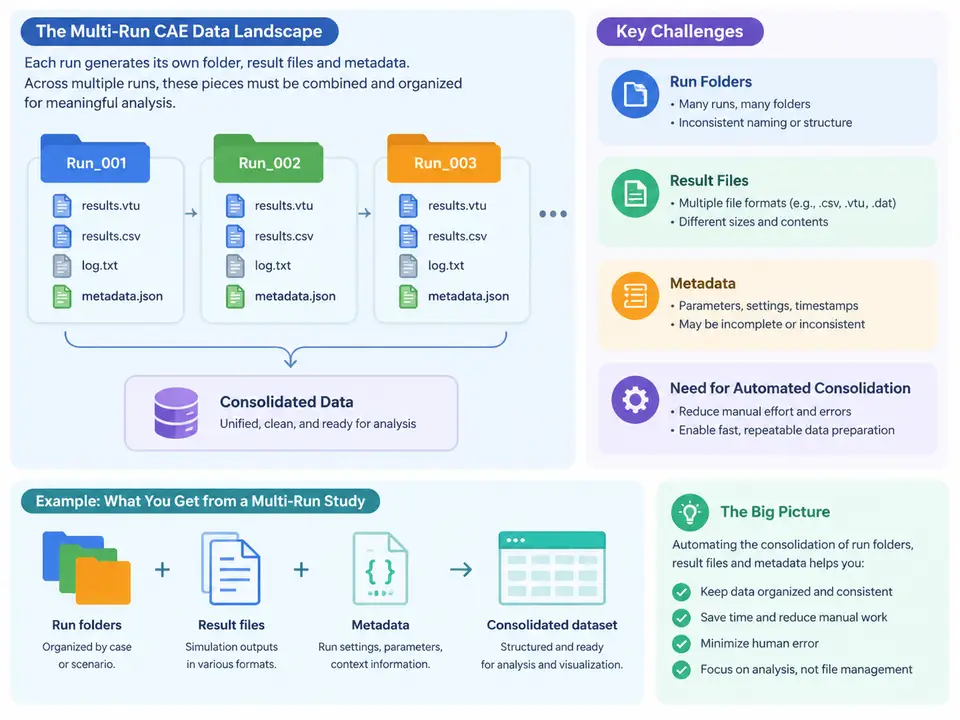
In a typical CAE workflow, a single simulation is rarely the deliverable. Design studies, DOE sweeps, tolerance stacks, load-case matrices, and solver restarts all produce families of runs that share a model lineage but differ in one or more input parameters. A crashworthiness study might vary wall thickness across five values and impact velocity across four values, yielding twenty runs. A thermal analysis might sweep three material conductivities against two convection coefficients, yielding six. Each run writes its own directory tree, its own solver output, and its own metadata — and the engineer is eventually asked a deceptively simple question: which combination produced the best result, and by how much?
Answering that question by hand does not scale. The purpose of this chapter is to establish a precise vocabulary for the artifacts a multi-run study produces, to show where the friction actually lives, and to motivate why Power Query — rather than a folder-by-folder manual review — is the right consolidation layer.
What a run actually leaves behind
Consider a representative LS-DYNA or Abaqus batch study laid out on a shared drive. The directory convention is usually something like:
studies/
  crash_barrier_2024/
    run_T2.0_V30/
      model.k
      run.log
      d3plot
      nodout
      glstat
      run_meta.json
    run_T2.0_V40/
      ...
    run_T2.5_V30/
      ...
    run_T2.5_V40/
      ...
Three distinct classes of artifact appear here, and conflating them is the root of most consolidation pain.
- Run folders — the directory identity of a run. The folder name is often the only place where the parameter combination is encoded, and it is encoded as an ad-hoc string (
run_T2.0_V40) whose parsing rules exist only in the analyst's head. - Result files — solver-native outputs such as
glstat(global energy/time history),nodout(nodal displacements), ord3plot(binary state database). These are large, format-specific, and frequently one file per run per quantity of interest. - Metadata — the descriptive layer: solver version, mesh size, element count, material card revision, submission timestamp, convergence status, and the parameter values themselves. Metadata may live in a sidecar JSON, in the solver log header, in a spreadsheet maintained by the analyst, or nowhere at all.
The critical observation is that these three classes are stored in different places, in different formats, with different granularity. The parameter values are in the folder name; the peak acceleration is buried in a text file; the solver version is in a log header; the pass/fail verdict is in the analyst's email. Consolidation means reconciling all of them into one row per run.
Where the friction actually lives
The diagram above compresses the problem into a single picture, but the practical difficulties deserve naming explicitly, because each one maps to a specific Power Query technique later in the course.
Identity is implicit. A run has no primary key. Its identity is a folder path, and the parameter values must be recovered by string parsing. If one analyst names a folder run_T2.0_V40 and another names it T2_V40_rerun, the parsing rule breaks silently. Consolidation therefore begins with a deliberate decision: define a canonical run identifier and a parsing contract, then enforce it. In Power Query this is a custom column built from Text.BetweenDelimiters or Text.Split, applied uniformly to every folder.
Result files are not tabular. A glstat file is a fixed-width or whitespace-delimited time history with a header block. Extracting a single scalar — say, peak resultant acceleration — requires reading the file, skipping the header, selecting the relevant column, and reducing it with a maximum. Doing this once is trivial; doing it across two hundred runs is where manual workflows collapse. Power Query handles this through a folder connector plus a per-file transformation function, so the extraction logic is written once and applied to every file.
Metadata is heterogeneous and often missing. Some runs carry a run_meta.json; some carry only a solver log; some carry nothing. A robust consolidation must tolerate missing metadata rather than fail on it. This is the argument for treating metadata as an optional left join rather than a required input, and for surfacing nulls explicitly so that incomplete runs are visible rather than silently dropped.
Scale changes the failure mode. With five runs, a human notices that one folder is missing a glstat. With five hundred, that run simply vanishes from the summary, and the resulting trend line is quietly wrong. Automation is not merely faster — it makes completeness checkable. A consolidated table with an explicit row count and a status column turns an invisible omission into a visible defect.
What "automated consolidation" must deliver
A consolidation layer is adequate when it satisfies four properties. First, one row per run, with the parameter combination promoted to typed columns (Thickness as decimal, Velocity as integer) rather than left as text. Second, key scalar results extracted from solver files by a reusable transformation, not by copy-paste. Third, metadata joined on the run identifier, with missing values represented as null rather than as an error. Fourth, refreshability: when a new run folder appears, a single refresh incorporates it without re-editing any query.
A minimal worked example
Suppose the study root is C:\studies\crash_barrier_2024 and each run folder contains a glstat whose column 4 holds resultant acceleration. The consolidation logic, expressed as the shape of the Power Query steps rather than full M code, proceeds as follows. Connect to the folder with Folder.Files, filter to rows where the extension is empty (i.e., directories) or where the name matches run_*. Add a custom column that splits the folder name on _ and extracts the T and V tokens, converting them with Number.FromText. Then invoke a helper function on each folder path that reads glstat, promotes the first data row to headers, and returns the maximum of the acceleration column. Finally, left-join the optional run_meta.json on the run identifier.
The observable verification is concrete: the output table should have exactly as many rows as there are run folders, the Thickness and Velocity columns should be numeric (not text), and the peak-acceleration column should contain no nulls for runs whose status is ok. A null in that column for an ok run is the signature of a file-read step that failed on a format variation — the typical first defect in a real study.
Why Power Query, specifically
The consolidation problem is fundamentally an ETL problem: extract from heterogeneous sources, transform into a uniform schema, load into an analysis-ready table. Power Query is well suited because it separates the definition of the transformation from its execution. The query records the steps — folder enumeration, name parsing, file reading, joining — and re-applies them on refresh. When the study grows from twenty runs to two hundred, nothing is rewritten; the same steps simply iterate over more inputs. That property, more than any individual function, is what makes multi-run CAE analysis tractable, and it is the foundation on which the remainder of this course builds.