1. CAE simulation data lifecycle
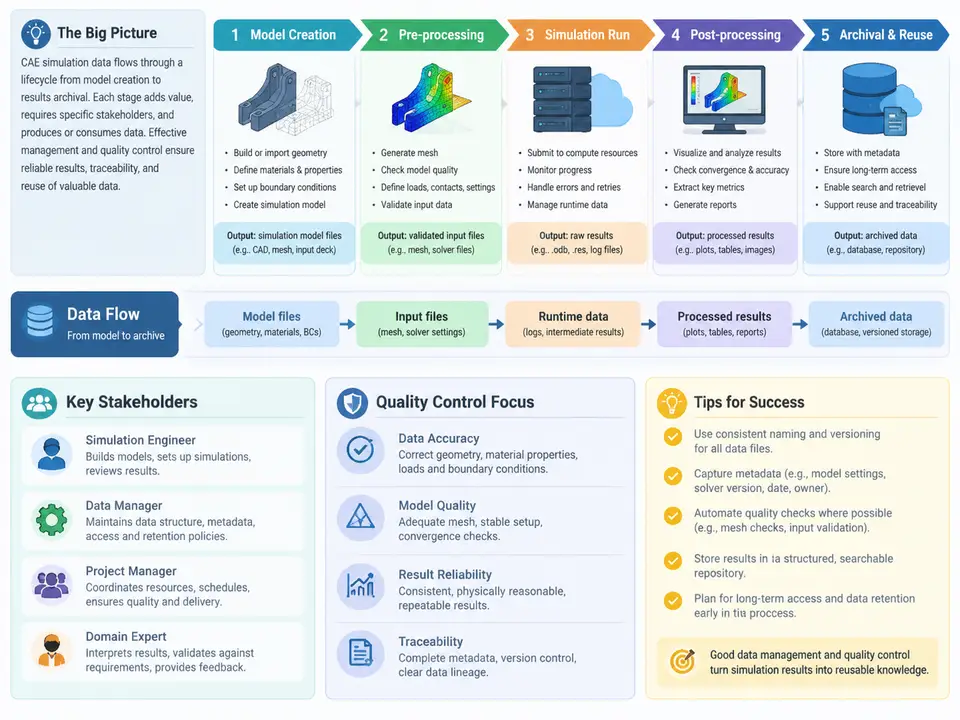
In CAE-driven product development, simulation data is rarely a single file. A completed analysis is an ecosystem of geometry, meshes, material definitions, solver decks, boundary conditions, solver logs, result databases, post-processing sessions, and the reports that interpret them. Managing this ecosystem means understanding its lifecycle: how data is created, transformed, consumed, reviewed, and eventually archived. Without a clear lifecycle model, teams accumulate orphaned meshes, ambiguous result versions, and audit trails that cannot answer the simplest question — "which model produced this number?"
This chapter establishes the lifecycle framework that the rest of the course builds on. We define the key stages, identify who touches the data at each stage, and show how to map the actual data flow in a real CAE organization so that storage, metadata, and quality controls can be placed where they matter.
Why a Lifecycle View Matters
A file-centric view treats simulation data as documents in folders. A lifecycle view treats it as a chain of dependent artifacts, each with provenance. The difference becomes obvious during a design review: if a stress result is challenged, the team must trace back through the result file, the solver input deck, the mesh, the geometry revision, and the material dataset. If any link is missing or ambiguous, the result is effectively unverifiable. Lifecycle management makes each link explicit and recoverable.
The lifecycle also determines cost. Meshes and result databases are large; a single transient CFD case can produce hundreds of gigabytes. Knowing which stage produces which data volume lets infrastructure teams plan tiered storage — fast scratch space for solving, governed repositories for released models, and compressed archives for closed projects.
The Six Core Stages
Although organizations label stages differently, most CAE data lifecycles can be decomposed into six stages. The boundaries matter because each boundary is a natural place for a quality gate and a metadata checkpoint.
- 1. Requirements and analysis planning. The analyst receives a question (for example, "will the bracket survive a 5 g lateral load?") and defines the simulation scope, fidelity, acceptance criteria, and the solver/toolchain to be used. Outputs: analysis plan, load case definitions, acceptance thresholds.
- 2. Geometry preparation and idealization. CAD geometry is imported, cleaned, defeatured (small fillets, bolt holes, logos removed where they do not affect physics), and split into domains for meshing. Outputs: idealized geometry, defeaturing log, named selections or groups.
- 3. Meshing. The continuous domain is discretized. Mesh density, element type, and quality metrics are chosen to match the physics and the acceptance criteria. Outputs: mesh file, mesh quality report, mesh independence study where required.
- 4. Model assembly and solver setup. Materials, properties, boundary conditions, contacts, solver settings, and output requests are attached to the mesh to form a complete solver deck. Outputs: input deck, setup checklist, run configuration.
- 5. Solving and monitoring. The solver executes, producing logs, convergence histories, and result files. Outputs: solver log, convergence plots, raw results, restart files.
- 6. Post-processing, review, and archival. Results are extracted, validated against acceptance criteria, visualized, reported, and then packaged for long-term retention. Outputs: post-processing session, report, archived dataset with metadata.
These stages are not strictly linear. A failed convergence check sends the analyst back to stage 4; a mesh quality failure returns to stage 3; a discovered modeling error can send the work back to stage 2. The lifecycle is a loop with feedback edges, and the data management system must preserve the history of those loops rather than overwrite them.
Stakeholders and Their Data Touchpoints
Each stage has a primary owner, but the data is consumed by a wider group. Mapping stakeholders to stages clarifies access control and review responsibilities.
| Stage | Primary owner | Other stakeholders | Typical data action |
|---|---|---|---|
| Analysis planning | Simulation engineer | Design engineer, project lead | Create plan, link to requirement ID |
| Geometry preparation | Simulation engineer / CAD specialist | Design engineer | Check out CAD revision, log defeatures |
| Meshing | Simulation engineer | Simulation lead (quality review) | Store mesh with quality report |
| Solver setup | Simulation engineer | Method owner, IT (licenses, HPC) | Commit input deck, lock parameters |
| Solving | HPC / solver | Simulation engineer (monitoring) | Write logs and results to scratch |
| Post-processing & archival | Simulation engineer | Design engineer, reviewer, quality engineer | Publish report, promote to archive |
Two roles deserve emphasis. The method owner defines standard modeling practices and approves solver settings for a given physics; without this role, every analyst invents a slightly different setup and results become incomparable. The quality engineer or independent reviewer verifies that the reported result actually satisfies the acceptance criteria and that the evidence chain is complete. In regulated industries, this reviewer signature is often the formal record of verification.
Mapping the Data Flow
A data flow map answers three questions for every artifact: where is it created, where is it stored, and who or what consumes it. The map below shows a representative flow for a structural analysis, including the feedback loops that are usually omitted from idealized diagrams.
The map makes two things visible that a stage list alone does not. First, the feedback edges are first-class data flows: a mesh quality failure is not an error to be deleted but a recorded event that explains why the final mesh differs from the first attempt. Second, each stage writes to a different storage tier. Scratch space is fast and disposable; the governed repository holds released, traceable artifacts; the archive holds immutable packages for long-term retention. Placing data in the wrong tier is one of the most common lifecycle failures — for example, keeping the only copy of a result database on scratch storage that is purged monthly.
Practical Data Flow Mapping in Your Organization
To build a map like the one above for a real team, start from the artifacts rather than the stages. List every file type that appears in a completed analysis — CAD export, mesh, input deck, solver log, result database, post-processing session, report — and for each one record four attributes: the tool that creates it, the tool that consumes it, the storage location, and the retention requirement. This artifact inventory usually reveals gaps quickly. A common finding is that the post-processing session is never stored, so a reviewer cannot reproduce the exact contour plot shown in the report. Another is that the solver version is recorded in the log but not in the report metadata, making it impossible to know whether a result is comparable to a later run.
Once the inventory exists, overlay the review gates. A gate is a point where data must satisfy a defined condition before it moves to the next tier. Typical gates include: mesh quality metrics within thresholds before solver setup; convergence and residual targets met before post-processing; acceptance criteria verified and reviewer signed before archival. Each gate should write a small, structured record — a JSON or database row — containing the artifact identifier, the gate name, the pass/fail result, the responsible person, and a timestamp. These records are the backbone of traceability and are far more valuable than folder naming conventions alone.
ANL-2024-0173) and prefix every artifact filename with it. This one convention makes it possible to reconstruct the full artifact set with a single search, even before a formal data management system is in place.
Common Lifecycle Failure Modes
Three failure modes account for most traceability breakdowns. Version ambiguity occurs when a result is overwritten in place, so the report references a file whose contents have since changed; the fix is immutable versioning at the repository gate. Orphaned inputs occur when the input deck is stored but the exact geometry revision it was built from is not; the fix is to record the CAD revision hash in the deck metadata. Silent rework occurs when an analyst reruns a case with modified settings and replaces the result without noting the change; the fix is to require a new analysis identifier or a documented revision entry for any rerun that changes physics or boundary conditions.
Understanding these stages, stakeholders, and flows is the foundation for everything that follows. Data management systems, naming conventions, metadata schemas, and quality gates are all design responses to the lifecycle described here. When the lifecycle is explicit, quality control becomes a matter of enforcing checks at known boundaries rather than chasing problems after the fact.