1. Course introduction
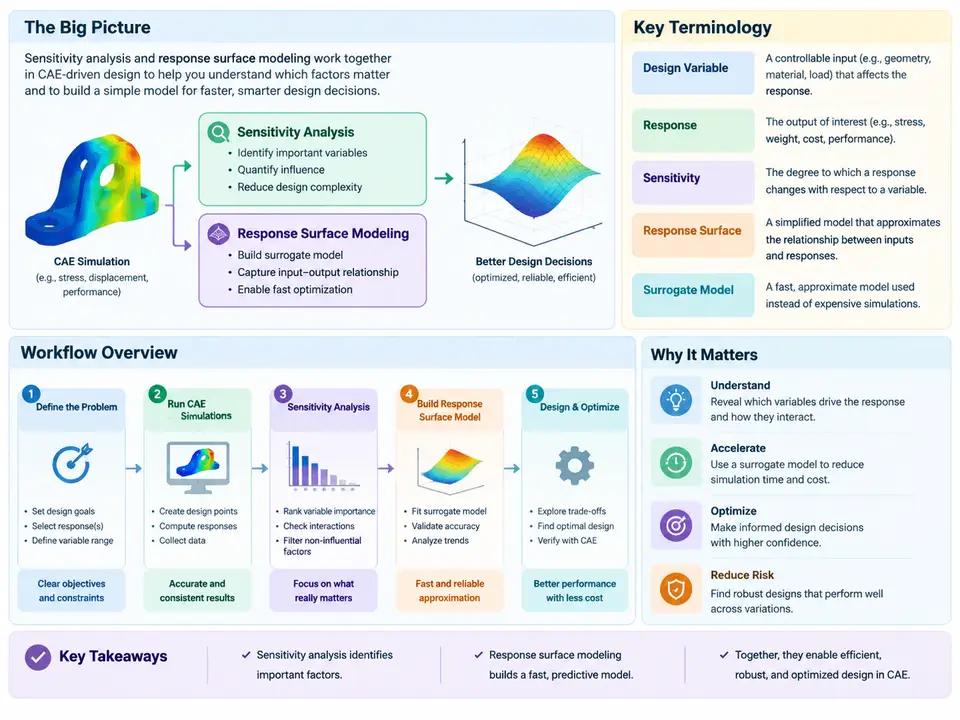
Computer-aided engineering (CAE) has become the backbone of modern product development, but running a single simulation is rarely enough to make a confident design decision. Engineers need to know which inputs actually matter, how robust a design is against variation, and where the design space offers the best trade-offs. Sensitivity analysis (SA) and response surface modeling (RSM) are the two complementary techniques that answer these questions. This chapter establishes the conceptual foundation for the entire course: what each technique does, how they fit together, and how they are applied in a real CAE workflow.
Why a Single Simulation Is Not a Design Decision
A typical finite element analysis (FEA) or computational fluid dynamics (CFD) run produces a deterministic result for one set of inputs: one geometry, one material definition, one load case. That result tells you how that specific configuration behaves, but it says nothing about:
- Which of the dozens of input parameters dominates the output variability.
- How the output changes when a parameter drifts within manufacturing tolerance.
- Whether a small perturbation could push a stress or temperature beyond an allowable limit.
- Where in the design space an optimum actually lies, without running thousands of full simulations.
Sensitivity analysis addresses the first three questions by quantifying how output responses respond to input changes. Response surface modeling addresses the fourth by constructing a fast, mathematically cheap surrogate that approximates the expensive CAE solver over a defined design space. Together they convert a single-point simulation into a design exploration capability.
Key Terminology
Before proceeding, the following terms must be precise, because they recur throughout the course:
| Term | Definition |
|---|---|
| Design variable (input factor) | A controllable parameter varied during the study, e.g., plate thickness t, fillet radius r, inlet velocity v. |
| Response (output) | A scalar result extracted from the CAE solution, e.g., maximum von Mises stress, first natural frequency, pressure drop. |
| Design space | The bounded region defined by the lower and upper limits of every design variable. |
| Design point / sample | One specific combination of design variable values at which the solver is evaluated. |
| Design of Experiments (DOE) | A structured sampling plan (e.g., Latin Hypercube, full factorial, central composite) that determines where to place design points. |
| Sensitivity coefficient | A measure of how strongly a response changes per unit change in an input, either local (derivative-based) or global (variance-based). |
| Response surface / surrogate | A fitted mathematical approximation (polynomial, Kriging, radial basis function) of the true CAE response over the design space. |
| Metamodel error | The discrepancy between surrogate prediction and a validation CAE run at an untrained point. |
Local versus Global Sensitivity
Sensitivity methods fall into two families that answer different questions. Local sensitivity evaluates the partial derivative of a response with respect to an input at a single design point, often computed by finite differences: perturb xi by Δx, rerun the solver, and divide the response change by Δx. It is cheap (one baseline plus one run per variable) but valid only near that point and blind to interactions.
Global sensitivity apportions the total output variance among inputs across the whole design space. Variance-based Sobol indices are the standard: the first-order index Si gives the fraction of output variance explained by input i alone, while the total index STi includes all interactions involving that input. A variable with a high STi but low Si matters mainly through interactions and cannot be screened out. Global methods require a DOE sample and are therefore naturally coupled with RSM.
The Integrated Workflow
The figure below shows how the techniques connect in a CAE-driven study. The workflow is not a rigid sequence; screening may feed back into variable selection, and surrogate validation may trigger additional sampling.
How the Pieces Interact in Practice
Consider a bracket optimization example. The baseline FEA model has three candidate design variables: plate thickness t (4–8 mm), fillet radius r (2–10 mm), and bolt preload F (8–12 kN). The response of interest is maximum von Mises stress σmax, with an allowable of 180 MPa. A 30-point Latin Hypercube DOE is generated, and 30 nonlinear static solves are submitted. The resulting response data feeds two parallel analyses:
- Sensitivity: Sobol total indices show
ST,t = 0.62,ST,r = 0.31,ST,F = 0.07. Thickness dominates; preload is nearly negligible and can be fixed at its nominal value, reducing the design space to two variables. - Surrogate: A quadratic polynomial is fitted to the 30 points. The coefficient of determination
R² = 0.94and root-mean-square errorRMSE = 6.2 MPaare acceptable for screening, but a hold-out validation at five untrained points reveals a maximum error of 14 MPa near the lower thickness bound, indicating curvature the quadratic cannot capture.
The validation failure triggers the feedback loop: a Kriging surrogate is fitted instead, and the hold-out maximum error drops to 4 MPa. Optimization on the Kriging surface then locates t = 5.8 mm, r = 7.5 mm with predicted σmax = 168 MPa. A final confirming CAE run at that point returns 171 MPa, within 2% of the surrogate prediction and below the allowable. The design decision is now supported by quantified sensitivity, a validated surrogate, and a confirming simulation.
What This Course Covers
The remaining chapters build from these foundations. You will learn to design DOE plans that balance cost and coverage, compute and interpret local and global sensitivity measures, fit and validate polynomial, Kriging, and radial basis function surrogates, and drive optimization and robust design studies on the resulting surfaces. Each technique is presented with its assumptions, its failure modes, and the diagnostic checks that tell you whether the result can be trusted. The goal is not to master a single software button but to understand the chain of reasoning from CAE model to design decision, so that every surrogate and every sensitivity number can be defended.