3. Containerization fundamentals for CAE
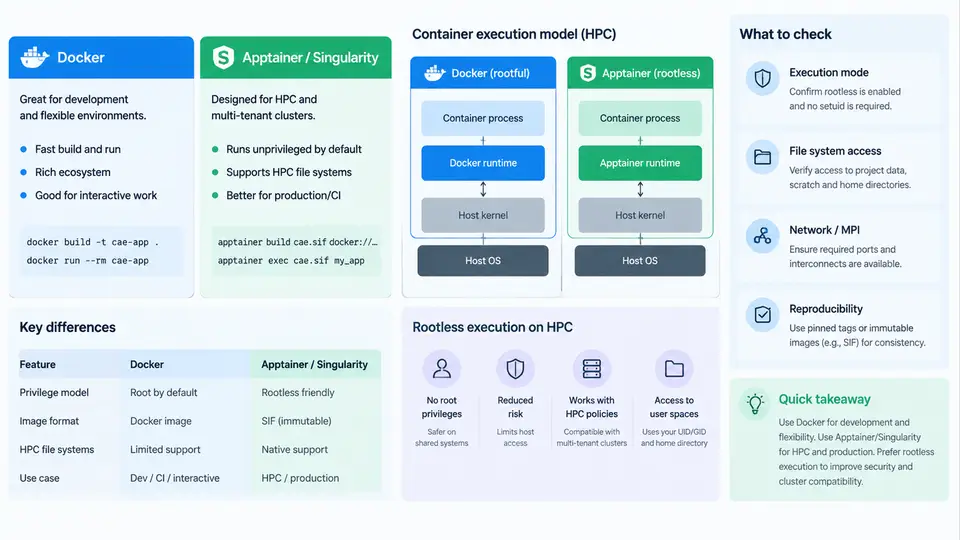
Crash CAE workflows—LS-DYNA, Pam-Crash, Radioss, Abaqus/Explicit, and their pre/post-processing chains—depend on a fragile stack of compilers, MPI libraries, math kernels, and license clients. A model that runs on one cluster node may fail on another because the solver was linked against a different OpenMPI ABI or a different MKL version. Containerization solves this by packaging the runtime environment as an immutable image, but the container technology used on a laptop is not the one that works on a shared HPC cluster. This section explains the three execution models you will encounter and how to choose between them.
Images, Containers, and the Runtime Contract
A container image is a filesystem plus metadata: layers of files, an entrypoint, environment variables, and a default command. A container is a running instance of that image, isolated by kernel namespaces (PID, mount, network, user) and constrained by cgroups. The critical point for CAE is that the container shares the host kernel. It does not virtualize hardware. This is why a container can use InfiniBand, GPUs, and the host's MPI fabric directly—provided the runtime is configured to expose them.
Two properties matter most for reproducibility. First, the image is content-addressable: a digest such as sha256:9f2c… pins the exact bits, so "it worked last month" becomes verifiable. Second, the image is portable across hosts with a compatible kernel and CPU architecture. For crash solvers, that means you can freeze the exact combination of solver build, MPI, and math library, then reproduce a run months later on a different partition.
Docker: The Reference Model and Its HPC Limits
Docker popularized the image/container model and remains the standard for building images. A typical CAE image build starts from a base and layers the solver:
FROM ubuntu:22.04
RUN apt-get update && apt-get install -y \
    libopenmpi3 libhwloc15 libnuma1 \
    && rm -rf /var/lib/apt/lists/*
COPY ls-dyna_smp_d_R13.0_linux_x86_64_ifort160 /opt/lsdyna/
COPY mpp/ls-dyna_mpp_d_R13.0_linux_x86_64_ifort160 /opt/lsdyna/
ENV LSTC_LICENSE=network
ENV LSTC_LICENSE_SERVER=27000@license.internal
ENTRYPOINT ["/opt/lsdyna/ls-dyna_mpp_d_R13.0_linux_x86_64_ifort160"]
On a workstation this runs with docker run --rm -v $PWD:/work -w /work image i=crash.k. On an HPC cluster, however, Docker is usually unavailable or forbidden. The reason is architectural: the Docker daemon runs as root, and any user who can talk to the daemon can effectively become root on the host. On a multi-tenant login node this is an unacceptable privilege escalation path. Docker also assumes it owns the network and storage stack, which conflicts with Slurm, Lustre, and the site's fabric configuration.
Apptainer/Singularity: Designed for Shared Clusters
Apptainer (the successor to Singularity, now under the Linux Foundation) was built for exactly this environment. Its design inverts Docker's assumptions:
- No daemon. The
apptainerbinary is invoked directly by the user; there is no privileged background service. - Runs as the invoking user. By default, your UID/GID inside the container match your UID/GID on the host, so files written to Lustre or GPFS have correct ownership.
- Images are single files. A
.sif(Singularity Image Format) file is a self-contained, optionally signed artifact that can live on shared storage and be referenced by path. - Host integration is explicit. You bind-mount the directories you need, and the runtime can inherit the host's MPI, GPU, and InfiniBand libraries.
Converting a Docker image is a one-liner, and the result is a portable file:
apptainer build lsdyna-r13.sif docker://registry.internal/cae/lsdyna:r13
apptainer exec --nv --bind /scratch/$USER:/work lsdyna-r13.sif \
    ls-dyna_mpp_d_R13.0_linux_x86_64_ifort160 i=crash.k ncpu=64
The --nv flag injects the host's NVIDIA driver and device nodes; without it, a GPU-accelerated solver will not see the GPU. The --bind flag makes the working directory visible inside the container. Note that the solver binary is invoked directly—Apptainer does not require the image's ENTRYPOINT, which gives you flexibility to run different executables from the same image.
Rootless Execution and the User Namespace
"Rootless" means the container runtime does not require root privileges on the host. There are two distinct mechanisms, and confusing them causes most of the practical problems.
Rootless Docker uses the Linux user namespace: a daemon runs as your unprivileged user, and UID 0 inside the container maps to your UID outside. It works well on workstations and single-user nodes. On HPC it is rarely deployed because it still needs a per-user daemon and systemd --user, which many clusters do not provide.
Apptainer's rootless model is different and simpler: there is no daemon at all. The runtime uses user namespaces only when needed (for example, to run a build step that requires fakeroot). For normal execution, no namespace remapping is required—your process simply runs with your identity, inside a mount namespace that presents the image's filesystem. This is why Apptainer works on clusters where Docker cannot.
kernel.unprivileged_userns_clone=0), Apptainer can still run existing images in setuid mode, where a small setuid helper performs the mount operations. Check with apptainer exec --version and the site's documentation before assuming rootless builds will work.Choosing the Right Model
| Requirement | Docker | Apptainer/Singularity |
|---|---|---|
| Runs on shared HPC login/compute nodes | Usually forbidden | Yes, designed for it |
| Requires a daemon | Yes (root) | No |
| Image format | Layered OCI | Single .sif file |
| File ownership on shared FS | Often root-owned | Matches invoking user |
| MPI / InfiniBand passthrough | Manual, fragile | Native host integration |
| Best use | Building images, workstations | Running on clusters |
The practical workflow is hybrid: build and test images with Docker on a workstation or a dedicated build node, push them to an internal registry, then convert to .sif on the cluster and run under Slurm. This gives you Docker's mature build tooling and Apptainer's cluster-safe execution.
Practical Verification and Common Failures
After building a .sif, verify it before submitting a production job. A minimal smoke test checks that the solver starts, sees the right MPI, and can read the input deck:
apptainer exec lsdyna-r13.sif ls-dyna_mpp_d_R13.0_linux_x86_64_ifort160 i=smoke.k ncpu=2
# Expected: "LS-DYNA ... version R13.0" banner, then normal termination
# with "Normal termination" in the d3hsp file.
Three failure modes dominate in practice. First, MPI ABI mismatch: the solver was built against OpenMPI 4.x but the host provides 5.x, producing undefined symbol: ompi_mpi_init. Fix by building the image against the cluster's MPI or by using the host's MPI via --bind of the MPI library path. Second, missing GPU driver: the solver reports "no CUDA device" because --nv was omitted. Third, license client failure: the container cannot reach the license server because the network namespace is isolated; use --net or ensure the host network is inherited. Each of these is diagnosable from the solver's output file, which is why the smoke test must be run before scaling to a full crash model.
With these fundamentals in place, the next step is to apply them to a concrete CAE toolchain: building a solver image, wiring it into Slurm, and validating that a crash model produces bit-identical results across nodes.