3. Container runtime selection for CAE
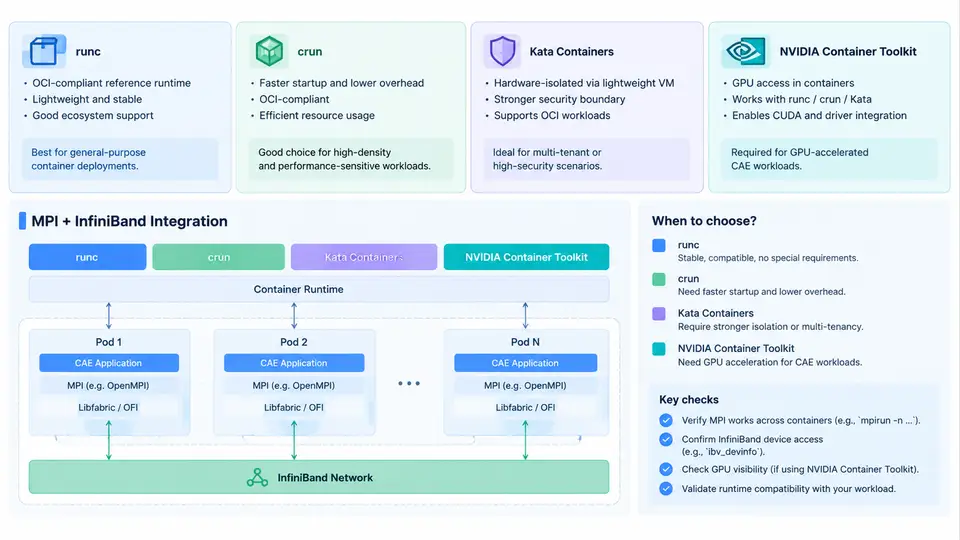
For CAE solver deployment, the container runtime is not a neutral choice. It determines how the solver process sees the host kernel, how GPUs and RDMA devices are exposed, how MPI ranks are launched across nodes, and how much overhead is added to every system call in a tightly coupled simulation. This section examines the four runtime layers that matter in practice: the low-level OCI runtimes runc and crun, the sandboxed Kata Containers runtime, and the NVIDIA Container Toolkit that bridges GPU and InfiniBand devices into containers. The goal is to give you a decision framework and the concrete configuration knowledge to wire these together for an MPI-based solver such as OpenFOAM, Ansys Fluent, or a custom CFD/FEA code.
OCI Runtime Layer: runc vs. crun
Both runc and crun implement the Open Container Initiative (OCI) runtime specification. They are the component that actually creates the container process from a bundle: setting up namespaces, cgroups, mounts, and then executing the entrypoint. containerd or CRI-O calls one of them as the low-level runtime.
runc is the reference implementation, written in Go, and is the default in most distributions. It is stable and well understood. crun is a C implementation that is significantly lighter: lower memory footprint, faster container startup, and lower fork/exec latency. For CAE workloads, the difference is most visible when you launch many short-lived containers or when you run hundreds of MPI ranks as separate containers. A single long-running solver container will not notice much difference, but a job that spawns 256 rank containers will see measurable startup savings with crun.
Switching the runtime in containerd is a configuration change, not a code change. In /etc/containerd/config.toml:
[plugins."io.containerd.grpc.v1.cri".containerd.runtimes.crun]
  runtime_type = "io.containerd.runc.v2"
  [plugins."io.containerd.grpc.v1.cri".containerd.runtimes.crun.options]
    BinaryName = "/usr/bin/crun"
Then reference it in a pod or container spec with runtimeClassName: crun. Verify with crun --version and by checking that a test container starts. A common failure symptom is a silent fallback to runc when the binary path is wrong; check crictl info or the containerd logs for the actual runtime used.
Kata Containers: When You Need a Real Kernel Boundary
Kata Containers runs each container inside a lightweight virtual machine with its own guest kernel. The container still looks like a container to Kubernetes, but the isolation boundary is a hypervisor (QEMU, Cloud Hypervisor, or Firecracker) rather than Linux namespaces. This matters for CAE in two scenarios: multi-tenant clusters where you cannot trust the solver image, and workloads that need a specific kernel version or kernel module that differs from the host.
The trade-off is real. Kata adds VM boot latency (typically hundreds of milliseconds to a few seconds) and can complicate GPU and RDMA passthrough because devices must be assigned to the guest. For a tightly coupled MPI job with InfiniBand, you must ensure the guest kernel has the matching mlx5 driver and that the virtual NIC or SR-IOV VF is passed through correctly. If your solver relies on host-level RDMA performance, Kata is usually the wrong choice unless isolation is a hard requirement. For single-tenant HPC clusters running trusted images, runc or crun is the pragmatic default.
NVIDIA Container Toolkit and Device Injection
The NVIDIA Container Toolkit (formerly nvidia-docker) is what makes GPUs usable inside containers. It consists of a runtime hook and a CLI wrapper. The modern integration path is through the NVIDIA Container Runtime, which is configured as an OCI runtime or as a hook in containerd/CRI-O.
For containerd, the standard configuration is:
[plugins."io.containerd.grpc.v1.cri".containerd.runtimes.nvidia]
  runtime_type = "io.containerd.runc.v2"
  [plugins."io.containerd.grpc.v1.cri".containerd.runtimes.nvidia.options]
    BinaryName = "/usr/bin/nvidia-container-runtime"
With this in place, a container requesting nvidia.com/gpu: 1 gets the device nodes, driver libraries, and nvidia-smi visibility injected automatically. The key environment variable is NVIDIA_VISIBLE_DEVICES, which can be set to all or a specific GPU UUID list. For CAE solvers, you typically also need NVIDIA_DRIVER_CAPABILITIES=compute,utility to get the CUDA compute stack without unnecessary graphics libraries.
MPI and InfiniBand Inside Containers
MPI is where containerized CAE gets genuinely tricky. There are two common models:
- Host MPI, containerized solver: the MPI launcher (
mpirunormpiexec) runs on the host, and each rank is a container. This requires the container to have the same MPI ABI as the host, or to use a PMI/PMIx interface that is version-compatible. - Containerized MPI: the entire MPI stack, including the launcher, lives in the image. This is more portable but requires the container to have access to the interconnect.
For InfiniBand, the container needs /dev/infiniband devices, the libibverbs and rdma-core userspace libraries, and often CAP_IPC_LOCK and CAP_SYS_NICE capabilities for registered memory and CPU pinning. The NVIDIA Container Toolkit can also inject InfiniBand devices when configured with the nvidia-container-runtime and the appropriate NVIDIA_DRIVER_CAPABILITIES including compute and utility; however, for pure InfiniBand without GPU, you typically mount the devices explicitly:
docker run --rm -it \
  --device=/dev/infiniband/uverbs0 \
  --device=/dev/infiniband/rdma_cm \
  --cap-add=IPC_LOCK \
  --cap-add=SYS_NICE \
  --ulimit memlock=-1:-1 \
  openfoam/openfoam:v2012 \
  mpirun -np 4 --hostfile hosts interFoam -parallel
The --ulimit memlock=-1:-1 is critical: without it, ibv_reg_mr fails with Cannot allocate memory when the solver tries to register large buffers. This is one of the most common InfiniBand-in-container failures.
MPI_Init. Check that the container's libibverbs version matches the host's rdma-core, and that the ib_uverbs kernel module is loaded on the host. A mismatch produces ibv_create_cq errors or silent fallback to TCP, which destroys performance.
Decision Framework
The following table summarizes the selection criteria for CAE workloads:
| Runtime | Isolation | Startup Overhead | GPU/IB Support | Best For |
|---|---|---|---|---|
runc |
Namespaces/cgroups | Low | Via NVIDIA toolkit | Default, trusted single-tenant HPC |
crun |
Namespaces/cgroups | Lower | Via NVIDIA toolkit | Many-rank jobs, fast startup |
Kata Containers |
VM boundary | High | Complex passthrough | Multi-tenant, untrusted images |
NVIDIA Container Toolkit |
Hook/runtime layer | Negligible | GPU + IB injection | Any GPU-accelerated solver |
In practice, the most common production stack for CAE is containerd + crun + NVIDIA Container Runtime, with explicit InfiniBand device mounts and memlock limits. Kata is reserved for cases where the security boundary justifies the performance cost. The next section moves from runtime selection to the actual image build and MPI launch configuration that ties these pieces together.