1. Crash CAE production workloads on HPC
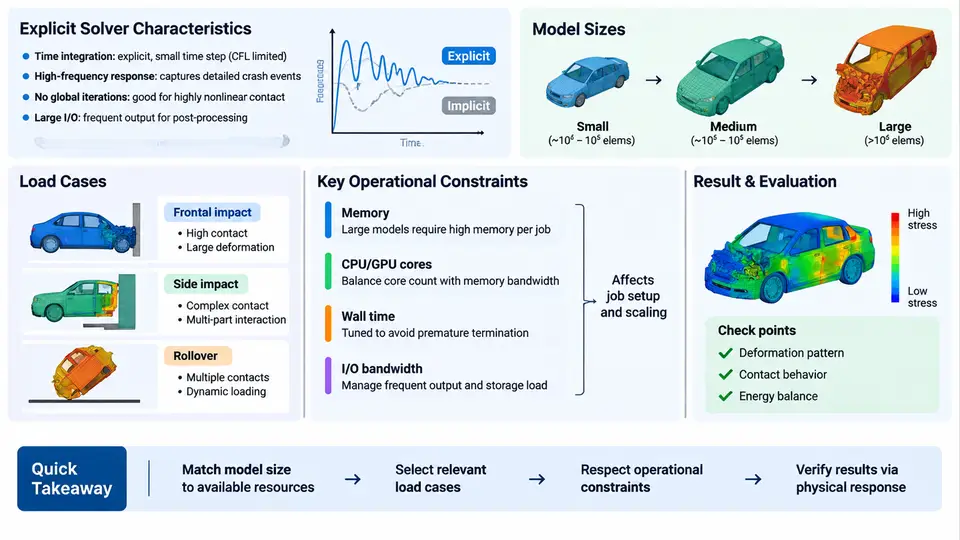
Crash CAE is one of the most demanding workloads a production HPC cluster will ever host. Unlike steady-state structural analysis or thermal simulation, a vehicle crash event is a highly nonlinear, transient, contact-dominated problem that must be resolved over a very short physical time window with extremely small explicit time steps. Understanding what makes these jobs different is the foundation for every operational decision that follows: how nodes are partitioned, how job queues are configured, how storage is tiered, and how failures are triaged.
Why Explicit Solvers Drive the Infrastructure
Production crash simulation is dominated by explicit dynamics codes — LS-DYNA, Radioss, Abaqus/Explicit, and PAM-CRASH being the most common in automotive and aerospace programs. The explicit method advances the solution by a central-difference time integration scheme. There is no global stiffness matrix assembly and no linear system solve; instead, each time step computes nodal accelerations from element and contact forces, then updates velocities and displacements. This has two profound operational consequences.
First, the stable time step is governed by the Courant condition, approximately Δt ≤ L_min / c, where L_min is the smallest element characteristic length and c is the dilatational wave speed in the material. A typical steel shell element of 5 mm with a wave speed near 5000 m/s yields a stable step on the order of 1 µs. To simulate 150 ms of physical event time, the solver must therefore execute roughly 150,000 time steps. Second, because there is no matrix solve, the cost per step scales with element count and contact pair count, and the workload parallelizes well across MPI ranks — but only if the domain decomposition keeps communication balanced.
Model Scale and Composition
A modern full-vehicle frontal impact model is not a single mesh but an assembly of subsystems: body-in-white, closures, powertrain, suspension, interior trim, occupant dummies, and barriers. Element counts for a detailed full-vehicle model commonly fall in the range of 8–25 million elements, with some OEM programs exceeding 40 million when dummies and detailed closures are included. The mesh is predominantly shell elements (4-node quads and 3-node triangles) for sheet-metal structures, supplemented by solid elements for castings, bushings, and foam, plus discrete elements for spot welds, seams, and bolts.
Contact is the dominant cost driver. A full frontal model may define hundreds of contact interfaces — self-contact within the body, surface-to-surface between subsystems, and tied contact at weld locations. Contact search and force calculation can consume 40–60% of total runtime in contact-heavy load cases. This is why model quality, not just model size, determines whether a job finishes in 8 hours or 30.
| Load Case | Typical Event Time | Element Count | Dominant Cost |
|---|---|---|---|
| Full frontal rigid barrier (56 km/h) | 120–150 ms | 10–20 M | Contact + shell deformation |
| Offset deformable barrier (64 km/h) | 150–200 ms | 12–25 M | Contact + material failure |
| Side impact MDB (50 km/h) | 100–120 ms | 8–15 M | Contact + occupant interaction |
| Rear impact / whiplash | 150–250 ms | 6–12 M | Seat + dummy kinematics |
| Pedestrian protection | 30–50 ms | 2–6 M | Local contact + headform |
Operational Constraints That Shape Cluster Usage
Crash workloads impose a distinctive set of constraints on HPC operations. The most consequential are memory footprint, I/O behavior, licensing, and restart strategy.
Memory footprint. Explicit solvers hold the full model in memory: nodal coordinates, velocities, accelerations, element state variables, contact segment data, and material history. A practical rule of thumb is 1.5–3 GB of RAM per million shell elements, depending on the number of integration points and material models. A 20-million-element model can therefore require 40–60 GB per node, which pushes jobs toward high-memory nodes and limits how many concurrent jobs a partition can host.
I/O behavior. Crash jobs write two very different data streams. The first is the restart/dump file, written at intervals (often every 5–10 ms of event time) so that a failed job can resume without restarting from zero. The second is the results database — d3plot for LS-DYNA, for example — which can reach hundreds of gigabytes for a full-vehicle model with fine output intervals. Both streams are bursty and can saturate a shared parallel file system if many jobs write simultaneously. Staging results to node-local NVMe before transferring to central storage is a common mitigation.
Licensing. Commercial explicit solvers are licensed per-core or per-token, and license servers are a hard constraint. A 512-core job may consume 512 license tokens; if the pool is exhausted, jobs queue even when compute nodes are idle. Operations teams must monitor license utilization as carefully as node utilization.
Restart and checkpoint strategy. Because a crash job may run for 10–20 hours, restart files are not optional. A well-configured job writes a restart at fixed event-time intervals and retains at least the last two. If a node fails, the job is resubmitted from the most recent restart rather than from the beginning.
How the Pieces Fit Together
The diagram below shows the relationship between the physical crash event, the solver's time-stepping loop, and the operational resources each stage consumes. It is not a workflow to follow step by step; it is a map of where cost and risk concentrate.
What This Means for Production Operations
The practical takeaway is that crash CAE is not a generic "run a solver" workload. It is a long-duration, memory-heavy, communication-intensive, license-constrained application whose performance is determined as much by model preparation and job configuration as by raw hardware. An operations team supporting crash CAE must be able to answer questions such as: How many elements per core is optimal for this solver version? What is the restart interval that balances I/O cost against lost work? Which partition has enough memory per node for a 25-million-element model? Is the license pool the actual bottleneck today, or is it node availability?
These questions recur in every subsequent chapter. The chapters that follow will address node architecture and memory bandwidth, parallel file system tuning, job scheduling and queue design, license management, and failure diagnosis — all grounded in the characteristics described here. For now, the essential point is that crash CAE workloads are defined by their explicit time-stepping nature, their contact-dominated cost structure, their large memory footprint, and their dependence on tightly coupled MPI communication. Every operational decision should be evaluated against those four realities.