3. Version control fundamentals for data
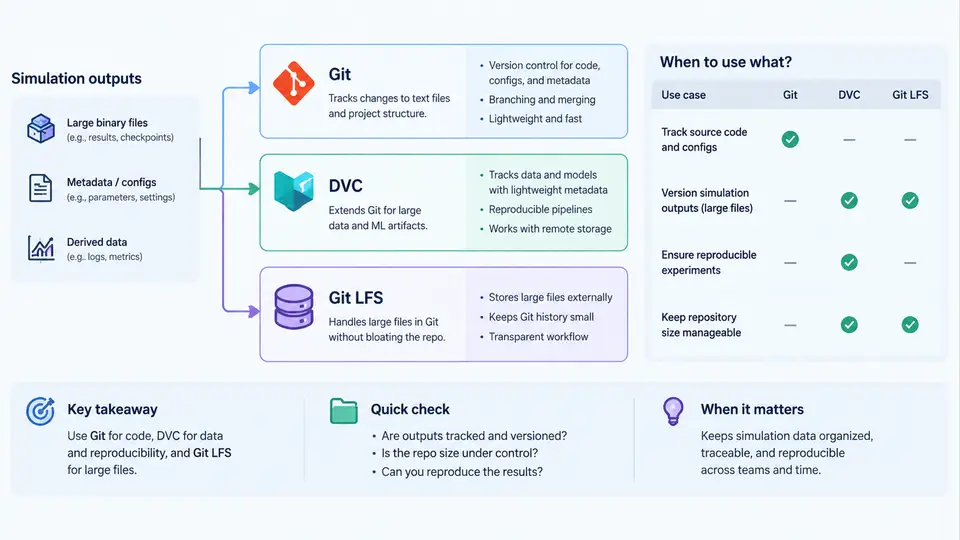
Simulation studies produce two fundamentally different classes of artifacts: text-like, human-authored assets (source code, configuration files, parameter sweeps, analysis notebooks) and binary, machine-generated assets (HDF5 result files, VTK/VTU meshes, checkpoint tensors, restart dumps, solver logs). A reproducible AI study must version both, but the tools that work well for one class often fail badly for the other. This section explains how Git, DVC, and Git LFS each model versioned data, where their storage and transfer semantics diverge, and how to choose among them for simulation outputs.
What Git Actually Versions
Git is a content-addressed object store. Every file it tracks is hashed with SHA-1 (or SHA-256 in newer repositories), compressed with zlib, and stored as a blob inside .git/objects. A commit is a tree object pointing to blobs and subtrees, plus metadata (author, timestamp, parent commit). The critical property for data work is that Git stores a full copy of every distinct version of every tracked file. Delta compression happens only within packfiles, and it is opportunistic — it does not guarantee that a 4 GB simulation restart file will be stored cheaply just because it changed slightly.
This design has three consequences that matter for simulation outputs:
- Repository growth is monotonic. Once a large blob is committed, it lives in history forever unless you rewrite history with
git filter-repoorBFG. Cloning fetches the entire history by default. - Binary files do not merge. Git can only store one side of a conflicting binary change; you must choose "ours" or "theirs".
- Line-ending and encoding normalization (
core.autocrlf,.gitattributes) can silently corrupt binary data if misapplied.
For a study whose outputs are a few kilobytes of CSV metrics, Git alone is often sufficient and simplest. For anything above roughly 10–50 MB per file, or hundreds of files per run, Git becomes a liability.
Git LFS: Pointer Files and a Separate Object Store
Git LFS (Large File Storage) keeps Git's workflow but replaces large blobs with small pointer files. When you track a pattern such as *.h5, Git stores a text file like:
version https://git-lfs.github.com/spec/v1
oid sha256:9f2c1a7e4b8d3f0a6c5e2b1d4a7f8c9e0b3d6a1f2c4e5b7d8a9f0c1e2b3d4a5f
size 2147483648
The actual bytes go to an LFS server (GitHub, GitLab, or a self-hosted endpoint). On git checkout, the LFS smudge filter downloads the object matching the OID. This gives you:
- Small Git history — only pointers are committed.
- Transparent workflow —
git add,git commit,git pushbehave as usual. - Bandwidth control —
git lfs pull --include="runs/2024-*/**.h5"fetches only what you need.
The trade-offs are real. LFS requires a server that supports it, and hosted quotas are typically 1–5 GB free. Every clone that wants the data must run git lfs install first, or it will silently receive pointer files. LFS also versions whole files: a 2 GB restart file that changes by 1% still uploads 2 GB. There is no deduplication across similar files.
DVC: Data as a First-Class, Content-Addressed Artifact
DVC (Data Version Control) takes a different approach. It does not store data in Git at all. Instead, dvc add computes a hash of the file or directory, moves the data into a local cache (.dvc/cache), and writes a small .dvc file that Git tracks:
$ dvc add runs/sweep-042/results.h5
$ cat runs/sweep-042/results.h5.dvc
outs:
- md5: a3f8c2e1b4d7a9f0c6e3b2d1a8f7c4e5.dir
  size: 2147483648
  nfiles: 1
  path: results.h5
The cache is content-addressed, so identical files across runs are stored once. DVC supports multiple remotes (S3, GCS, Azure Blob, SSH, local NAS), and dvc push/dvc pull move data independently of Git. Crucially, DVC also versions pipelines: a dvc.yaml declares stages, dependencies, and outputs, and dvc repro re-executes only what changed. This is where DVC becomes more than a storage layer — it becomes a reproducibility engine.
For simulation outputs, DVC's directory-level tracking is especially useful. A single dvc add runs/sweep-042/ captures thousands of VTU files as one logical artifact, and dvc checkout restores the exact set. The cost is operational: you must run dvc push after every meaningful run, and a forgotten push means the artifact exists only on one machine.
Choosing the Right Tool for Simulation Outputs
The decision is driven by file size, change frequency, and whether you need pipeline-level reproducibility. The following table summarizes the practical boundaries.
| Criterion | Git | Git LFS | DVC |
|---|---|---|---|
| Typical file size | < 10 MB | 10 MB – 2 GB | Any size |
| Storage location | In-repo | LFS server | Configurable remote |
| Deduplication | Packfile deltas | Per-file OID | Content-addressed cache |
| Partial fetch | No | Yes (include/exclude) | Yes (per artifact) |
| Pipeline tracking | No | No | Yes (dvc.yaml) |
| Clone without data | N/A | Pointers only | Metadata only |
A common and effective pattern for simulation studies is hybrid: Git tracks code, configs, and small metrics; DVC tracks large outputs and defines the pipeline; Git LFS is reserved for assets that must be co-located with code (e.g., a reference mesh that the test suite loads directly). Avoid tracking the same artifact with both LFS and DVC — the two caches will diverge and git checkout may overwrite a DVC-managed file with an LFS pointer.
.h5 file directly to Git "just this once". Even after git rm, the blob remains in history and every future clone pays the cost. If this happens, rewrite history with git filter-repo --path runs/ --invert-paths before pushing, or accept the permanent repository bloat.
Practical Setup for a Simulation Study
The following sequence establishes a minimal, reproducible layout. It assumes a study directory with src/, configs/, and runs/.
# 1. Initialize Git and DVC
git init study-001 && cd study-001
dvc init

# 2. Configure a remote (example: local NAS)
dvc remote add -d storage /mnt/nas/dvc-store

# 3. Track large outputs with DVC, not Git
dvc add runs/sweep-042/results.h5
git add runs/sweep-042/results.h5.dvc .gitignore
git commit -m "Track sweep-042 results with DVC"

# 4. Push data to the remote
dvc push

# 5. On another machine, restore exactly
git clone <repo-url> && cd study-001
dvc pull
After dvc pull, verify integrity with dvc status — it should report "Data and pipelines are up to date." If it reports missing cache entries, the remote push was incomplete; re-run dvc push from the machine that produced the data.
The key discipline is that every artifact referenced by a commit must be reachable from a remote. A commit that points to a DVC file whose cache entry exists only on a laptop is not reproducible, no matter how clean the Git history looks.
Applicability Summary
Use Git alone when the entire study fits comfortably in a repository — typically small parameter sweeps with CSV or JSON outputs under a few megabytes. Use Git LFS when you need large files to travel with the code and your team already has an LFS-capable remote, but you do not need pipeline-level reproducibility. Use DVC when simulation outputs are large, numerous, or produced by multi-stage pipelines, and when you want dvc repro to re-execute only the stages whose inputs changed. In practice, most serious simulation studies end up with Git for code and metadata, DVC for outputs and pipelines, and LFS only for the handful of binary fixtures that the test suite must load directly.