1. CAE data landscape and scalability chall
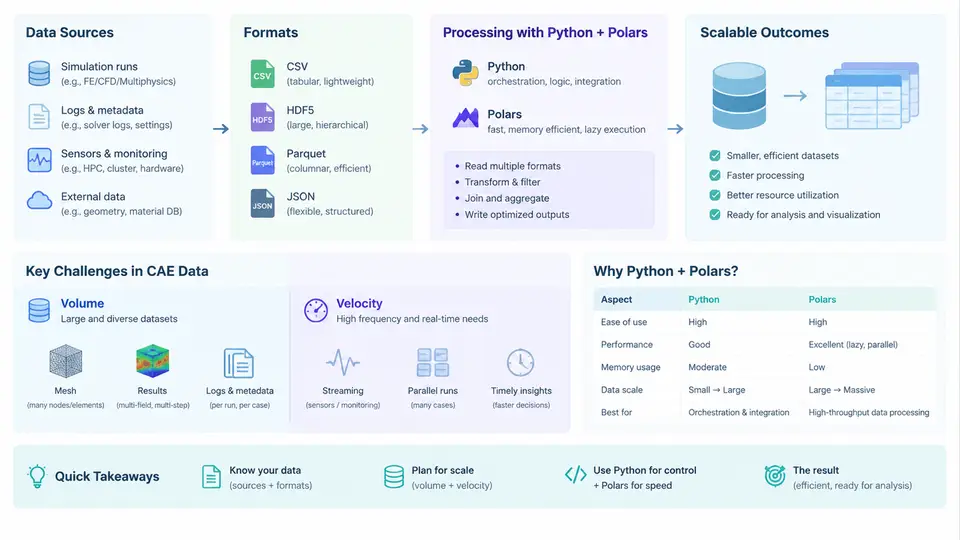
Computer-aided engineering (CAE) has never been a single-tool discipline. A modern product development loop typically touches structural FEA, computational fluid dynamics (CFD), thermal analysis, crash simulation, NVH, and multi-body dynamics — each producing its own file families, its own time bases, and its own notion of what a "result" is. Before writing a single line of Python, it is worth mapping that landscape honestly, because the scalability problem is rarely "Python is slow." It is almost always "the data is larger, wider, and messier than the script assumed."
Where CAE data comes from
CAE data originates from four broad source classes, and they behave very differently under load:
- Solver output. Native result files from solvers such as Abaqus (
.odb), ANSYS (.rst,.rth), Nastran (.op2), LS-DYNA (d3plot), and OpenFOAM (time-directory fields). These are binary, often memory-mapped, and frequently append-only during a run. - Pre-processing and mesh data. Meshes, boundary conditions, and material cards in formats like
.inp,.cdb,.bdf, and CGNS. These are large but comparatively static. - Test and measurement data. Strain gauges, accelerometers, and thermal couples logged as CSV, TDMS, or HDF5, usually at high sample rates and with irregular timestamps.
- Derived and metadata. Job schedulers, run manifests, DOE tables, and post-processed scalar summaries — small individually, but numerous and often the join key that ties everything together.
The practical consequence is that a single simulation campaign is not one dataset. It is a collection of heterogeneous datasets that must be aligned by case ID, time step, and physical location before any engineering conclusion can be drawn.
Formats, volume, and velocity
Volume in CAE grows along three independent axes, and conflating them is a common source of bad architecture decisions:
| Axis | Typical driver | Order of magnitude |
|---|---|---|
| Spatial | Mesh refinement, node/element count | 106–108 nodes per case |
| Temporal | Time steps, output frequency | 102–105 frames per case |
| Ensemble | DOE, optimization, Monte Carlo | 102–104 cases per study |
Multiply those and a single optimization study can legitimately reach tens of terabytes. Velocity matters just as much: a transient CFD run may write a new field every few seconds, and a crash simulation can emit hundreds of state frames in minutes. Downstream tooling that assumes "read the file once, then analyze" breaks the moment the file is still being written.
Why the traditional Python stack strains
Python is the natural glue language for CAE: it has mature readers for nearly every solver format, it integrates with job schedulers, and it is what engineers already know. The problem is that the default data-handling idioms — csv, numpy.loadtxt, and especially pandas — were designed for datasets that fit comfortably in RAM. When a single result array is 40 GB, three things happen:
- Memory pressure. Pandas materializes columns eagerly and often copies on operations, so peak RSS can be several times the on-disk size.
- Single-threaded execution. Most pandas operations use one core, leaving the rest of a 64-core node idle.
- Type and schema drift. CAE exports mix integers, floats, and strings in ways that force object dtypes, which silently destroys both memory efficiency and vectorization.
The result is scripts that work beautifully on a 2 GB validation case and fail — or take all night — on the production case.
The role of Polars
Polars addresses these failure modes directly. It is a columnar DataFrame library written in Rust with an Arrow-backed memory model, and its design choices map cleanly onto CAE workloads:
- Lazy evaluation. A
LazyFramebuilds a query plan that is optimized before execution, so filters and projections are pushed down and unnecessary columns are never read. - Streaming execution.
collect(streaming=True)processes data in chunks, allowing datasets larger than RAM to be handled with bounded memory. - Parallelism by default. Operations use all available cores without explicit threading code.
- Strict, explicit schemas. Types are declared up front, which catches format drift early instead of at the end of a long pipeline.
A minimal example shows the difference in intent. Reading a large CSV of nodal results and computing a per-step maximum becomes:
import polars as pl

lf = (
    pl.scan_csv("nodal_results.csv")
      .select(["step", "node_id", "von_mises"])
      .filter(pl.col("von_mises").is_not_null())
      .group_by("step")
      .agg(pl.col("von_mises").max().alias("max_vm"))
)

result = lf.collect(streaming=True)
print(result.sort("step"))
Nothing here loads the full file. scan_csv defers reading, the projection and filter are pushed into the scan, and the aggregation streams. On a 20 GB file this typically runs in a fraction of the memory a pandas equivalent would require — and the code is arguably clearer about what it computes.
scan_* and a lazy pipeline rather than read_*. It costs nothing and preserves the option to scale.
How the pieces fit together
The diagram below summarizes the flow from heterogeneous CAE sources through a Python/Polars processing layer to engineering outputs, and highlights where scalability pressure actually appears.
What this means in practice
Three habits follow from the landscape above and will recur throughout this course:
- Profile before optimizing. Measure peak memory and wall time on a representative case, not the smallest one. A pipeline that is fine at 1 GB may be unusable at 50 GB.
- Prefer columnar intermediates. Convert solver output to Parquet or Arrow once, then reuse it. Repeated parsing of binary solver formats is one of the largest hidden costs in CAE post-processing.
- Design for the ensemble, not the case. If the study will eventually contain 500 cases, the schema and partitioning decisions made for case one determine whether case 500 is a query or a rewrite.
With the data landscape mapped and the scalability pressure points identified, the next step is to establish a working Python and Polars environment that can actually exercise these patterns on real CAE files.