1. Crash simulation feature stores for engi
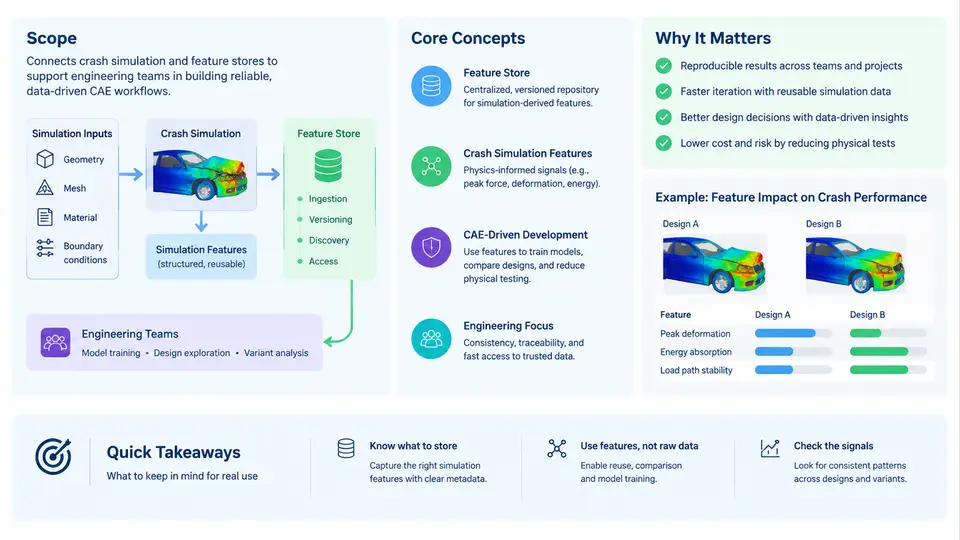
Crash simulation is one of the most data-intensive activities in automotive product development. A single full-vehicle frontal impact model can contain 8–15 million elements, hundreds of material definitions, dozens of contact interfaces, and thousands of output requests. A typical vehicle program runs thousands of such simulations across body-in-white, closures, seats, restraints, battery enclosures, and occupant safety subsystems. The result is a sprawling, heterogeneous, and rapidly growing body of simulation data that engineers must search, compare, and reuse every day.
A crash simulation feature store is a curated, queryable repository that transforms raw solver output and model metadata into structured, reusable features — numeric descriptors, categorical labels, and derived signals that characterize a crash model, a load case, or a simulation result. This chapter defines the scope of the course, introduces the core concepts, and explains why feature stores have become a practical necessity in CAE-driven product development.
Why Raw Simulation Data Is Not Enough
Most engineering teams already store simulation results. The problem is not storage — it is retrieval and reasoning. Consider a common request: "Find all side-impact load cases from the last two years where the B-pillar intrusion exceeded 120 mm and the model used a high-strength steel grade above 980 MPa."
In a conventional file-based workflow, answering this question requires opening hundreds of result decks, manually reading intrusion curves, cross-referencing material cards, and reconciling inconsistent naming conventions. The data exists, but it is not addressable. A feature store solves this by extracting the relevant quantities at ingestion time and storing them as typed, indexed fields.
Core Concepts
Four concepts anchor the rest of this course.
- Feature. A named, typed value derived from a model or result. Examples:
max_intrusion_mm(float),material_grade(string),load_case(enum),peak_accel_g(float),energy_absorbed_kj(float). - Entity. The object a feature describes. Typical entities are model, load case, simulation run, part, and subsystem.
- Feature group. A logical collection of features that share an entity and a lifecycle — for example, a "frontal impact result" group containing intrusion, acceleration, and energy metrics.
- Lineage. The provenance chain linking a feature back to the source deck, solver version, and extraction script. Lineage is what makes a feature trustworthy.
These concepts map directly onto the day-to-day vocabulary of CAE engineers. A feature is what an engineer would write on a whiteboard when comparing two designs; a feature group is the set of columns in a comparison spreadsheet; lineage is the audit trail that answers "where did this number come from?"
The Role of Feature Stores in CAE-Driven Development
Feature stores change how engineering teams work in three concrete ways.
Design comparison. When a feature store holds intrusion, acceleration, and mass metrics for every design iteration, comparing two body-in-white concepts becomes a query rather than a manual review. Engineers can rank variants by a weighted objective without opening a single result file.
Regression detection. As a program progresses, features accumulate over time. A feature store can flag when a new run's peak_accel_g exceeds the historical distribution for the same load case, catching regressions before they reach a physical test.
Machine learning and surrogate modeling. Structured features are the prerequisite for training surrogate models that predict crash performance from design parameters. Without a feature store, every ML experiment begins with weeks of data wrangling.
Reference Architecture
The diagram below shows how a feature store fits into a typical CAE pipeline. Raw solver output and model decks flow into an extraction layer, which produces typed features. Those features are stored with lineage metadata and exposed through a query API to downstream consumers: dashboards, comparison tools, and ML pipelines.
What This Course Covers
The course is organized into six parts. Part 1 (Chapters 1–5) establishes foundations: feature taxonomy, entity modeling, and the ingestion pipeline. Part 2 (Chapters 6–11) covers extraction engineering — parsing d3plot and binout files, handling unit systems, and deriving engineering features such as intrusion, acceleration, and energy. Part 3 (Chapters 12–17) addresses storage and query design, including schema evolution and indexing strategies. Part 4 (Chapters 18–22) focuses on integration with existing CAE and PLM workflows. Part 5 (Chapters 23–27) covers advanced topics: surrogate modeling, anomaly detection, and cross-program benchmarking. Part 6 (Chapters 28–30) presents case studies and operational practices.
A Minimal Working Example
To make the concept concrete, consider a single frontal impact run. The extraction layer reads the glstat file and produces the following feature record:
{
  "entity": "run_2024_FR_001",
  "load_case": "frontal_56kph_full_overlap",
  "features": {
    "peak_accel_g": 42.7,
    "max_intrusion_mm": 118.3,
    "energy_absorbed_kj": 87.4,
    "mass_kg": 1420.0,
    "material_grade": "DP980"
  },
  "lineage": {
    "source_deck": "biw_v3_fr.key",
    "solver": "LS-DYNA R13.1",
    "extraction_script": "extract_glstat.py@v2.3",
    "timestamp": "2024-11-15T09:42:00Z"
  }
}
Once this record is stored, a query such as SELECT * WHERE load_case = 'frontal_56kph_full_overlap' AND max_intrusion_mm > 100 returns all matching runs in milliseconds. The same record can be joined with material properties, compared against test data, or fed into a surrogate model — all without reopening the original result files.
Key Takeaways
- Crash simulation produces large, heterogeneous data that is difficult to query and compare in raw form.
- A feature store extracts typed, named features from solver output and model decks, making simulation data addressable.
- Core concepts are feature, entity, feature group, and lineage.
- Feature stores enable design comparison, regression detection, and machine learning on crash data.
- The architecture separates inputs, extraction, storage, and consumers, with lineage flowing back to sources.
The next chapter examines feature taxonomy in detail, showing how to classify features by entity, data type, and derivation method so that the store remains consistent as it grows.