1. CAE experiment tracking and model regist
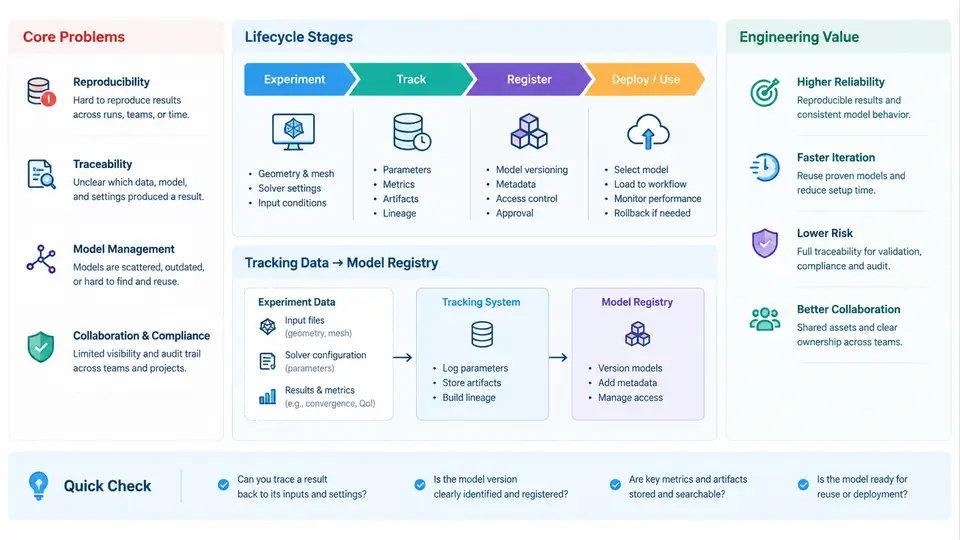
Simulation-driven product development generates a continuous stream of numerical experiments: mesh convergence studies, solver parameter sweeps, material model calibrations, and design-of-experiments (DOE) campaigns. In a typical CAE workflow, a single engineer may launch dozens of solver runs per week, each producing input decks, solver logs, result fields, and post-processed metrics. Without a dedicated tracking layer, this information fragments across local directories, shared drives, spreadsheets, and personal notes. The consequences are predictable: duplicated runs, lost provenance, irreproducible results, and an inability to answer the deceptively simple question — which model version produced this result, and under what conditions?
This chapter introduces the two systems that address these problems: experiment tracking and the model registry. It defines the core problems they solve, maps the lifecycle stages of a CAE experiment, and explains why these systems carry engineering value beyond bookkeeping.
Core Problems in Untracked CAE Workflows
CAE differs from machine-learning experimentation in ways that shape the tracking problem. Simulation inputs are structured files (Abaqus .inp, ANSYS .cdb, Nastran .bdf), outputs are large binary result databases (.odb, .rst, .op2), and the "model" is a combination of geometry, mesh, material definitions, boundary conditions, and solver settings. Four recurring problems emerge:
- Provenance loss. A result file exists, but the exact input deck, solver version, and boundary conditions that produced it are unknown or reconstructed from memory.
- Parameter opacity. A DOE sweep varies thickness, material modulus, and load angle, but the mapping from run to parameter combination is stored in a spreadsheet that drifts out of sync with the actual runs.
- Artifact sprawl. Result databases reach hundreds of megabytes to several gigabytes; copying them into shared folders creates storage pressure and version ambiguity.
- Promotion ambiguity. When a design is approved, there is no controlled mechanism to mark a specific model-plus-result combination as the validated baseline for downstream teams.
Experiment tracking addresses the first three by recording each run as a structured, queryable entity. The model registry addresses the fourth by managing the promotion, versioning, and retrieval of approved models.
Lifecycle Stages of a Tracked CAE Experiment
A tracked experiment moves through five stages. The boundaries are conceptual, but each stage has distinct artifacts and metadata that the tracking system must capture.
1. Definition. The engineer specifies the simulation intent: solver, analysis type (static, modal, explicit), parameter set, and the input deck template. At this stage the tracking system creates an experiment record with a unique identifier and stores the parameter values as structured metadata rather than free text.
2. Execution. The solver runs, either locally or on an HPC cluster. The tracking layer captures the start and end timestamps, exit status, solver version string, hostname, and the resolved input deck. For HPC runs, the job scheduler ID (e.g., Slurm JobID) is recorded so the run can be traced back to cluster logs.
3. Artifact capture. Outputs are registered with references rather than duplicated. Large result databases are stored in an artifact repository (object storage or a shared filesystem) and linked to the run record by URI and checksum. Lightweight artifacts — solver logs, convergence histories, and extracted scalar metrics — are stored inline or as small files.
4. Analysis and comparison. Extracted metrics (maximum von Mises stress, first natural frequency, mass, safety factor) are attached to the run. The tracking system enables side-by-side comparison across runs, which is where parameter sensitivity becomes visible.
5. Promotion. A run whose results meet acceptance criteria is promoted to the model registry as a versioned, immutable entry. Promotion is a deliberate, auditable action, not an automatic side effect of a successful solve.
What the Tracking System Must Record
The value of tracking depends on the granularity of captured metadata. A minimal but sufficient schema for a CAE run includes:
| Field | Example value | Purpose |
|---|---|---|
run_id | run-2024-0417-0032 | Unique identifier for the run |
solver | Abaqus 2023 | Solver and version for reproducibility |
analysis_type | static_general | Analysis procedure classification |
parameters | {thickness: 2.5, E: 210000, load_angle: 30} | Structured DOE inputs |
input_deck_hash | sha256:9f3c… | Detects input changes between runs |
exit_code | 0 | Distinguishes converged from failed runs |
artifact_uri | s3://cae-results/run-0032/result.odb | Reference to large result database |
metrics | {max_vm_stress: 312.4, f1: 48.7, mass: 1.82} | Enables comparison and filtering |
Storing parameters as structured key-value pairs rather than a free-text description is what makes later queries possible. A question such as "show all runs where thickness < 3 mm and max von Mises stress < 350 MPa" can only be answered if thickness and stress are typed fields, not prose.
Engineering Value Across the Product Development Cycle
The value of these systems compounds as the development cycle progresses. During concept exploration, tracking makes DOE campaigns interpretable: instead of a folder of result files, the engineer sees a parameter-metric table and can identify which variables dominate the response. During detailed design, the registry provides a controlled baseline: downstream teams (thermal, fatigue, NVH) retrieve the approved model version rather than guessing which result file is current. During validation and certification, the audit trail — input hash, solver version, parameter set, acceptance record — supports traceability requirements that increasingly appear in regulated industries.
A Minimal Reproducible Example
Consider a parameter sweep on a bracket. The engineer varies plate thickness t ∈ {2.0, 2.5, 3.0} mm and load angle θ ∈ {0°, 30°, 60°}, producing nine runs. Each run is submitted with a tracking call that records the parameters and the input deck hash. After completion, a post-processing script extracts max_vm_stress from the .odb and attaches it to the run record.
# Example: register a run and attach metrics (illustrative API)
run = tracker.start_run(
    solver="Abaqus 2023",
    analysis_type="static_general",
    parameters={"thickness_mm": 2.5, "load_angle_deg": 30, "E_MPa": 210000},
    input_deck="bracket_t2.5_a30.inp"
)
tracker.log_artifact(run, "result.odb", uri="s3://cae-results/run-0032/result.odb")
tracker.log_metrics(run, {"max_vm_stress_MPa": 312.4, "f1_Hz": 48.7, "mass_kg": 1.82})
tracker.end_run(run, exit_code=0)
After the sweep, the engineer queries the tracking system for all runs with max_vm_stress_MPa < 350 and mass_kg < 2.0. Suppose two runs satisfy both criteria. The engineer inspects their convergence histories, confirms mesh quality, and promotes the better one to the registry as bracket-baseline v1.0. The promotion record includes the run ID, the acceptance criteria, and the approver. If a later run fails to reproduce the baseline stress within tolerance, the registry entry provides the exact input deck and solver version needed to diagnose the discrepancy.
Common Failure Modes and How Tracking Helps
- Silent input drift. A mesh is refined but the run is labeled with the old parameter set. The
input_deck_hashchanges, flagging the mismatch. - Failed runs polluting comparisons. A run that diverged at increment 12 is recorded with
exit_code != 0and excluded from metric comparisons by default. - Storage exhaustion. Result databases are referenced by URI and checksum rather than copied into the tracking database, keeping the metadata store small.
- Baseline confusion. Only registry entries are treated as approved baselines; exploratory runs remain in tracking but never become the reference for downstream work.
These systems do not replace engineering judgment. They ensure that judgment is applied to complete, traceable information rather than to fragments scattered across directories. The remainder of this course builds on this foundation, moving from the conceptual lifecycle into concrete implementation patterns for tracking backends, artifact storage, registry versioning, and integration with CAE solver workflows.