1. Crash simulation data landscape
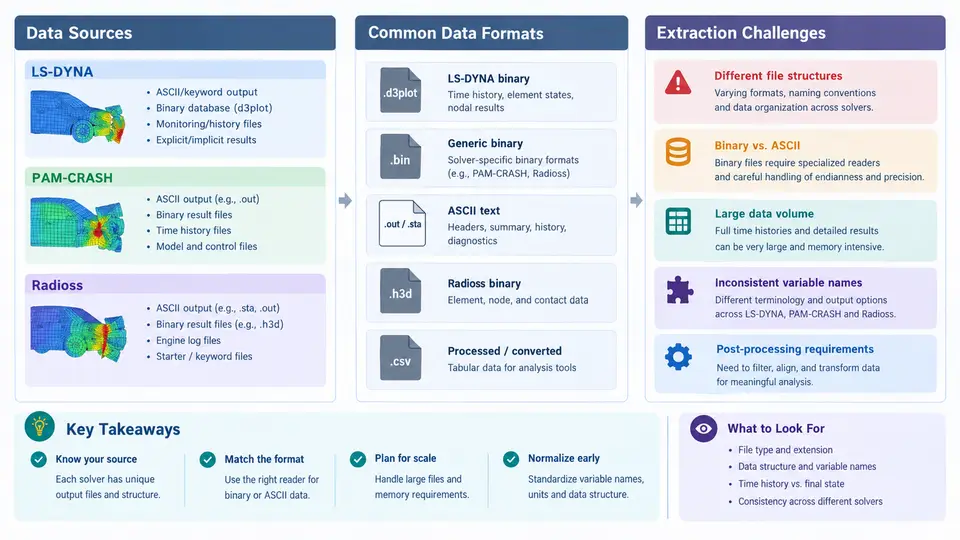
Crash simulation is one of the most data-intensive activities in automotive CAE. A single full-vehicle frontal impact model may contain 8–15 million elements, run for 120–150 ms of physical time, and write hundreds of gigabytes of d3plot, animation, and time-history output. Before any meaningful analysis can happen — occupant injury metrics, structural intrusion, energy balance, or design-of-experiments correlation — the engineer must first locate, read, and normalize data that originates from three fundamentally different solver ecosystems: LS-DYNA, PAM-CRASH, and Radioss. This chapter maps that landscape: where the data comes from, what formats it takes, and why extraction is rarely a simple file-read operation.
Where crash data originates
Every crash simulation produces data at three distinct levels, and each level has different extraction characteristics:
- Keyword/input deck — the model definition itself: nodes, elements, materials, contacts, boundary conditions, and control cards. This is the source of truth for geometry and setup, and it is the only place where part IDs, material IDs, and section properties can be resolved.
- Time-history output — scalar or vector channels sampled at fixed intervals: accelerations at sensor locations, forces through cross-sections, energies, and displacements. These are small, structured, and cheap to extract.
- Full-field state output — nodal coordinates, stresses, strains, and element states for every element at every output step. This is where the volume problem lives: a 10-million-element model writing 200 states produces billions of floating-point values.
The critical insight is that these three levels are not stored in one file. The input deck is ASCII keyword text; time-history data may be ASCII or binary; full-field data is almost always binary and solver-specific. Any extraction pipeline must reconcile all three.
Format families across the three solvers
Although LS-DYNA, PAM-CRASH, and Radioss solve the same physics, their output conventions diverge sharply. The table below summarizes the practical extraction surface for each.
| Solver | Input deck | Time-history | Full-field binary | Primary reader |
|---|---|---|---|---|
| LS-DYNA | *KEYWORD ASCII | binout / ascii via *DATABASE_* | d3plot, d3thdt | LS-PrePost, lasso, qd- Python libs |
| PAM-CRASH | .pc / .dat ASCII | TH files, .erfh5 | .dsy, .erfh5 | Animator, pamcrash2hdf |
| Radioss | _0000.rad ASCII | T01 / T02 ASCII | A01, A02, Annn | HyperView, radioss2hdf |
Two format families dominate the binary side. LS-DYNA uses its own d3plot container, a Fortran-style record stream with a fixed header block followed by per-state geometry and per-element result blocks. PAM-CRASH and Radioss increasingly write HDF5-based containers (.erfh5 and converted .h5), which are self-describing and support partial reads. The practical consequence: d3plot extraction requires a solver-aware parser, while HDF5 extraction can use generic tooling once the schema is known.
The extraction pipeline and its failure points
A robust extraction workflow has four stages, and each has a characteristic failure mode. The SVG below shows the data flow from solver output to analysis-ready tables, with the specific friction point at each transition.
Why extraction is harder than it looks
Three challenges recur regardless of solver, and they are worth naming explicitly because they drive most pipeline design decisions.
Binary record structure. The d3plot format is a sequence of Fortran records, each preceded and followed by a 4-byte integer giving the record length. The header block contains the number of nodes, elements, and states, plus a set of control words that determine how the rest of the file is laid out. If a reader misinterprets a single control word — for example, treating a single-precision file as double-precision — every subsequent value is garbage. This is why hand-rolled parsers fail and why solver-native libraries such as lasso or LS-PrePost's batch mode are preferred.
ID mapping and version drift. Part IDs in the input deck do not always match the internal IDs used in binary output. LS-DYNA may renumber parts when *INCLUDE files are merged; PAM-CRASH and Radioss have their own conventions. A part that is ID 1001 in the keyword file may appear as index 47 in the binary. Any extraction that needs to associate a result with a named component must resolve this mapping, typically by reading the part definition block from the binary header and joining it against the keyword file.
Time and unit alignment. LS-DYNA uses a consistent unit system chosen by the user (commonly mm, ms, kg, kN, GPa). PAM-CRASH and Radioss may use different default conventions. When comparing acceleration traces from two solvers, a factor-of-1000 error from ms versus s is a classic and easy mistake. Similarly, output intervals differ: one solver may write every 0.1 ms, another every 0.5 ms. Before any cross-solver comparison, resample all channels to a common time base.
A minimal extraction example
Consider a simple but realistic task: extract the resultant acceleration at a B-pillar sensor from an LS-DYNA run and confirm it against the input deck. The steps below use the lasso Python library, which reads d3plot and binout directly.
import lasso
import numpy as np

# Open the d3plot file (full-field binary)
d3 = lasso.dyna.D3plot("run01/d3plot")

# Read the binout file (time-history channels)
binout = lasso.dyna.Binout("run01/binout")

# List available time-history blocks
print(binout.get_blocks())

# Extract acceleration for a specific node set
# Node IDs come from the keyword deck, not from the binary index
accel = binout.read("nodout", "x_acceleration")
time  = binout.read("nodout", "time")

# Resample to a uniform 0.1 ms grid for downstream comparison
t_uniform = np.arange(0, time.max(), 0.1)
a_uniform = np.interp(t_uniform, time, accel)

print(f"Peak acceleration: {a_uniform.max():.1f} (solver units)")
print(f"Time of peak: {t_uniform[np.argmax(a_uniform)]:.2f} ms")
The expected output is a peak acceleration value and its time of occurrence. The verification step is to cross-check the node ID against the *NODE definition in the keyword file and confirm that the sensor location matches the intended B-pillar position. If the peak time is zero or the trace is flat, the most likely cause is that the node set was not written to nodout — check the *DATABASE_NODOUT card and the DT output interval.
What to carry forward
The crash data landscape is defined by three solvers, three data levels, and a persistent gap between ASCII setup files and binary result files. Extraction is not a single operation but a pipeline: read the binary with a solver-aware tool, resolve IDs against the keyword deck, normalize time and units, and only then analyze. The friction points — binary record structure, ID mapping, and time/unit alignment — are where most real-world pipelines break, and they are the reason this course treats extraction as a first-class engineering task rather than a preprocessing afterthought.