1. MADYMO simulation workflow fundamentals
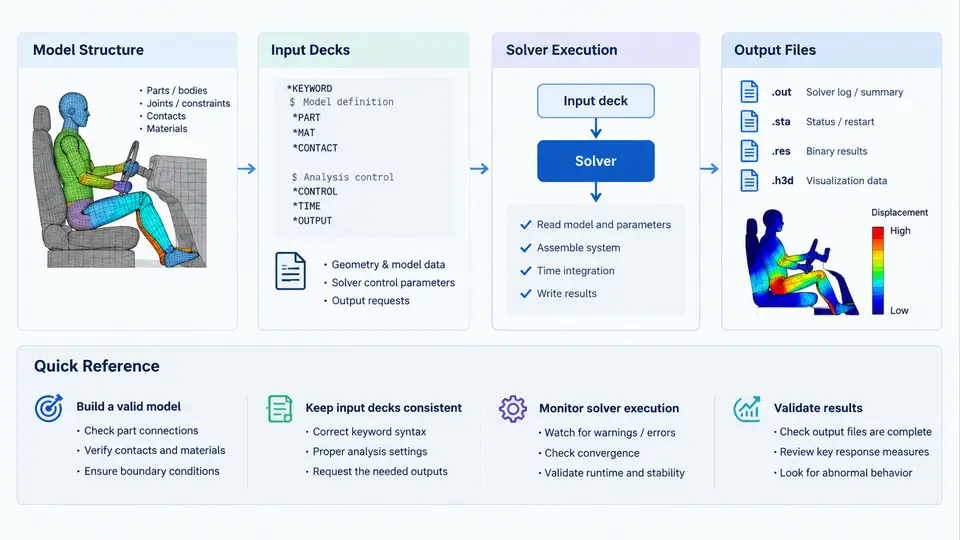
MADYMO (Mathematical Dynamic Model) is a multibody and finite-element solver used primarily for occupant safety analysis, restraint system design, and vehicle crashworthiness studies. Before any Python automation can be useful, you need a precise mental model of how a MADYMO job is structured and executed. This chapter establishes that model: what a MADYMO model actually contains, how input decks are organized, how the solver is invoked, and what the solver produces as output. Every automation script you write later will manipulate one or more of these four elements, so getting the vocabulary and file conventions right at the start pays off throughout the course.
Model Structure: Systems, Bodies, and the Kinematic Tree
A MADYMO model is a hierarchical assembly of systems. The top-level system typically represents the vehicle environment (a SYSTEM of type FEM or MB), while nested systems represent the occupant, the seat, the airbag, and the seatbelt. Each system contains bodies, joints, and force models. Multibody (MB) systems use rigid bodies connected by kinematic joints; finite-element (FE) systems use meshed bodies with nodal degrees of freedom. Hybrid models combine both, which is common in occupant simulation: the dummy is multibody, the airbag is FE.
The kinematic tree defines how bodies connect. A body's position is expressed relative to its parent through a joint, and the joint type (revolute, translational, spherical, free, etc.) determines which degrees of freedom are active. This tree structure is not cosmetic — it dictates how the solver assembles equations of motion and how initial positions propagate. When you later write Python to generate or modify models, you will frequently traverse this tree, so it helps to think of a MADYMO model as a directed graph rooted at the top system.
Force models sit alongside the kinematic tree. They include contact interactions (body-to-body, FE-to-FE, or body-to-FE), restraint forces (seatbelt elements, pretensioners, load limiters), and prescribed accelerations or velocities applied to bodies. Each force model references the bodies or nodes it acts upon, and its parameters (stiffness curves, damping, friction) are usually supplied as tables or functions.
Input Decks: The XML-Based Model Definition
MADYMO input decks are XML files, conventionally with the extension .xml (older versions used .dat). The root element is <MADYMO>, and the deck is organized into a small number of top-level sections:
<CONTROL>— solver settings: simulation time, time step, output intervals, integration method, and units.<SYSTEM>— the model itself, possibly nested. ContainsBODY,JOINT,FORCE, andFE_MODELelements.<INCLUDE>— references to external files, allowing modular model libraries.<OUTPUT>— requests for specific result quantities and file formats.
A minimal but valid deck looks like this:
<?xml version="1.0"?>
<MADYMO version="7.7">
  <CONTROL>
    <TIME> T_STOP="0.120" DT="1.0e-5" />
    <OUTPUT> T_START="0.0" T_STEP="0.001" />
  </CONTROL>
  <SYSTEM NAME="vehicle">
    <BODY NAME="chassis">
      <INITIAL_POSITION> X="0.0" Y="0.0" Z="0.0" />
    </BODY>
  </SYSTEM>
</MADYMO>
Two conventions matter here. First, MADYMO uses a right-handed coordinate system with X forward, Y left, and Z up by default; you can redefine this in <CONTROL>, but if you do, document it explicitly because every position, velocity, and force vector in the deck depends on it. Second, units are not enforced by the solver — you must be consistent. The standard SI-adjacent set is meters, kilograms, seconds, and newtons, but millimeters and milliseconds are also common in crash applications. Mixing them silently is one of the most frequent causes of nonsensical results.
Solver Execution
The MADYMO solver is invoked from the command line. The typical call is:
madymo -i occupant_restraint.xml -o run01 -n 4Here -i specifies the input deck, -o sets the output base name, and -n requests four parallel threads. The solver reads the deck, expands any <INCLUDE> directives, builds the internal model, and integrates the equations of motion over the time span defined in <CONTROL><TIME>. Progress is written to a log file, and any errors — malformed XML, missing include files, inconsistent units, singular joints — are reported there with line references.
For automation, the important point is that the solver is a batch process with a well-defined exit code and a predictable set of output files. A Python wrapper can therefore construct a deck, call the solver via subprocess.run(), check the return code, and parse the outputs without any interactive step. This is the foundation of every workflow we will build.
Output Files
A completed run produces several files sharing the output base name. The most important are:
| File | Contents | Typical use |
|---|---|---|
run01.xml | Full result deck: time histories of all requested quantities | Post-processing, metric extraction |
run01.log | Solver log, warnings, errors, timing | Debugging, run validation |
run01.kin | Kinematic animation data | Visual review in MADYMO Viewer |
run01.rep | Summary report of key responses | Quick sanity check |
The result deck is the primary automation target. It contains time-series data for body accelerations, joint displacements, belt forces, contact forces, and any user-defined outputs. Because it is XML, it can be parsed with xml.etree.ElementTree or lxml without third-party MADYMO libraries. The log file is equally important: a run that "completes" but emits warnings about negative volumes or excessive penetration is not a valid result, and your automation should treat those warnings as failures rather than silently accepting the output.
How the Four Elements Fit Together
The diagram below shows the relationship between model structure, input deck, solver, and outputs. The key insight is that the input deck is the single interface between your Python code and the solver — everything upstream is model authoring, everything downstream is result interpretation.
What This Means for Automation
Every Python automation task in this course reduces to one of four operations on this pipeline: generating or modifying an input deck, invoking the solver, parsing output files, or orchestrating multiple runs. The model structure determines what you can parameterize; the input deck is what you actually write; the solver is what you call; the outputs are what you read back. Keeping these four roles distinct in your code — separate functions or classes for deck generation, execution, and parsing — makes the automation testable and reusable.
A practical first exercise: take a small MADYMO deck, run it manually, then write a Python script that copies the deck, changes a single parameter (for example, the simulation stop time in <CONTROL><TIME>), runs the solver, and confirms that the new result deck reflects the change. This closes the loop on the entire workflow and gives you a working skeleton for everything that follows.