1. LS-DYNA simulation workflow landscape
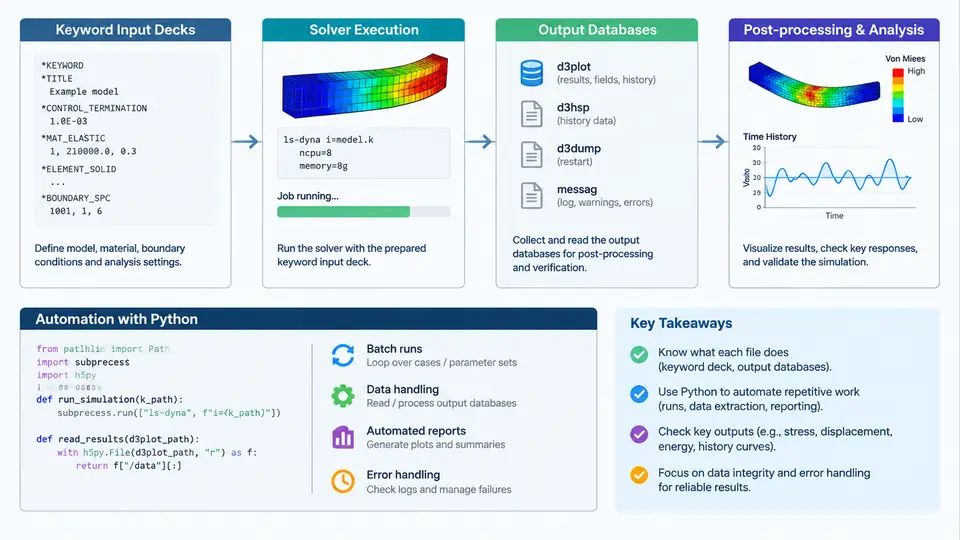
LS-DYNA is an explicit and implicit finite element solver used for crashworthiness, drop tests, blast loading, metal forming, and other highly nonlinear transient problems. Before any Python automation makes sense, you need a precise mental model of how a simulation actually moves through the toolchain. The workflow has four distinct stages: keyword input deck preparation, solver execution, output database generation, and post-processing / decision making. Each stage has its own file formats, failure modes, and automation entry points. This chapter maps that landscape so later chapters can target the right stage with the right Python technique.
1.1 The Keyword Input Deck
LS-DYNA does not read a GUI project file. It reads a plain-text keyword deck, conventionally named main.k or input.k. The deck is organized into keyword blocks, each beginning with an asterisk. A minimal explicit analysis deck contains at least these blocks:
*KEYWORD
*CONTROL_TERMINATION
$   ENDTIM
    0.050
*CONTROL_TIMESTEP
$   DTINIT  TSSFAC
     0.0     0.90
*DATABASE_BINARY_D3PLOT
$   DT
    0.001
*PART
$   PID  SECID  MID
     1    1      1
*SECTION_SHELL
$   SECID  ELFORM  SHRF  NIP
     1      2      1.0   5
*MAT_PIECEWISE_LINEAR_PLASTICITY
$   MID  RO  E  PR  SIGY  ETAN
     1    7.85e-9  210000.0  0.30  350.0  1200.0
*NODE
$   NID  X  Y  Z
     1    0.0  0.0  0.0
*ELEMENT_SHELL
$   EID  PID  N1  N2  N3  N4
     1    1    1   2   3   4
*SET_NODE_LIST_TITLE
Fixed_Support
$   SID
     100
     1
*BOUNDARY_SPC_SET
$   NSID  CID  DOFX  DOFY  DOFZ  DOFRX  DOFRY  DOFRZ
     100   0    1     1     1     1      1      1
*INITIAL_VELOCITY_GENERATION
$   NSID  STYP  OMEGA  VX  VY  VZ
     200   0     0.0    0.0  0.0  -5000.0
*END
Two structural facts matter for automation. First, keyword blocks are order-independent in most cases, but cross-references (part → section → material, set → node/element) must resolve. Second, the deck supports *INCLUDE statements, which let you split a model into reusable fragments:
*INCLUDE
../materials/steel_dp600.k
../boundary/fixture_A.k
This include mechanism is the single most important enabler of Python-driven deck generation. Instead of rewriting a monolithic file, a script can emit small parameterized fragments and assemble them. Typical automation targets at this stage include: generating node/element meshes from parametric geometry, sweeping material cards across a design-of-experiments matrix, injecting boundary conditions from a CSV, and rewriting *CONTROL_* cards for different solver settings.
1.2 Solver Execution
The solver binary is invoked from the command line. On Linux the typical call is:
ls-dyna i=main.k ncpu=8 memory=200m
# or with explicit solver selection
lsdyna_dp i=main.k ncpu=8 memory=200m
On Windows the equivalent is lsdyna.exe i=main.k ncpu=8 memory=200m. The key parameters are i= (input deck), ncpu= (shared-memory threads for SMP), memory= (words per processor), and for MPP runs a decomposition file via p=. The solver writes a d3hsp file (diagnostics and echo of the input), a messag file (progress and warnings), and a status file. Exit codes are the primary automation signal: 0 for normal termination, non-zero for errors. However, LS-DYNA sometimes returns 0 even when the run terminated early due to a negative volume or mass scaling blow-up, so exit code alone is insufficient.
Automation opportunities here are mostly about orchestration: launching many runs in parallel, monitoring the messag file for keywords like Error, Warning, or termination, enforcing wall-clock limits, and restarting from d3dump files when a run is interrupted. A Python wrapper typically uses subprocess.Popen with a polling loop rather than subprocess.run, because long runs need progress inspection and cancellation.
1.3 Output Databases
LS-DYNA produces several output families, and knowing which one carries which data is essential before writing any parser:
| File | Format | Content | Typical use |
|---|---|---|---|
d3plot | Binary | Full-field state at plot intervals | Contour plots, animation, stress/strain fields |
binout* | Binary | Time-history channels (nodal, element, rigid body) | Force/displacement curves, energy plots |
d3hsp | Text | Input echo, mass, energy summary | Model verification, debugging |
messag | Text | Timestep, warnings, errors | Run monitoring, failure diagnosis |
glstat | Text | Global energy balance per cycle | Energy error checks, hourglass energy |
matsum | Text | Per-material energy and mass | Material-level diagnostics |
rcforc | Text | Contact interface forces | Impact force extraction |
The d3plot and binout files are binary and require either LS-DYNA's own lsda/lspp readers or third-party libraries. The text files (glstat, matsum, rcforc, messag) are directly parseable with Python's standard library, which makes them the lowest-friction automation target. A common first automation task is extracting the peak glstat hourglass energy ratio and flagging runs where it exceeds 5% of total energy — a classic indicator of under-integrated element problems.
1.4 Where Python Fits
The diagram below shows the four stages and the concrete Python intervention points at each. Notice that automation is not a single script but a set of hooks distributed across the pipeline.
1.5 A Concrete First Automation Task
To make the landscape tangible, consider a small but complete task: run the same impact model at three initial velocities and extract the peak contact force from each run. The inputs are the deck above, a velocity set [3000, 5000, 7000] mm/s, and a fixed run directory layout. The Python script does three things:
- Reads the base deck, replaces the
*INITIAL_VELOCITY_GENERATIONVZ value, and writesrun_3000/main.k,run_5000/main.k,run_7000/main.k. - Launches each run with
subprocess.Popen, redirecting stdout torun_*/solver.log, and polls themessagfile every 10 seconds for the stringError. - After each run completes, parses
rcforcfor the maximum force in the first interface and writes a summary CSV.
import subprocess, pathlib, re, csv

base = pathlib.Path("base/main.k").read_text()
velocities = [3000, 5000, 7000]
results = []

for v in velocities:
    run_dir = pathlib.Path(f"run_{v}")
    run_dir.mkdir(exist_ok=True)
    deck = re.sub(
        r"(\*INITIAL_VELOCITY_GENERATION.*?\n(?:.*\n)*?\s+\S+\s+\S+\s+\S+\s+\S+\s+\S+\s+)(-?\d+\.?\d*)",
        lambda m: m.group(1) + str(-v),
        base, count=1, flags=re.DOTALL)
    (run_dir / "main.k").write_text(deck)

    proc = subprocess.Popen(
        ["lsdyna", "i=main.k", "ncpu=4", "memory=100m"],
        cwd=run_dir, stdout=subprocess.PIPE, stderr=subprocess.STDOUT)
    proc.wait()

    rcforc = run_dir / "rcforc"
    peak = 0.0
    if rcforc.exists():
        for line in rcforc.read_text().splitlines():
            parts = line.split()
            if len(parts) >= 4:
                try:
                    peak = max(peak, abs(float(parts[3])))
                except ValueError:
                    pass
    results.append({"velocity": v, "peak_force": peak})

with open("summary.csv", "w", newline="") as f:
    w = csv.DictWriter(f, fieldnames=["velocity", "peak_force"])
    w.writeheader()
    w.writerows(results)
Expected observable output is a summary.csv with three rows. Verification criteria: each run directory contains a non-empty d3plot, the messag file ends with Normal termination, and peak force increases monotonically with velocity. Typical failure symptoms and their causes: an empty rcforc usually means the contact interface ID in *DATABASE_RCFORC does not match any defined contact; a run that exits in seconds with a messag containing negative volume indicates element distortion requiring timestep or mesh adjustment; a d3plot that exists but is only a few kilobytes means the run terminated before the first plot interval.
1.6 What to Automate First
Not every stage deserves equal automation effort. The highest return comes from tasks that are repeated, error-prone, and text-based. Deck parameter sweeps, batch run launching, and text-file result extraction satisfy all three. Binary d3plot post-processing is valuable but requires external libraries and is better tackled after the text pipeline is stable. The rest of this course follows that order: deck manipulation first, then orchestration, then extraction, then reporting and optimization loops.