1. PAM-CRASH input deck fundamentals
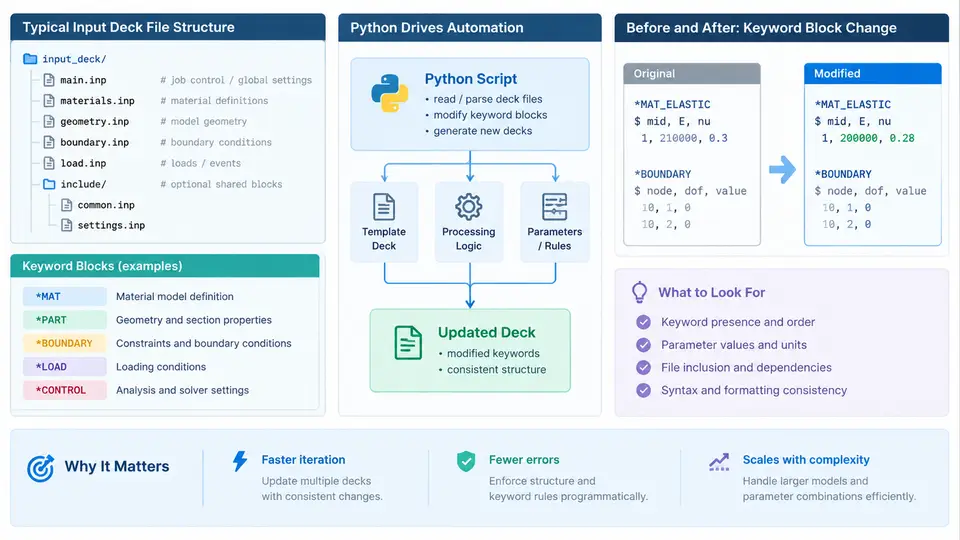
PAM-CRASH is an explicit finite element solver widely used for crashworthiness, occupant safety, and impact simulation. Its input deck is a plain-text file that fully describes the model: nodes, elements, materials, contact definitions, boundary conditions, time-step controls, and output requests. Because the deck is text-based and keyword-driven, it is an ideal target for programmatic generation and modification with Python. This chapter establishes the structural vocabulary you need before writing any automation script.
File Structure and Keyword Blocks
A PAM-CRASH input deck is organized as a sequence of keyword blocks. Each block begins with a keyword line that starts with a slash, such as /NODE, /SHELL, /MAT, or /END. The keyword line is followed by data lines whose column layout and field meaning are defined by the PAM-CRASH input manual. The deck is terminated by /END.
Two structural conventions matter for automation. First, most blocks are fixed-format: field positions are column-sensitive, so a misplaced space can shift a value into the wrong field. Second, some blocks are free-format or accept comma-separated values. A robust generator must know which convention applies to each keyword it emits.
A minimal deck skeleton looks like this:
/TITLE
Crash box baseline model
/UNIT
  1  1  1  1
/NODE
  1  0.000  0.000  0.000
  2  50.000 0.000  0.000
/SHELL
  1  1  2  3  4
/MAT
  1  1  0.000  2.100E+05  0.300  7.850E-09
/TIME
  0.000  1.000E-02
/END
Each block carries a specific semantic role. /NODE defines coordinates; /SHELL and /SOLID define connectivity; /MAT assigns material models and parameters; /PART groups elements with a material and property set; /CONTACT defines interface behavior; /TIME and /DT control the explicit time integration. Understanding this mapping is the prerequisite for any scripted edit.
Why Python Fits Deck Automation
Manual deck editing does not scale. A parametric study over fifty thickness values, a batch of material variations, or a geometry sweep produced by an external mesher all require the same operations: read a template, substitute values, write a new deck, and launch the solver. Python handles all of these with its standard library alone.
The core operations map cleanly onto Python constructs:
- Parsing — read the deck line by line, detect keyword lines with
line.startswith('/'), and group subsequent data lines into a block dictionary. - Substitution — replace numeric fields in a block using string formatting or regular expressions.
- Generation — build new blocks from parameter dictionaries and write them in the correct column format.
- Orchestration — loop over parameter sets, write one deck per case, and invoke the solver via
subprocess.
A small parser illustrates the idea. It does not interpret every keyword; it only separates blocks so that later code can act on them.
def parse_deck(path):
    blocks = {}
    current = None
    with open(path) as f:
        for line in f:
            if line.startswith('/'):
                current = line.strip().split()[0]
                blocks[current] = []
            elif current:
                blocks[current].append(line.rstrip('\n'))
    return blocks

deck = parse_deck('crash_box.key')
print(deck['/NODE'][:2])
Running this on the skeleton above prints the first two node lines, confirming that the block boundaries were detected correctly. From here, a script can rewrite the /MAT block, scale node coordinates, or append a new /CONTACT block.
Column-Sensitive Writing
Because PAM-CRASH expects fixed columns, naive string concatenation often produces decks that the solver rejects with a field-format error. The safe pattern is to format each field to a fixed width and join them. For example, a node line with an integer ID and three coordinates can be written as:
def node_line(nid, x, y, z):
    return f"{nid:>8d}{x:>10.3f}{y:>10.3f}{z:>10.3f}"
This guarantees that every node line has identical column positions, which is exactly what the solver's reader expects. The same discipline applies to element and material blocks, where field widths differ.
/END, or a keyword typo will cause the solver to abort during the input phase, often with a message that points to the wrong line number.From Template to Parametric Study
The practical workflow is template-driven. You maintain one hand-verified baseline deck, then let Python produce variants. A thickness study, for instance, reads the baseline, locates the /SHELL or /PART block, substitutes the thickness field, and writes case_t3.key, case_t4.key, and so on. Each deck is then submitted independently.
The diagram below shows how a single template deck flows through a Python generator into multiple case decks, and how the solver consumes them.
Verification and Failure Symptoms
After generating a deck, verify it before submitting a long run. A quick check reads the file back, confirms that /END is present, and counts blocks against the template. If the solver aborts immediately, the usual causes are a missing keyword, a field that overflowed its column width, or a material ID referenced by a part but never defined. Reading the solver's .err or listing file and locating the reported keyword is the fastest path to the defect.
With this foundation — block structure, column discipline, and a parse-substitute-write loop — you are ready to automate deck generation. The remaining chapters build on these primitives to handle materials, contacts, boundary conditions, and full parametric studies.