1. Crash CAE automation landscape
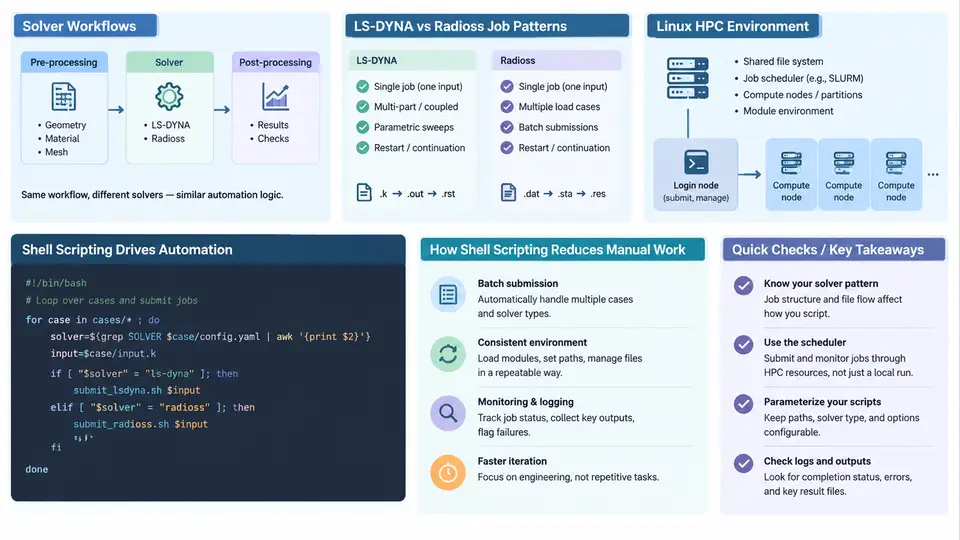
Crash simulation is one of the most resource-intensive workloads in automotive CAE. A single full-vehicle frontal impact model may contain 8–15 million elements, run for 150 ms of physical time, and consume hundreds of CPU-core-hours on a Linux cluster. Because a typical vehicle program requires hundreds or thousands of such runs — design of experiments, parameter sweeps, robustness studies, regulatory matrix runs — the difference between a productive CAE group and a bottlenecked one is rarely solver expertise alone. It is the degree to which the surrounding workflow is automated. Shell scripting on Linux is the glue that makes that automation possible.
Where Shell Scripting Sits in the CAE Stack
It helps to picture the crash CAE environment as a layered stack. At the bottom is the HPC infrastructure: compute nodes, a shared parallel filesystem such as Lustre or GPFS, a job scheduler (Slurm, PBS Pro, or LSF), and MPI libraries. Above that sits the solver layer — LS-DYNA, Radioss, or both — together with pre-processors (HyperMesh, ANSA, Primer) and post-processors (LS-PrePost, HyperView, Animator). Above the solver is the model data layer: keyword decks, include files, material libraries, and result databases. At the top is the orchestration layer, where jobs are generated, submitted, monitored, and harvested.
Shell scripting occupies the orchestration layer and reaches downward into every other layer. A well-written script does not replace the solver or the pre-processor; it drives them, feeds them, watches them, and collects what they produce. This is why shell scripting is not a peripheral skill for crash CAE engineers — it is the mechanism by which engineering intent is translated into repeatable cluster activity.
LS-DYNA and Radioss Job Patterns
Although LS-DYNA and Radioss differ in keyword syntax and solver internals, their job patterns on Linux HPC are structurally similar, and a shell script that understands one can usually be adapted to the other with modest changes.
An LS-DYNA MPP run is typically launched as:
mpirun -np 64 ls-dyna_mpp_d R=main.k NCPU=64 MEMORY=2000m \
  I=d3plot D3PLOT=1.0e-4 ENDTIM=0.15
Here R= names the input deck, NCPU= sets the number of MPI ranks, MEMORY= requests per-rank memory, and D3PLOT= controls output frequency. A Radioss run looks different at the surface but follows the same contract:
mpirun -np 64 radioss -i main_0000.rad -nt 64 -outp 1Both solvers expect a working directory containing the input deck and any include files, both write a restart file at intervals, and both produce a result database that post-processors read. The shell script's job is to guarantee that these expectations are met for every run, without a human logging in to check.
A minimal but realistic job script for Slurm illustrates the pattern:
#!/bin/bash
#SBATCH --job-name=crash_run
#SBATCH --nodes=2
#SBATCH --ntasks-per-node=32
#SBATCH --time=08:00:00
#SBATCH --partition=compute

module load ls-dyna/13.1
module load intel-mpi/2021.6

cd $SLURM_SUBMIT_DIR
mpirun -np $SLURM_NTASKS ls-dyna_mpp_d R=main.k \
  NCPU=$SLURM_NTASKS MEMORY=2000m D3PLOT=1.0e-4
The script is short, but it encodes several decisions: which solver build to use, how many ranks to request, how much memory per rank, and where to run. When a study involves 200 variants, those decisions must be made consistently and without manual editing of each deck.
What Shell Scripting Actually Automates
The value of shell scripting in this context is easiest to see by enumerating the manual interventions it removes. Without automation, an engineer typically performs the following sequence by hand for each run: copy the baseline deck to a new directory, edit one or more parameter values, write a submission script, submit it, check the queue, wait, inspect the log for errors, and copy results to a shared location. Multiply that by hundreds of runs and the cost is obvious.
A shell script collapses this into a single invocation. Consider a parameter sweep over a material yield stress and a shell thickness:
#!/bin/bash
for ys in 280 320 360; do
  for th in 1.2 1.6 2.0; do
    tag="ys${ys}_th${th}"
    mkdir -p runs/$tag
    cp baseline/main.k runs/$tag/
    sed -i "s/^\(.*SIGY.*\)[0-9]\+\.[0-9]\+/\1${ys}.0/" runs/$tag/main.k
    sed -i "s/^\(.*T1.*\)[0-9]\+\.[0-9]\+/\1${th}/" runs/$tag/main.k
    sbatch --job-name=$tag --chdir=runs/$tag submit.sh
  done
done
This is a deliberately simple example, but it demonstrates the essential mechanics: directory creation, in-place parameter substitution with sed, and scheduler submission. In practice, the substitution targets are usually identified by keyword cards rather than by fragile regular expressions, and the script would also record a manifest of what was changed so the results remain traceable.
sed, anchor the pattern to the keyword card and use a unique field marker. A pattern like s/^\(.*SIGY.*\)[0-9]\+\.[0-9]\+/\1${ys}.0/ is safer than a bare number replacement, which can silently corrupt unrelated cards.
Monitoring, Failure Detection, and Result Harvesting
Submission is only the first half. A production script must also answer three questions: is the job still running, did it finish successfully, and where are the results? On Slurm, squeue -u $USER lists active jobs, and sacct -j <jobid> --format=State,ExitCode reports the final state. A polling loop can wait for completion and then trigger post-processing:
while squeue -h -j $JOBID | grep -q .; do sleep 60; done
state=$(sacct -j $JOBID --format=State --noheader | head -1 | tr -d ' ')
if [[ "$state" == "COMPLETED" ]]; then
  ls-prepost -n d3plot -m movie.cfg
else
  echo "Job $JOBID ended with state $state" >> failures.log
fi
Typical failure symptoms are recognizable and worth encoding as checks. A solver that exits immediately usually indicates a missing include file or a license checkout failure; the log will contain Error or License near the top. A run that terminates after a few cycles often points to negative volume or an unstable time step, visible as negative volume or time step warnings in the messag or d3hsp file. A job killed by the scheduler at the wall-clock limit shows state TIMEOUT in sacct. Each of these can be detected by a grep against the appropriate log file, and the script can route the run to a retry queue or a failure report accordingly.
Why This Matters for the Rest of the Course
The crash CAE automation landscape is not a single tool but a set of interacting layers, and shell scripting is the layer that binds them. LS-DYNA and Radioss provide the physics; the HPC cluster provides the compute; the pre- and post-processors provide the model and the results. None of these, on their own, removes the manual intervention that limits throughput. A shell script that generates decks, submits jobs, monitors them, detects failures, and harvests results does. The chapters that follow build the specific skills — text processing, job control, error handling, parallel submission, and result extraction — that make such scripts reliable enough to trust with a full vehicle program.