1. LS-DYNA keyword file structure and autom
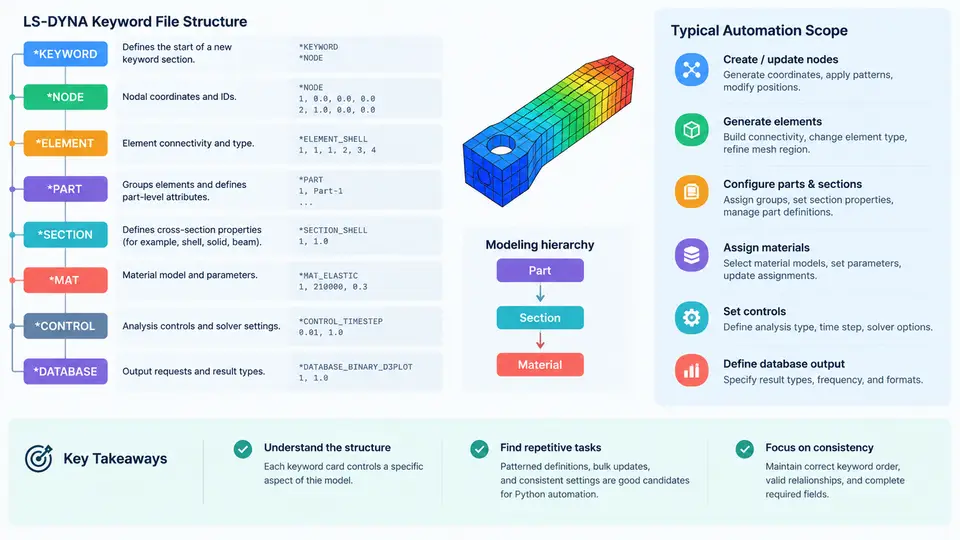
An LS-DYNA input deck is a plain-text file composed of keyword cards. Each card begins with an asterisk (*) in column 1, followed by a keyword name such as *NODE, *ELEMENT, or *MAT. The solver reads these cards sequentially, so the order of certain blocks matters: for example, *NODE and *ELEMENT must be defined before any *SET_NODE or *SET_SEGMENT that references them. Understanding this structure is the prerequisite for any Python automation, because automation ultimately means generating, modifying, or validating these text blocks programmatically.
Core Keyword Cards and Their Roles
The following table summarizes the cards most frequently encountered in a typical explicit dynamics model and the data each one carries.
| Card | Purpose | Typical Fields |
|---|---|---|
*KEYWORD |
Deck header; sets title and optional solver flags | Title line, PARAMETER, MEMORY |
*NODE |
Defines nodal coordinates | NID, X, Y, Z |
*ELEMENT_SHELL / *ELEMENT_SOLID |
Connectivity between nodes | EID, PID, N1–N4 (shell) or N1–N8 (solid) |
*PART |
Binds section, material, and element set | PID, SECID, MID, EOSID |
*SECTION_SHELL / *SECTION_SOLID |
Element formulation and thickness | SECID, ELFORM, thickness (shell) |
*MAT_* |
Constitutive model | MID, RO, E, PR, SIGY (e.g., *MAT_PLASTIC_KINEMATIC) |
*CONTROL_* |
Global solver settings | *CONTROL_TERMINATION (ENDTIM), *CONTROL_TIMESTEP (DTINIT, TSSFAC) |
*DATABASE_* |
Output requests | *DATABASE_BINARY_D3PLOT (DT/CYCL), *DATABASE_ASCII_* |
A minimal deck that runs a single shell part under a prescribed end time looks like this:
*KEYWORD
$ Unit system: mm, ms, kg, kN
*CONTROL_TERMINATION
$  ENDTIM
   10.0
*CONTROL_TIMESTEP
$  DTINIT   TSSFAC
   0.0      0.9
*DATABASE_BINARY_D3PLOT
$  DT
   0.5
*NODE
$  NID    X       Y       Z
   1      0.0     0.0     0.0
   2      10.0    0.0     0.0
   3      10.0    10.0    0.0
   4      0.0     10.0    0.0
*ELEMENT_SHELL
$  EID    PID     N1  N2  N3  N4
   1      1       1   2   3   4
*PART
$  PID    SECID   MID
   1      1       1
*SECTION_SHELL
$  SECID  ELFORM  SHRF    NIP     PROPT   QR/IRID  ICOMP
   1      2       1.0     5       1.0     0.0      0
$  T1     T2      T3      T4
   1.0    1.0     1.0     1.0
*MAT_PLASTIC_KINEMATIC
$  MID    RO      E       PR      SIGY    ETAN    BETA
   1      7.85e-6 210.0   0.3     0.25    0.8     0.0
*END
Note the fixed-width field convention: LS-DYNA reads columns 1–8, 9–16, 17–24, and so on. A value that overflows its field silently corrupts the next field. This is one of the most common sources of errors when decks are edited by hand or generated by scripts that do not respect field widths.
Identifying Repetitive Tasks Suitable for Automation
Not every modeling activity benefits from scripting. The tasks that do share three characteristics: they are repetitive, rule-based, and error-prone when done manually. The following categories consistently qualify.
- Parametric geometry generation. Creating node and element grids for a family of specimens that differ only in dimensions (e.g., a series of tensile coupons with varying gauge length). A Python loop over dimensions replaces dozens of manual edits.
- Bulk material assignment. When a model contains hundreds of parts, assigning the correct
MIDandSECIDto each*PARTentry by hand invites mismatches. A lookup table in Python eliminates this class of error. - Systematic output control. Generating
*DATABASE_*cards for a parameter sweep, where each run needs a different output interval or a different set of ASCII files. - Deck validation and linting. Checking that every
PIDreferenced in*ELEMENT_*exists in*PART, that everySECIDandMIDreferenced in*PARTexists in the corresponding section and material cards, and that no duplicate IDs appear. - Batch job preparation. Producing N variants of a base deck with modified
*CONTROL_TERMINATIONend times or initial velocities, then writing them to separate directories.
Where Automation Stops Being Useful
Automation is not a substitute for engineering judgment. Tasks that require physical reasoning — selecting an appropriate element formulation for a given deformation mode, choosing a material model that captures strain-rate sensitivity, or deciding on a mesh density based on expected stress gradients — should remain manual decisions. Python can enforce consistency once those decisions are made, but it cannot make them. A practical rule: if the task can be described as "apply the same rule to every occurrence," automate it; if it requires evaluating whether the rule itself is correct, keep it under human control.
Reading and Writing Decks with Python
The most direct approach treats the deck as a list of lines and operates on card blocks. A minimal reader that extracts all *PART entries illustrates the pattern:
def read_parts(path):
    parts = []
    with open(path) as f:
        lines = f.readlines()
    i = 0
    while i < len(lines):
        if lines[i].strip().upper().startswith('*PART'):
            i += 1
            while i < len(lines) and not lines[i].startswith('*'):
                if lines[i].strip() and not lines[i].startswith('$'):
                    fields = [lines[i][j:j+8].strip()
                              for j in range(0, 32, 8)]
                    parts.append({'PID': fields[0],
                                  'SECID': fields[1],
                                  'MID': fields[2]})
                i += 1
        else:
            i += 1
    return parts
This function returns a list of dictionaries, one per part. From here, validation is straightforward: collect all SECID values from *SECTION_* cards, all MID values from *MAT_* cards, and check that every part's references resolve. The same slicing technique — line[j:j+8] — applies to every fixed-width card in the deck.
$) when rewriting a deck. LS-DYNA ignores comments, but they carry unit-system notes and provenance information that are valuable during debugging.
Automation Scope Map
The diagram below maps the keyword cards to the automation tasks they enable. It is organized by data flow: geometry cards feed into part definitions, which reference section and material cards, while control and database cards operate independently of the model topology.
The diagram shows that geometry cards (*NODE, *ELEMENT_*) are the primary input to part definitions, which in turn reference section and material cards through SECID and MID. Control and database cards sit outside this dependency chain, which means they can be modified independently — a useful property when building parameter sweeps. The dashed validation box at the bottom represents the cross-reference checks that a Python script should perform before submitting a deck to the solver.
Practical Starting Point
Before writing any automation code, inspect the deck you intend to work with. Count the number of *PART entries, check whether IDs are contiguous, and note which cards appear more than once. A deck with 300 parts and non-contiguous IDs requires a different automation strategy than one with 12 parts and sequential IDs. The inspection itself can be done with a short Python script that reads the file line by line and tallies card occurrences — a task that takes minutes to write and immediately reveals where automation will pay off.