1. Course overview
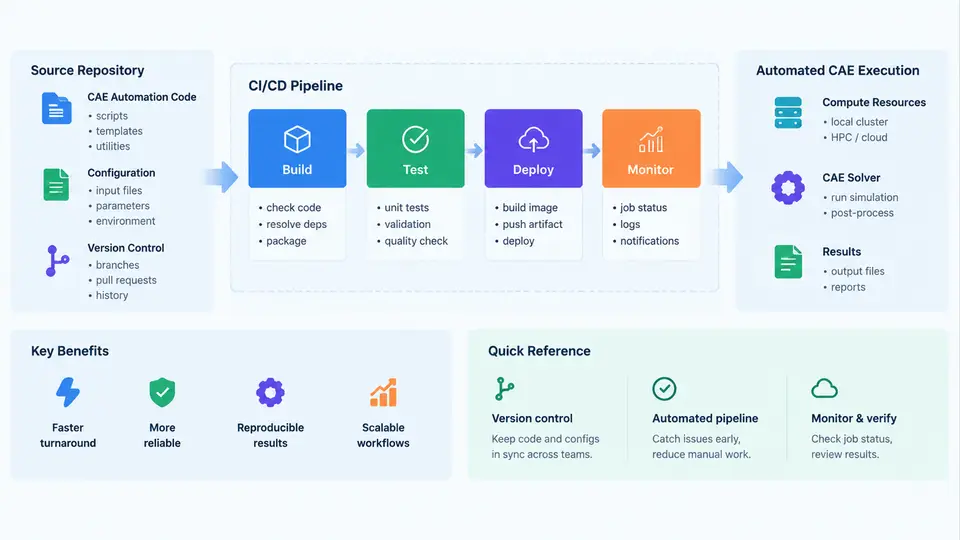
Production CAE automation tools are not ordinary scripts. They are long-lived engineering assets that encode solver expertise, meshing conventions, material libraries, and post-processing rules. A single tool may be invoked thousands of times per program, feed downstream optimization loops, and be audited months later when a certification authority asks how a particular result was produced. This course treats those tools as software products with a lifecycle: version control, automated testing, artifact promotion, and traceable release. The two enabling technologies are Git for source and configuration history, and CI/CD (Continuous Integration / Continuous Delivery) for repeatable build, verification, and deployment.
What "production" means in this context
A CAE automation tool crosses into production when other engineers depend on it without reading its source. Typical markers include: it is called from a job scheduler rather than a terminal; its outputs are consumed by downstream tools or reports; a change to it can invalidate previously approved results; and someone other than the author must be able to reproduce a run. Once those conditions hold, informal practices — editing files on a shared drive, keeping "final_v3_really_final" copies, testing only on the developer's workstation — become the dominant source of risk.
The scope of this course covers the automation layer, not the solvers themselves. We assume a commercial or open-source solver (for example, a structural FEA, CFD, or multi-body package) is already licensed and installed. What we manage is everything around it: parameter files, input deck generators, solver invocation wrappers, result parsers, report templates, and the environment definitions that make them run identically on a laptop and on a cluster node.
The three layers of a CAE automation repository
It helps to separate a repository into three layers, because they change at different rates and require different verification strategies.
- Tooling layer — Python, shell, or Tcl code that drives the solver, plus unit tests. Changes frequently; verified by fast unit tests that do not require a solver license.
- Model and configuration layer — parameter sets, material cards, mesh control files, boundary-condition templates, and solver version pins. Changes per project; verified by schema validation and smoke runs.
- Artifact and environment layer — container images, solver installation manifests, license configuration, and reference results used as regression baselines. Changes rarely; verified by full end-to-end runs.
Conflating these layers is the most common structural mistake. When a material card edit and a parser bug fix land in the same commit, a regression is nearly impossible to attribute. Keeping them separate also lets CI run cheap checks on every push while reserving expensive solver-in-the-loop jobs for merge requests or nightly builds.
Core concepts you will use throughout the course
Repository and history. Git stores snapshots, not diffs, and identifies each snapshot by a SHA-1 (or SHA-256) hash. For CAE work, the practical consequence is that any result can be tied to an exact tree state. Tagging a release as v2.4.0 and recording that tag in the run manifest is what makes a result defensible.
Branching and review. A short-lived feature branch plus a merge request gives a natural place to attach CI results. The branch is where a solver run is allowed to fail; the protected main branch is where only verified states live.
Pipeline stages. A CI/CD pipeline is a directed sequence of jobs, each running in a fresh environment. A workable stage order for CAE automation is: lint → unit test → schema validation → smoke solve → regression solve → package → deploy. Each stage is a gate; a failure stops promotion.
Artifacts and provenance. Build outputs — wheels, container images, generated decks, baseline result files — are artifacts. Provenance means recording, for every artifact, the commit hash, the pipeline run ID, the solver version, and the input parameter set.
How the pieces connect
The diagram below shows the flow from a developer's change through verification to a deployed, traceable tool. Note that the solver appears twice: once in a fast smoke configuration and once in a full regression configuration. This split is deliberate — it keeps the feedback loop short while still catching physics-level regressions before release.
A concrete example: what a change looks like end to end
Suppose an engineer needs to change the default convergence tolerance in a nonlinear structural wrapper from 1e-4 to 5e-5. In a production setup the sequence is:
- Create branch
fix/tol-5e-5and edit the parameter default inconfigs/defaults.yaml. - Add or update a unit test asserting the generated solver input deck contains
CNVTOL,F,5e-5. - Push. CI runs lint, unit tests, and schema validation — all under a minute, no license consumed.
- Open a merge request. The smoke solve runs a small cantilever model and checks that the run completes and the tip displacement is within 2% of the stored baseline.
- On merge to
main, the nightly regression suite runs the full model set. A tolerance change that alters results beyond the accepted band fails the job and blocks the release tag. - Tag
v2.4.1. The pipeline packages the tool and writes a manifest containing the commit SHA, solver version, and baseline hashes.
The observable verification criteria are concrete: the smoke job must exit zero and report a displacement delta under the threshold; the regression job must report no baseline mismatches outside tolerance. Typical failure symptoms are equally concrete — a schema validation error usually means a YAML key was renamed without updating the template; a smoke solve that hangs usually indicates a license checkout problem or a stale solver path in the container image; a regression mismatch that appears only in one model usually points to a model-specific assumption baked into the parser rather than a genuine physics change.
What you will be able to do after this course
By the end, you should be able to structure a CAE automation repository so that tooling, configuration, and environment concerns are separable; write a pipeline that runs fast checks on every push and solver-in-the-loop regression on a schedule; package a tool with pinned solver and license dependencies; and produce a provenance record that lets a colleague reproduce any released result from its commit hash alone. The remaining chapters build these capabilities in order, starting with repository structure and branching strategy, then moving through testing, pipeline design, artifact management, and release governance.