1. Factorial DOE in CAE context
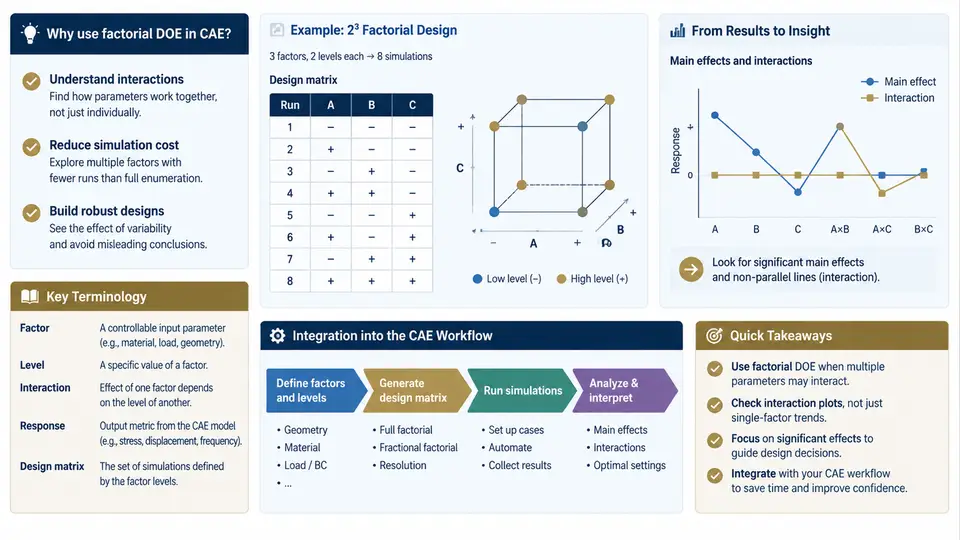
In CAE-driven product development, a single simulation run rarely answers the engineering question. Whether you are tuning a crash-box wall thickness, calibrating a thermal model, or mapping the sensitivity of a suspension bushing to stiffness and preload, the real question is how the response changes when several inputs move together. Factorial design of experiments (DOE) is the systematic answer to that question: it arranges simulation runs so that the effect of each parameter — and, critically, the interaction between parameters — can be estimated from a manageable number of solver executions.
The motivation is easy to state and easy to underestimate. A one-factor-at-a-time (OFAT) study varies one input while holding the rest fixed. It is intuitive, but it cannot reveal interactions, and it wastes runs: if you have four parameters at two levels each, OFAT needs roughly nine runs to sweep them, while a full 24 factorial needs sixteen runs and delivers every main effect plus all six two-way interactions and the higher-order terms. In CAE, where a nonlinear explicit run may take hours, the difference between "runs that answer the question" and "runs that merely fill a spreadsheet" is the difference between a design decision this week and one next month.
Core terminology in the CAE setting
The vocabulary of factorial DOE maps cleanly onto simulation practice, but a few terms deserve precise definition because they are frequently blurred in engineering reports.
- Factor — an input variable under study, such as sheet thickness
t, material yield stressσy, friction coefficientμ, or mesh sizeh. In CAE, factors are usually the parameters you can edit in the solver input deck or the CAD/CAE parameter table. - Level — a specific value assigned to a factor. A two-level design uses a low and a high level, conventionally coded −1 and +1; a three-level design adds a center level coded 0.
- Response — the measured output, such as peak acceleration, maximum von Mises stress, intrusion, mass, or first natural frequency. Responses must be defined before the design is built, because they determine what the post-processing script must extract.
- Main effect — the average change in response when a factor moves from its low to its high level, averaged over all combinations of the other factors.
- Interaction — the situation where the effect of one factor depends on the level of another. A classic CAE example: increasing rib thickness helps stiffness only when the rib height is above a certain value; below it, the thicker rib adds mass without benefit.
- Replication and center points — repeated runs at identical settings, used to estimate pure error and to detect curvature. In deterministic simulation, replication mainly checks solver/setup repeatability (e.g., mesh sensitivity or contact initialization), not physical noise.
- Confounding and resolution — in fractional factorials, some effects are aliased with others. Resolution IV designs keep main effects clear of two-way interactions; Resolution III designs do not. Choosing resolution is a deliberate trade between run count and interpretability.
Where factorial DOE sits in the CAE workflow
Factorial DOE is not a standalone activity; it is a layer that wraps around the existing simulation loop. The integration points are the parameter table, the run manager, and the post-processing extractor. A practical workflow looks like this:
- Define the study objective and responses. State the decision the study supports (e.g., "select a geometry that keeps peak stress below 250 MPa while minimizing mass") and the responses that encode it.
- Select factors and levels from physics and prior runs. Use screening runs or engineering judgment to bound the ranges. Levels must be physically admissible — a negative thickness or a friction coefficient above 1.0 is not a level, it is a modeling error.
- Choose the design. Full factorial for small factor counts (2–4) or when interactions are the point; fractional factorial or Plackett–Burman for screening many factors; response surface designs (central composite, Box–Behnken) when the goal is an optimum rather than a screening verdict.
- Generate the run matrix and parameterize the model. Each row becomes a solver input deck with the factor values substituted into named parameters. Keep the mapping explicit and version-controlled.
- Execute runs and extract responses. Automate post-processing so every run yields the same response set; manual extraction is the most common source of silent DOE failure.
- Analyze effects and validate. Fit a model, inspect main effects and interaction plots, check residuals, and confirm the predicted optimum with a confirmation run.
The diagram below shows how these elements connect: factors and levels feed the design matrix, the matrix drives the solver, and the extracted responses feed the effect analysis that closes the loop back to the engineering decision.
A worked example: three-factor full factorial
Consider a simplified crash-box study with three factors at two levels: wall thickness t (1.2 / 1.8 mm), yield stress σy (280 / 420 MPa), and friction coefficient μ (0.10 / 0.30). A full 2³ design requires eight runs. The coded matrix in the figure above is the standard Yates order; in practice you would randomize the run order to avoid confounding with queue position or solver version changes.
Suppose the extracted peak acceleration responses (in g, illustrative values only) are:
| Run | t | σy | μ | Peak accel (g) |
|---|---|---|---|---|
| 1 | −1 | −1 | −1 | 42.1 |
| 2 | +1 | −1 | −1 | 38.6 |
| 3 | −1 | +1 | −1 | 44.3 |
| 4 | +1 | +1 | −1 | 39.9 |
| 5 | −1 | −1 | +1 | 41.5 |
| 6 | +1 | −1 | +1 | 37.8 |
| 7 | −1 | +1 | +1 | 43.7 |
| 8 | +1 | +1 | +1 | 39.2 |
The main effect of thickness is the average of the +1 runs minus the average of the −1 runs: (38.6 + 39.9 + 37.8 + 39.2)/4 − (42.1 + 44.3 + 41.5 + 43.7)/4 = 38.875 − 42.9 = −4.025 g. Increasing thickness reduces peak acceleration by about 4 g on average. The yield-stress effect is (44.3 + 39.9 + 43.7 + 39.2)/4 − (42.1 + 38.6 + 41.5 + 37.8)/4 = 41.775 − 40.0 = +1.775 g. The friction effect is small: (41.5 + 37.8 + 43.7 + 39.2)/4 − (42.1 + 38.6 + 44.3 + 39.9)/4 = 40.55 − 41.225 = −0.675 g.
Now check the thickness × yield-stress interaction. Compute the thickness effect separately at each yield-stress level. At σy = −1: (38.6 − 42.1)/2 = −1.75 g. At σy = +1: (39.9 − 44.3)/2 = −2.2 g. The interaction is half the difference: (−2.2 − (−1.75))/2 = −0.225 g. It is small here, but the procedure is the point — with OFAT you would never have seen it, and in strongly nonlinear CAE responses (contact, buckling, material failure) such interactions are often the dominant term.
Practical integration notes
Three habits make factorial DOE reliable in a CAE environment. First, parameterize before you design: every factor must be a named parameter in the input deck, not a hand-edited number, so the run matrix can be generated and audited. Second, automate response extraction: write the post-processing script once, validate it on a baseline run, and apply it unchanged to all runs; a response defined differently in run 3 and run 7 invalidates the analysis. Third, record the design and the solver version alongside the results — a DOE table without provenance is not reproducible, and CAE results are sensitive to solver settings, contact parameters, and mesh transitions that are easy to change between batches.
With the terminology fixed and the workflow integrated, the next step is to choose the design itself: full factorial when interactions matter and the factor count is small, fractional factorial when screening many parameters, and response-surface designs when the objective is optimization rather than screening. The choice is driven by the engineering question, not by the software default.