1. CAE simulation workflow automation progr
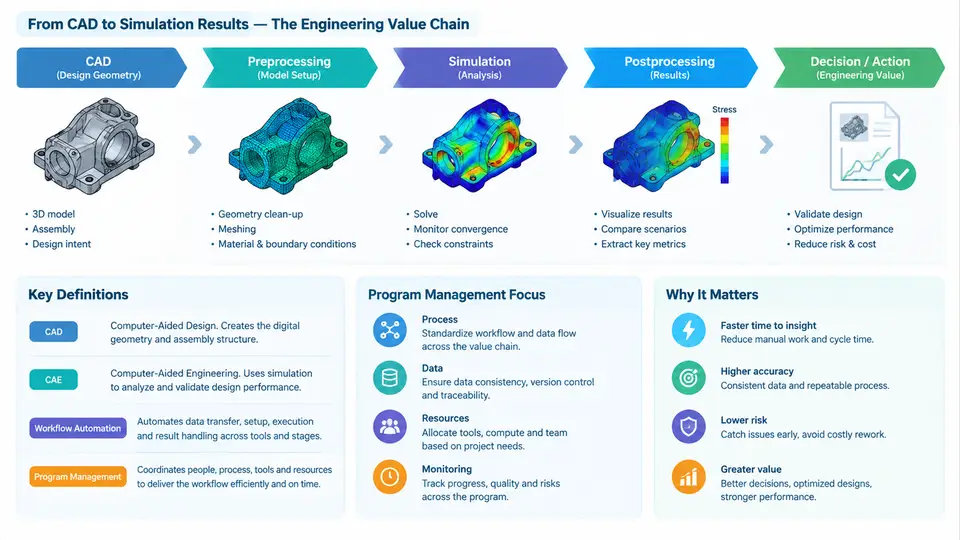
Computer-aided engineering (CAE) simulation workflow automation program management is the discipline of planning, coordinating, and governing the technical and organizational systems that turn repetitive simulation tasks into reliable, traceable, and reusable processes. It sits at the intersection of simulation methodology, software integration, data management, and engineering operations. Unlike managing a single simulation project, program management here addresses a portfolio of workflows: crashworthiness, thermal management, modal analysis, fatigue life, computational fluid dynamics (CFD), and others, each with its own solver, mesh strategy, material library, and acceptance criteria.
The scope of the program is deliberately broader than "writing scripts." It includes:
- Workflow definition and standardization — capturing the sequence of preprocessing, solving, and postprocessing steps that engineers actually perform, then encoding them as repeatable process templates.
- Toolchain integration — connecting CAD systems, meshers, solvers, optimization engines, and reporting tools through stable interfaces (APIs, command-line execution, file-based exchange, or workflow engines).
- Data and metadata governance — ensuring that geometry revisions, material cards, boundary conditions, solver versions, and result files are linked and versioned.
- Automation infrastructure — job schedulers, license management, compute resource allocation, and failure recovery.
- Quality and verification — regression checks, unit validation of scripts, and traceability from requirement to result.
- Adoption and change management — training, documentation, and measuring whether automation actually reduces lead time or improves consistency.
A useful working definition: a CAE simulation workflow automation program is a managed set of reusable, parameterized, and governed processes that transform CAD and engineering requirements into simulation results with minimal manual intervention, while preserving traceability and engineering judgment at critical decision points. The phrase "minimal manual intervention" is important. Automation does not remove the engineer; it removes repetitive file handling, manual solver setup, and copy-paste reporting so that the engineer can focus on interpretation and design decisions.
The engineering value chain from CAD to simulation results
To manage automation effectively, the program manager must understand the value chain that the automation supports. This chain is not a single linear path; it is a directed network with feedback loops. The core stages are:
- CAD geometry and design intent — parametric models, assemblies, and configuration data. Automation must handle geometry changes without breaking the simulation setup.
- Geometry preparation and meshing — defeaturing, midsurface extraction, mesh generation, and quality checks. These steps are often the most time-consuming and the most sensitive to CAD changes.
- Model setup — material assignment, boundary conditions, loads, contacts, and solver settings. This is where engineering assumptions are encoded.
- Solver execution — submitting jobs to local or HPC resources, managing licenses, and monitoring convergence or termination.
- Postprocessing and results extraction — computing key performance indicators (KPIs) such as maximum stress, displacement, temperature, or drag coefficient.
- Reporting and decision support — generating standardized reports, dashboards, or optimization inputs.
Each stage produces artifacts that the next stage consumes. Automation value comes from reducing manual handoffs, enforcing consistent naming and metadata, and enabling re-execution when upstream data changes. A well-managed program treats the entire chain as a product with versioned releases, not as a collection of personal scripts.
Example: a parameterized crashworthiness workflow. Suppose a team wants to automate a frontal impact simulation for a vehicle body-in-white. The input is a CAD assembly with a design parameter rail_thickness ranging from 1.8 mm to 2.6 mm. The workflow script reads the parameter, updates the geometry, generates a shell mesh with a target element size of 5 mm, assigns material DP780, applies a 50 km/h velocity boundary condition, submits the job to a Linux cluster using ls-dyna, and extracts the maximum intrusion and peak acceleration. The output is a CSV row: rail_thickness, max_intrusion_mm, peak_accel_g, solver_status. A regression check compares the baseline result at 2.2 mm against a stored reference within 3% tolerance. If the solver fails to converge, the script captures the d3hsp file and flags the run for engineer review rather than silently retrying.
This example illustrates several program management concerns: parameter definition, toolchain integration, resource submission, KPI extraction, and failure handling. The automation is not just a script; it is a managed workflow with defined inputs, outputs, and acceptance criteria.
Why program management matters
Without program management, automation efforts tend to fragment. One engineer automates meshing, another writes a solver wrapper, and a third builds a reporting macro. The pieces do not compose, metadata is inconsistent, and no one can reproduce a result six months later. Program management provides:
- Common interfaces — agreed file formats, naming conventions, and API contracts between tools.
- Version control — scripts, templates, and solver settings stored in Git or a similar system, with tagged releases.
- Traceability — each result can be traced back to a specific CAD revision, material card, and script version.
- Metrics — lead time per simulation, automation coverage, failure rate, and engineer adoption.
- Governance — who approves changes to a workflow, how regressions are handled, and how new solvers are onboarded.
The following diagram shows the value chain and the automation control points that a program manager typically governs. It is a data and control flow view, not a simple linear process, because feedback from results and verification loops back into model setup and geometry preparation.
The control layer is what distinguishes a managed program from ad hoc scripting. It defines how workflows are versioned, how metadata is attached, how failures are handled, and how changes propagate. The feedback loop is equally important: when a KPI deviates beyond tolerance or a solver fails to converge, the program must route that information back to the appropriate stage—model setup, mesh, or even CAD—rather than treating it as an isolated error.
Practical implications for the program manager
In practice, a program manager for CAE automation should maintain a workflow inventory that records, for each workflow: the responsible engineer, the CAD input type, the solver and version, the compute resource, the expected runtime, the KPI definitions, and the regression baseline. This inventory becomes the basis for prioritization. Workflows with high manual effort and high repetition are the best candidates for early automation. Workflows with unstable geometry or frequent solver changes may need a more modular approach, where only the stable stages are automated first.
Another practical concern is the boundary between automation and engineering judgment. A well-designed program automates data movement, solver setup, and KPI extraction, but it should flag results that fall outside expected ranges for human review. For example, if a thermal simulation predicts a junction temperature above a defined threshold, the workflow should not silently pass; it should generate an alert and attach the relevant result plots. This preserves the engineer's role as the decision-maker while removing the burden of manual file handling.
Definition to carry forward: A CAE simulation workflow automation program is a governed portfolio of parameterized, versioned, and traceable processes that transform CAD and requirements into simulation results, with defined control points for quality, failure handling, and human review. Its value is measured not by the number of scripts written, but by reduced lead time, improved consistency, and reproducible engineering decisions.
Understanding this scope and the CAD-to-results value chain is the foundation for everything that follows: workflow design, toolchain integration, data governance, and performance measurement. The next sections will build on this foundation to address how individual workflows are specified, implemented, and managed across an engineering organization.