1. Automotive CAE project landscape
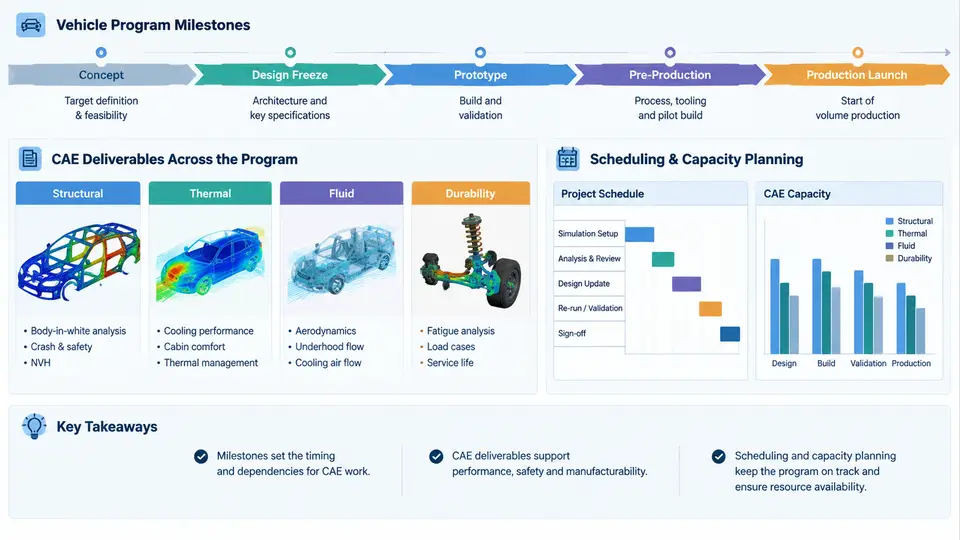
In automotive product development, CAE is not a single activity but a portfolio of simulation services delivered against a fixed vehicle program timeline. A typical passenger-car program runs 36–48 months from Program Start (PS) to Start of Production (SOP), and every CAE group — body structure, NVH, crash, thermal, CFD, durability — must deliver its results inside that timeline. Understanding the program milestone structure is therefore the prerequisite for any meaningful scheduling or capacity plan.
Vehicle Program Milestones and the CAE Gate Structure
Most OEMs use a milestone nomenclature similar to the following, though names vary (G1–G8, PM–SOP, or internal codes):
| Milestone | Typical Timing | Key CAE Deliverable |
|---|---|---|
| Concept / PS | Month 0 | Concept CAE feasibility, architecture trade-off studies |
| Design Freeze 1 (DF1) | Month 8–10 | Full-vehicle crash, stiffness, and NVH baseline |
| Design Freeze 2 (DF2) | Month 16–20 | Optimization loops, material/thickness proposals |
| Tooling Kick-off (TKO) | Month 24–28 | Final verification CAE, sign-off reports |
| SOP | Month 36–48 | Homologation support, correlation studies |
Each milestone acts as a gate: CAE results must be available before the design decision meeting, not after. This backward scheduling constraint is the single most important driver of CAE workload. If a crash model must be delivered at DF1 in month 10, and the full-vehicle model build takes 6 weeks, the mesh and assembly work must start by month 8.5 — which means the CAD geometry must be frozen even earlier.
CAE Deliverables: What Actually Gets Produced
CAE deliverables fall into four categories, each with different resource profiles:
- Feasibility studies — simplified models (beam-shell hybrids, lumped-mass) used during concept phase. Turnaround: 3–5 days. Low HPC demand.
- Full-vehicle verification models — detailed crash (LS-DYNA), NVH (Nastran/OptiStruct), CFD (STAR-CCM+/Fluent). Turnaround: 2–4 weeks per load case. High HPC and solver-license demand.
- Optimization and DOE campaigns — 20–200 runs per study, often automated via modeFRONTIER or optiSLang. Turnaround: 4–8 weeks. Very high HPC demand, moderate engineer time.
- Correlation and sign-off reports — physical test vs. simulation comparison, model updating. Turnaround: 2–3 weeks. Low HPC, high engineer time.
The resource profile matters because a capacity plan that only counts "number of CAE jobs" will fail. A single DOE campaign with 150 crash runs consumes more HPC core-hours than 30 individual NVH jobs, yet both may appear as "one project" in a tracking spreadsheet.
Why Scheduling and Capacity Planning Are Distinct
Scheduling answers when a deliverable is needed and in what sequence. Capacity planning answers whether the required resources — engineers, HPC cores, solver licenses, test fixtures — are available at that time. The two are coupled but not identical.
Consider a concrete example. A CAE group supports three vehicle programs simultaneously. Program A needs a full-vehicle frontal crash run at DF1 in week 40. Program B needs a side-impact DOE (60 runs) at DF2 in week 42. Program C needs an NVH body-in-white modal analysis in week 41. Each crash run requires 8 hours on 128 cores; each NVH run requires 2 hours on 32 cores. The HPC cluster has 512 cores available for CAE.
Program A: 1 run × 128 cores × 8 h = 1,024 core-hours
Program B: 60 runs × 128 cores × 8 h = 61,440 core-hours
Program C: 1 run × 32 cores × 2 h = 64 core-hours

Total demand in weeks 40–42: 62,528 core-hours
Available capacity: 512 cores × 3 weeks × 168 h/week = 258,048 core-hours
Utilization: 24.2% — apparently comfortable.
But this aggregate view hides the real constraint: Program B's 60 runs cannot all start at once because the DOE requires sequential model updates. If each run takes 8 hours and the DOE is serialized, 60 runs × 8 h = 480 hours = 20 days, which exceeds the 2-week window before DF2. The scheduler must either parallelize the DOE (requiring 60 × 128 = 7,680 cores, far exceeding capacity) or negotiate a reduced DOE scope. This is the kind of trade-off that capacity planning exists to surface before the deadline is missed.
The CAE Delivery Pipeline
The diagram below shows how a CAE deliverable moves from CAD release to milestone sign-off, and where scheduling and capacity constraints enter the pipeline.
Practical Implications for the CAE Planner
Three practical rules follow from the landscape described above:
- Schedule backward from the milestone, not forward from today. The milestone date is fixed by the vehicle program. The CAE planner's job is to determine the latest possible start date for each pipeline stage and then check whether that start date is feasible given current capacity.
- Track peak concurrent demand, not just totals. A weekly resource histogram (cores, licenses, engineers) reveals bottlenecks that monthly or annual totals hide. In the example above, the DOE campaign creates a sharp peak in weeks 40–42 that a smooth annual plan would miss.
- Treat iteration as a first-class citizen. CAE results frequently trigger design changes, which require re-runs. A capacity plan that assumes one pass per deliverable will underestimate workload by 30–50% in practice. Reserve buffer capacity or explicitly plan for one re-run cycle per major deliverable.
With this landscape established — milestones as fixed gates, deliverables as resource-consuming pipeline stages, and scheduling and capacity as two coupled but distinct planning problems — the next step is to build the actual scheduling model. That requires a clear understanding of task dependencies, resource calendars, and the difference between a plan that looks good on paper and one that survives contact with a real program.