1. Crash FE model quality assurance
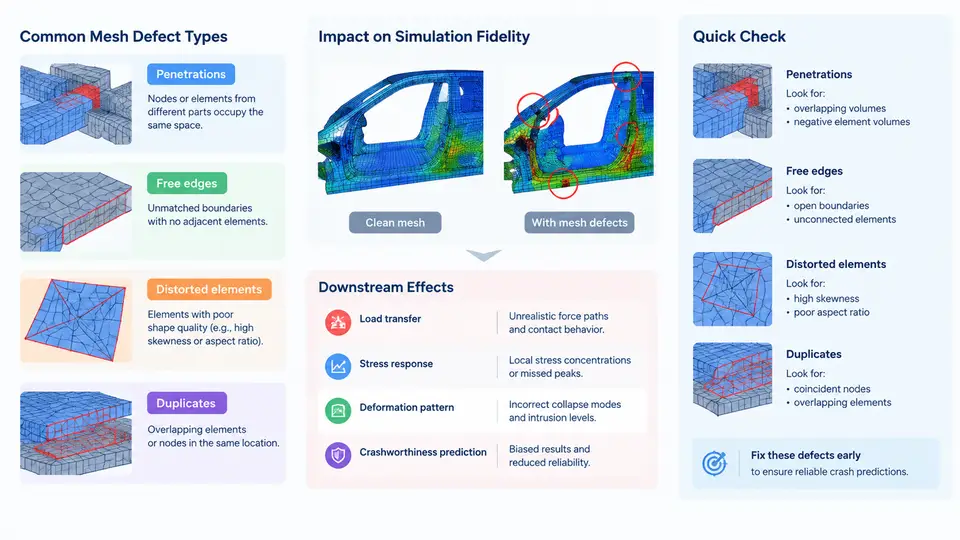
In crashworthiness engineering, the finite element (FE) model is the virtual test article. A full-vehicle frontal impact model routinely contains 8–15 million elements, thousands of spot welds, dozens of material laws, and hundreds of contact interfaces. When such a model is solved in LS-DYNA or Radioss, the solver does not know which parts of the mesh are "wrong" — it simply integrates the equations of motion over whatever connectivity and geometry it is given. A single inverted shell element, a duplicated node set, or an unintended penetration between a bumper beam and a rail can change the predicted intrusion by tens of millimeters, flip a pass/fail decision, or produce a non-physical energy spike that invalidates the entire run. Model quality assurance (QA) is therefore not a cosmetic cleanup step; it is a prerequisite for the simulation result to carry any engineering meaning.
Why Mesh Defects Matter for Crash Fidelity
Crash simulation is a highly nonlinear, transient, explicit-dynamics problem. Element quality directly controls the stable time step, the accuracy of strain and stress recovery, and the robustness of contact. In an explicit solver the critical time step for a shell element scales approximately with the characteristic length divided by the wave speed, so a single collapsed element with near-zero edge length can force the solver to reduce the global time step by orders of magnitude — or, more commonly, the code deletes or distorts that element and injects spurious energy. Contact is equally sensitive: penetrations create artificial initial forces, while free edges and duplicates create gaps or overlapping surfaces that either leak contact or generate redundant constraints. The result is a simulation that may still "run to termination" but whose force–displacement curve, intrusion profile, and energy balance no longer represent the physical structure.
Common Defect Types and Their Signatures
Mesh defects in crash models fall into four recurring families. Each has a distinct geometric signature and a distinct failure mode in the solver.
| Defect type | Geometric signature | Typical solver symptom | Effect on crash prediction |
|---|---|---|---|
| Penetrations | Nodes of one part inside the volume of another; initial gap < 0 | Large initial contact force, negative sliding energy, "initial penetration" warnings | Over-stiff early response, premature buckling, wrong force peak |
| Free edges | Unconnected shell boundaries where a weld or seam should exist | Parts separate under load, contact surfaces open, energy imbalance | Under-predicted stiffness, missing load path, late or absent failure |
| Distorted elements | High aspect ratio, warpage, skew, negative Jacobian, inverted normals | Negative volume, "element has negative Jacobian", tiny time step | Local stress concentration, premature element deletion, noisy forces |
| Duplicates | Coincident nodes/elements, overlapping shells, repeated welds | Double stiffness, redundant constraints, contact chatter | Over-stiff structure, non-physical mass and energy, unstable contact |
Penetrations are especially common at interfaces between parts modeled independently — for example, a radiator support nested inside a front-end module, or a seat frame inside a body-in-white floor. Free edges appear when a weld deck is incomplete or when a trimmed surface is not reconnected. Distorted elements usually originate from CAD-to-mesh translation of small fillets, beads, or sharp corners. Duplicates arise from merging subassemblies, from mirroring operations, or from re-importing a previously meshed component.
From Defect to Downstream Effect: A Worked Example
Consider a full-vehicle frontal impact model with a 64 km/h offset deformable barrier (ODB) load case. Suppose the front bumper beam and the left crash box are meshed separately and merged without a penetration check. The crash box nodes overlap the bumper beam by 3 mm over a 40 mm × 60 mm patch. At t = 0, the contact algorithm detects this overlap and applies a penalty force to push the nodes apart. The initial kinetic energy is 1.2 MJ; the penalty work appears as a negative sliding energy of roughly 1.5 kJ in the first 2 ms. The resulting force–displacement curve shows a 15 kN spike at 1 ms that does not exist in the physical test. An engineer reading only the peak force might conclude the structure is too stiff and thin the crash box — a wrong design change driven entirely by a mesh defect.
Now consider a free edge: a spot weld between the B-pillar and the rocker is missing because the weld deck was not updated after a geometry change. Under side impact, the B-pillar separates from the rocker at 30 ms, the door intrusion increases by 25 mm, and the occupant injury criterion (e.g., rib deflection) is over-predicted. The solver may still terminate normally, and the energy balance may look acceptable, because the missing weld simply removes a load path rather than creating a numerical instability. This is the most dangerous class of defect: silent, plausible, and wrong.
QA Workflow and Acceptance Criteria
A practical QA workflow for crash FE models combines automated checks with targeted manual review. The following sequence is representative of industry practice and can be implemented with tools such as ANSA, HyperMesh, or LS-DYNA's own checking utilities.
- Geometry and connectivity checks. Run free-edge detection, duplicate node/element detection, and normal consistency checks on every part. Flag any free edge that is not an intentional boundary (e.g., a trimmed outer panel edge).
- Element quality checks. Apply thresholds for Jacobian, aspect ratio, warpage, skew, and minimum/maximum edge length. For crash models, a common starting set is: Jacobian > 0.6, aspect ratio < 5, warpage < 15°, skew < 60°, minimum edge length > 3 mm in energy-absorbing regions.
- Penetration checks. Use a contact-based initial penetration check with a tolerance of 0.5–1.0 mm for primary interfaces and 2.0 mm for secondary interfaces. Resolve penetrations by node adjustment, not by deleting elements.
- Mass and inertia check. Compare the total model mass and center of gravity against the physical bill of materials. A deviation greater than 1–2% usually indicates duplicates or missing parts.
- Energy balance check. After a short initialization run (e.g., 5 ms with no load), verify that hourglass energy, sliding energy, and internal energy are within acceptable bounds. A negative sliding energy or a sudden hourglass spike is a strong indicator of unresolved defects.
Visualizing the Defect-to-Failure Chain
The diagram below maps the four defect families to their immediate solver symptoms and the resulting crashworthiness prediction errors. It is intended as a diagnostic reference: when a simulation shows an unexpected force peak, energy imbalance, or missing load path, the engineer can trace backward to the most likely defect class.
Closing Perspective
Mesh defects are not a preprocessing nuisance to be tolerated; they are a direct source of simulation error that can propagate into design decisions, physical test plans, and safety conclusions. The four defect families — penetrations, free edges, distorted elements, and duplicates — cover the majority of issues found in production crash models, and each has a recognizable solver signature. By combining automated checks with function-based acceptance criteria and a short initialization run, engineers can catch these defects before they contaminate the result. The next step in this course is to move from manual and rule-based QA toward machine learning methods that can detect and classify these defects directly from mesh data, enabling faster and more consistent model validation at scale.