1. Crash simulation numerical failure lands
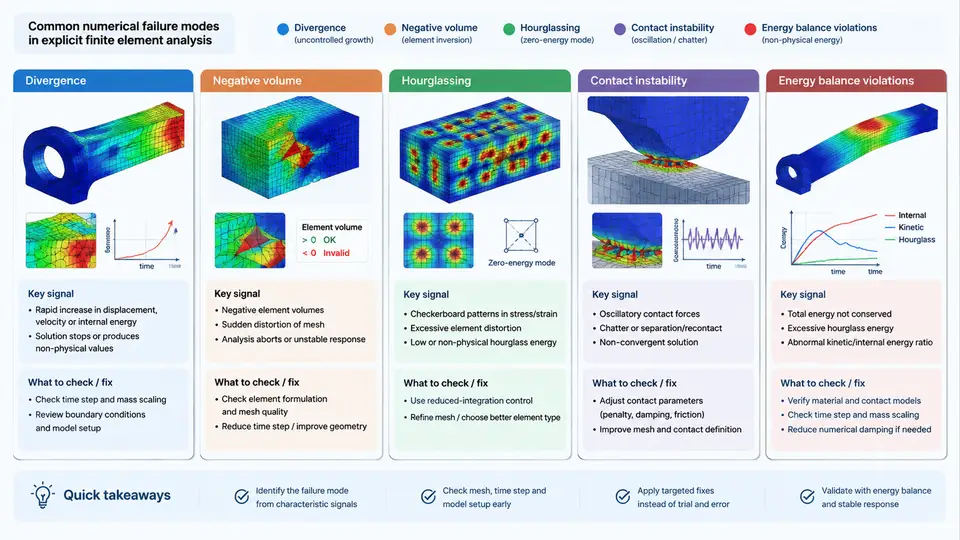
Explicit finite element analysis (FEA) of vehicle crash events is a nonlinear, transient, contact-dominated problem. The solver advances the solution with a central-difference time integration scheme, and stability is governed by the Courant–Friedrichs–Lewy (CFL) condition: the stable time increment is proportional to the smallest element characteristic length divided by the dilatational wave speed. Because crash models routinely contain millions of elements, dozens of contact interfaces, and highly nonlinear material laws, numerical failures are not rare exceptions — they are a normal part of the debugging workload. The first step toward efficient diagnosis is a clear taxonomy: knowing which failure family you are looking at determines which inputs, cards, and output channels you inspect first.
This chapter establishes that taxonomy across five recurring failure classes: divergence, negative volume, hourglassing, contact instability, and energy balance violations. Each class has distinct symptoms in the message file, distinct signatures in the output databases, and distinct root causes. The goal is not to memorize fixes but to build a reliable mapping from symptom to cause to corrective action.
Why Explicit Crash Models Fail Differently
In implicit static analysis, the dominant failure mode is non-convergence of the Newton–Raphson iteration. In explicit analysis there is no global equilibrium iteration, so the solver cannot "fail to converge" in the same sense. Instead, it fails when a local quantity becomes physically or numerically inadmissible: an element inverts, a nodal velocity becomes unbounded, a contact force oscillates without bound, or the total energy budget drifts away from conservation. This distinction matters because the diagnostic entry points are different. You rarely look at a residual norm; you look at element status, time-step size, contact penetration, and the energy summary.
A useful mental model is that explicit crash simulation is a chain of local stability constraints. The global time step is the minimum over all elements. If one element becomes too small or too distorted, the global time step collapses and the run either stalls or terminates. If one contact interface develops a high-frequency oscillation, the contact energy can grow without physical justification. If one material point accumulates non-physical strain, the element can invert and produce negative volume. The failure landscape is therefore a set of local pathologies that propagate to global termination.
The Five Failure Classes
Divergence is the most general symptom: the solution becomes unbounded. In practice it appears as nodal velocities or accelerations growing by orders of magnitude within a few cycles, often accompanied by a rapidly shrinking time step. Common triggers include an incorrect unit system, an unstable material model at large strain, a missing or wrong mass scaling definition, or a contact penalty stiffness that is too high relative to the local element stiffness. Divergence is rarely a root cause by itself; it is the terminal expression of another instability.
Negative volume occurs when a solid or shell element inverts so severely that its Jacobian becomes non-positive. The solver typically reports the element ID and the time of failure. In crash models, negative volume is most often caused by excessive compression in a foam or honeycomb material, an under-integrated element without hourglass control, or a contact condition that allows a slave node to pass through a master segment and drag the element inside out. The immediate fix is often a local mesh refinement or a material parameter adjustment, but the underlying cause is usually a load path that was not anticipated in the model.
Hourglassing is specific to reduced-integration elements (one integration point for solids, one in-plane point for shells). These elements are computationally efficient but have zero-energy deformation modes — hourglass modes — that produce no strain energy. If hourglass control is insufficient, these modes grow and contaminate the solution with a characteristic checkerboard pattern. The diagnostic signature is a high hourglass energy relative to internal energy, typically above 5–10% depending on the model. Hourglassing is not always fatal, but it invalidates the energy balance and often precedes negative volume.
Contact instability manifests as chattering contact forces, excessive penetration, or a sudden jump in contact energy. It arises from several sources: penalty stiffness mismatched to the local element stiffness, insufficient contact thickness, initial penetrations that are not resolved before the impact, or friction definitions that switch discontinuously. In explicit crash analysis, contact is often the single largest source of numerical noise. A stable contact definition requires consistent penalty scaling, adequate segment thickness, and a controlled initial penetration check.
Energy balance violations are the most integrative diagnostic. The total energy of a closed system should satisfy: initial kinetic energy plus external work equals final kinetic energy plus internal energy plus contact energy plus hourglass energy plus damping losses, within a small tolerance. When the energy summary shows unexplained growth — particularly in hourglass or contact energy — the solution is not physically trustworthy even if it completes. Energy balance is therefore both a failure class and a verification criterion for all other classes.
Reading the Failure Signature in Practice
In an LS-DYNA-style explicit run, the primary diagnostic channels are the message file (d3hsp or equivalent), the energy summary (glstat, matsum), the contact force output (rcforc, sleout), and the binary state database (d3plot). A practical triage sequence is:
- Check the termination message. If it reports a negative volume element ID, go directly to that element in the last
d3plotstate and inspect its deformation and surrounding mesh. - If termination is due to a time-step collapse, plot the time-step history. A sudden drop usually points to a single element or a contact interface.
- If the run completes but results look wrong, plot the energy summary. Hourglass energy above roughly 5% of internal energy, or contact energy that grows monotonically without physical justification, indicates a numerical problem even if no error was raised.
- If contact forces show high-frequency oscillation, inspect the penalty stiffness and the initial penetration status. A common cause is a penalty scale factor that is too high for the local element size.
Example: Diagnosing a Negative Volume in a Front Rail
Consider a full-frontal impact model with a thin-walled front rail modeled with reduced-integration shell elements (ELFORM=2) and a piecewise linear plasticity material. The run terminates at approximately 12 ms with a negative volume error on element 184223. The message file reports the element ID and the time of failure. Opening the last d3plot state shows the element folded into a sharp crease with a Jacobian near zero.
The diagnostic reasoning proceeds as follows. First, check whether the element is in a region of high compressive strain. If the rail is designed to fold, the fold wavelength may be too short for the local mesh density. Second, check the hourglass energy history: if it rose sharply before termination, the element may have been contaminated by an hourglass mode that drove the inversion. Third, check the contact definition: if the rail is in self-contact, a slave node may have penetrated a master segment and pulled the element inside out.
A representative corrective sequence, stated as an example rather than a guaranteed fix, is: refine the mesh in the fold region from 5 mm to 3 mm characteristic length, increase the hourglass control coefficient from 0.05 to 0.10, and verify that the contact thickness is at least 1.5 times the shell thickness. After these changes, the example model is expected to show a reduced hourglass energy fraction and a stable time step through the fold event. These values are illustrative and must be validated against the specific model.
Energy Balance as the Integrative Check
The energy balance equation for an explicit crash model can be written as:
E_total = E_kinetic + E_internal + E_contact + E_hourglass + E_damping - E_external_work ≈ constantIn a well-behaved model, the sum should remain within a small tolerance of the initial total energy. The most common violations are:
- Hourglass energy growth: indicates insufficient hourglass control or a mesh that is too coarse for the deformation mode.
- Contact energy growth: indicates penalty stiffness mismatch, excessive penetration, or friction switching.
- Internal energy growth without corresponding kinetic energy loss: indicates non-physical material behavior, often from an unstable material model or an incorrect equation of state.
- Negative damping energy: indicates a damping definition that is adding energy rather than removing it, which is always a modeling error.
Energy balance is therefore not just one failure class among five; it is the verification layer that confirms whether the other four have been resolved. A model that passes the energy check is not automatically correct, but a model that fails it is definitely not trustworthy.
Building the Diagnostic Mindset
The taxonomy presented here is a starting point, not a closed list. Real crash models can exhibit combinations: hourglassing that triggers negative volume, contact instability that drives divergence, or energy drift that masks a material instability. The value of the taxonomy is that it gives you a structured set of entry points. When a run fails, you do not start from scratch; you ask which family the symptom belongs to, which diagnostic channel will confirm it, and which corrective direction is most likely to address the root cause.
In the chapters that follow, each failure class will be examined in depth with concrete modeling parameters, solver settings, and diagnostic workflows. The objective is to move from recognizing a failure to resolving it efficiently, with a clear understanding of why the failure occurred and what the correction actually changes in the numerical solution.