1. Industrial operations data landscape
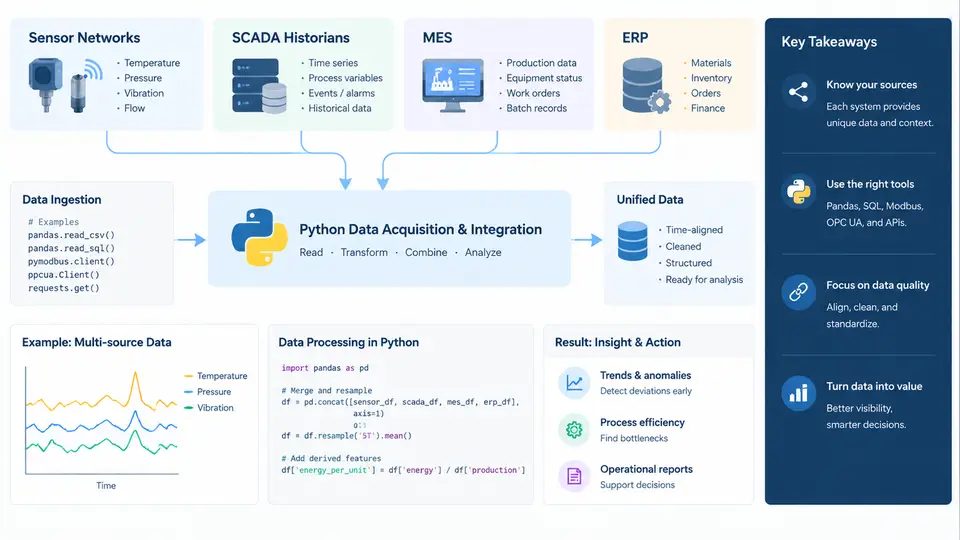
Before writing a single line of Python, a data scientist working in an industrial environment must understand where operational data lives, how it moves, and what each system is actually responsible for. Industrial operations are not a single database — they are a layered stack of systems, each with its own time scale, data model, and access pattern. A temperature reading sampled every 500 ms by a PLC and a monthly production cost figure in ERP are both "operations data," but they could not be more different in structure or retrieval strategy. This chapter maps that landscape and shows how Python connects to each layer.
The Five Layers of Industrial Data
Industrial data typically flows upward through five functional layers. Understanding the direction of flow — and where each layer's data originates — determines how you query it.
- Field / sensor layer: Physical instruments (thermocouples, flow meters, vibration accelerometers, pressure transmitters) connected to PLCs or RTUs. Data is raw, high-frequency, and often only meaningful in context of a tag name and unit.
- SCADA / historian layer: Supervisory control systems poll the field layer and archive time-series values into a historian (e.g., OSIsoft PI, AVEVA Historian, Ignition). This is where you get time-stamped process values at second-to-minute resolution.
- MES layer: Manufacturing Execution Systems track work orders, batch records, material genealogy, and equipment states. Data is event-driven and transactional, not continuous.
- ERP layer: Enterprise Resource Planning holds production orders, inventory, maintenance costs, and scheduling. Data is business-oriented, updated in batches or via transactions.
- Acquisition / integration layer: The Python-side glue — OPC UA clients, REST API calls, SQL queries, and file parsers that pull data from the four layers above into a unified analysis environment.
How Data Actually Moves: A Concrete Acquisition Path
Consider a real scenario: you need to detect abnormal vibration on a centrifugal pump and correlate it with maintenance work orders. The data path looks like this:
- A vibration sensor on the pump sends 4–20 mA signal to a PLC at 1 kHz.
- The PLC publishes the value via OPC UA to the SCADA system, which archives it in the historian at 1-second intervals.
- When vibration exceeds a threshold, the PLC sets an alarm; SCADA logs the alarm event with a timestamp.
- MES records the pump's work order status and any batch it was serving.
- ERP holds the maintenance history and spare-part costs for that pump asset ID.
In Python, you would acquire each layer differently. The historian is queried via its SDK or REST API; MES and ERP typically via SQL or REST; OPC UA via a Python client library. The critical join key across all layers is usually a tag name or asset ID — and getting that mapping right is often the hardest part of the job.
Practical Python Acquisition Patterns
Each layer demands a different Python approach. The table below summarizes the typical libraries and access methods you will use throughout this course.
| Layer | Typical Python Access | Data Shape | Common Pitfall |
|---|---|---|---|
| Field / PLC | asyncua, opcua, Modbus via pymodbus |
Scalar values, high frequency | Blocking reads stall the loop; use async or buffered reads |
| Historian | PI Web API, pyodbc, REST endpoints |
Time-series (timestamp, value, quality) | Quality codes ignored → false anomalies |
| MES | SQLAlchemy, pyodbc, vendor REST API |
Event tables, batch records | Time zone mismatches between MES and historian |
| ERP | REST API, database views, scheduled CSV exports | Transactional, slowly changing | Stale data if batch job failed silently |
A Minimal Historian Query in Python
The following example shows a typical pattern for pulling time-series data from a historian via a REST API. The exact endpoint and authentication depend on your vendor, but the structure — authenticate, specify tags and time range, parse the response into a DataFrame — is universal.
import requests
import pandas as pd
from datetime import datetime, timedelta

# Example: query a historian REST API for pump vibration tags
base_url = "https://historian.example.com/api/v1"
headers = {"Authorization": "Bearer <token>"}

end = datetime.utcnow()
start = end - timedelta(hours=8)

params = {
    "tags": "PUMP-101.VIB, PUMP-101.TEMP",
    "start": start.isoformat() + "Z",
    "end": end.isoformat() + "Z",
    "interval": "1s"
}

resp = requests.get(f"{base_url}/streams", headers=headers, params=params)
resp.raise_for_status()
payload = resp.json()

# Convert to DataFrame: each tag becomes a column
frames = []
for tag_data in payload["items"]:
    df = pd.DataFrame(tag_data["values"], columns=["timestamp", "value", "quality"])
    df["tag"] = tag_data["name"]
    frames.append(df)

ts = pd.concat(frames, ignore_index=True)
ts["timestamp"] = pd.to_datetime(ts["timestamp"], utc=True)
ts = ts.pivot(index="timestamp", columns="tag", values="value")
print(ts.head())
Two details matter here. First, the quality column is not decoration — a value with bad quality (e.g., sensor fault, stale data) should be filtered or flagged before analysis. Second, all timestamps are normalized to UTC; mixing local and UTC timestamps across MES and historian is one of the most common sources of silent errors in industrial analytics.
What to Verify Before Analysis
When you first connect to an unfamiliar industrial data source, run a short validation checklist. This prevents hours of debugging later:
- Tag existence and units: Confirm the tag name resolves and check the engineering unit (bar vs. kPa, °C vs. °F).
- Time range coverage: Query a known period and verify the row count matches the expected sampling interval.
- Quality distribution: Count good vs. bad quality values. A tag with 40% bad quality is not usable without treatment.
- Join key consistency: Verify that the asset ID in MES matches the tag prefix in the historian. Mismatches are common after equipment renames.
- Time zone: Confirm whether the source returns UTC or local time, and document it.
Once these five checks pass, you have a trustworthy acquisition path. The rest of this course builds on that foundation: cleaning and resampling time-series data, joining historian data with MES events, and feeding the result into anomaly detection and reporting workflows.