1. TensorFlow ecosystem overview
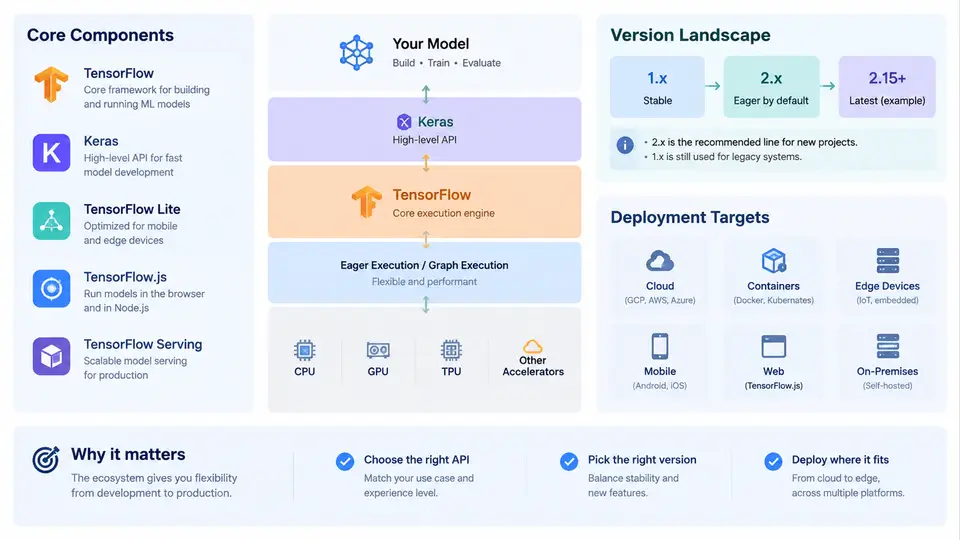
TensorFlow is not a single library but a layered ecosystem. Before writing a single model, it helps to understand what each layer does, which version line you should target, and where the trained artifact will eventually run. This chapter maps the ecosystem so that later decisions — which API to use, which runtime to install, which format to export — follow naturally from a clear mental model.
The Layered Architecture
At the bottom sits the TensorFlow runtime: the C++ core that executes tensor operations, manages device placement (CPU, GPU, TPU), and provides the graph execution engine. Above it, Keras is the recommended high-level API for building and training models. Keras 3 is now multi-backend, meaning the same Keras code can run on TensorFlow, JAX, or PyTorch, but within this course we use the TensorFlow backend.
Around the core, several specialized components extend the ecosystem:
- tf.data — input pipelines for building efficient, scalable data loaders with prefetching, shuffling, and parallel mapping.
- tf.function — converts Python functions into optimized TensorFlow graphs, enabling performance gains and exportability.
- TensorBoard — visualization toolkit for metrics, graphs, embeddings, and profiling.
- TensorFlow Lite (TFLite) — runtime and converter for mobile and embedded devices.
- TensorFlow.js — JavaScript runtime for browser and Node.js inference and training.
- TensorFlow Serving — production-grade model server with versioning and gRPC/REST endpoints.
- TFX (TensorFlow Extended) — end-to-end ML pipeline framework for data validation, transformation, training, and deployment.
These components are not alternatives; they compose. A typical workflow uses tf.data for input, Keras for modeling, tf.function for graph capture, SavedModel for export, and then one of TFLite, TF.js, or TF Serving for deployment depending on the target.
Version Landscape: TF 1.x vs TF 2.x and Beyond
The TensorFlow version landscape has three distinct eras that every practitioner should recognize:
| Era | Key Characteristics | Status |
|---|---|---|
| TF 1.x | Static computation graphs, tf.Session, tf.placeholder, separate graph construction and execution |
Legacy; security patches only |
| TF 2.x | Eager execution by default, Keras as primary API, tf.function for graph capture, unified SavedModel format |
Current stable line |
| TF 2.16+ | Keras 3 as default, multi-backend support, continued deprecation of tf.keras legacy internals |
Active development |
For new projects, always target TF 2.x with Keras 3. If you inherit TF 1.x code, the tf.compat.v1 module provides a migration bridge, but rewriting to TF 2 idioms is strongly preferred. The tf_upgrade_v2 script can automate much of the mechanical conversion.
requirements.txt (e.g., tensorflow==2.16.1) because minor version bumps can change default behaviors, especially around Keras 3 migration and mixed-precision defaults.
Deployment Targets and Export Formats
The choice of deployment target determines the export format and runtime. The table below summarizes the mapping:
| Target | Export Format | Runtime | Typical Use Case |
|---|---|---|---|
| Cloud / Server | SavedModel | TF Serving, Triton | REST/gRPC inference, versioning, A/B testing |
| Mobile (Android/iOS) | TFLite (.tflite) | TFLite Interpreter | On-device inference, low latency, offline |
| Browser / Node.js | TF.js Graph Model | TensorFlow.js | Client-side inference, interactive demos |
| Embedded / Edge | TFLite (with delegates) | TFLite Micro / Edge TPU | Microcontrollers, Coral devices |
| NVIDIA GPU Server | SavedModel + TF-TRT | TensorRT | Maximum throughput, low-latency serving |
A critical workflow principle: export once, deploy anywhere. Train a model in Keras, save it as a SavedModel, then convert to TFLite or TF.js as needed. The conversion step is where quantization, pruning, and graph freezing happen — not during training.
Hands-On: Inspecting Your TensorFlow Environment
Before building anything, verify your environment. Run the following in a Python shell or notebook:
import tensorflow as tf

print("TensorFlow version:", tf.__version__)
print("Eager execution:", tf.executing_eagerly())
print("GPU devices:", tf.config.list_physical_devices('GPU'))
print("Built with CUDA:", tf.test.is_built_with_cuda())

# Check Keras version and backend
import keras
print("Keras version:", keras.__version__)
print("Keras backend:", keras.backend.backend())
Expected output on a CPU-only machine running TF 2.16:
TensorFlow version: 2.16.1
Eager execution: True
GPU devices: []
Built with CUDA: False
Keras version: 3.3.3
Keras backend: tensorflow
If GPU devices is empty but you have an NVIDIA GPU, check that the CUDA toolkit and cuDNN versions match the TensorFlow build requirements. A common failure symptom is Could not load dynamic library 'libcudart.so.12' — this means the CUDA runtime is missing or the version is mismatched. Verify with nvidia-smi and consult the official compatibility table for your TF version.
tensorflow and tensorflow-gpu together causes conflicts. Since TF 2.0, the tensorflow package includes GPU support when the correct CUDA libraries are present. Use only pip install tensorflow (or tensorflow[and-cuda] for explicit CUDA dependencies).
Choosing Your Path Through the Ecosystem
The ecosystem can feel overwhelming, but the decision path is straightforward:
- Start with Keras for model definition and training. It handles the vast majority of use cases.
- Use tf.data when your input pipeline needs performance tuning or handles large datasets.
- Apply tf.function when you need custom training loops or graph-level optimizations.
- Export to SavedModel as the canonical interchange format.
- Convert to TFLite or TF.js only when your deployment target requires it.
- Add TFX when you need production pipeline orchestration, data validation, or model monitoring.
This progression keeps complexity proportional to need. Most projects never require TFX or custom C++ ops; they succeed with Keras, tf.data, and a well-chosen deployment target.
Key Takeaways
- TensorFlow is a layered ecosystem: runtime core → high-level APIs → tooling → deployment targets.
- TF 2.x with Keras 3 is the current standard; TF 1.x is legacy and should be migrated.
- SavedModel is the universal export format; TFLite and TF.js are derived formats for specific targets.
- Always verify your environment (version, GPU availability, Keras backend) before starting development.
- Choose the deployment target early — it determines the export format and runtime constraints.