1. PyTorch ecosystem and deployment landsca
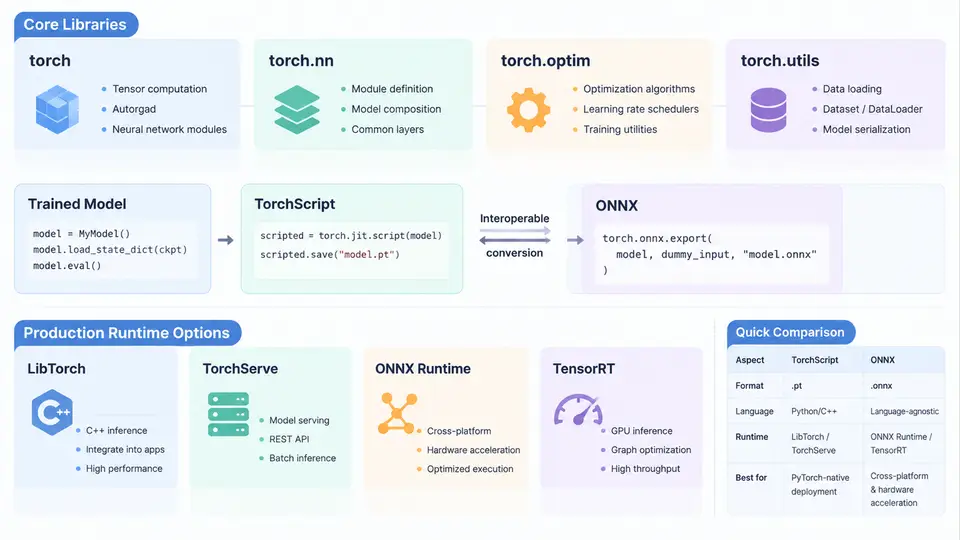
PyTorch is often introduced as a deep learning framework, but in production it is better understood as an ecosystem: a set of libraries that share tensor semantics, autograd, and serialization conventions, plus a set of export and runtime paths that carry a trained model out of the training script and into a serving environment. This chapter maps that ecosystem and the deployment landscape so that later chapters can make concrete choices instead of treating "deployment" as a single step.
Core libraries and their roles
The training-side ecosystem is layered. At the base, torch provides tensors, device management, and autograd. torch.nn supplies layers and loss functions, while torch.optim provides optimizers and learning-rate schedulers. Around these, domain libraries extend the same conventions:
torchvision— image datasets, transforms, and pretrained backbones such as ResNet and EfficientNet.torchaudio— waveform loading, spectrogram transforms, and audio pretrained models.torchtext— text datasets, vocabularies, and embedding utilities.torch.compile— graph capture and kernel fusion for training and inference speedups on supported hardware.torch.distributed— DDP and FSDP for multi-GPU and multi-node training.
These libraries matter for deployment because they define what a model is at save time. A checkpoint produced by torch.save typically contains a state_dict of parameter tensors keyed by module path. That representation is portable across machines but still requires the original Python class definitions to reconstruct the module graph. This is the first important distinction in the deployment landscape: checkpoint portability is not the same as runtime portability.
Three export and runtime paths
Once a model is trained, there are three broad ways to move it into production, and they differ in how much of the Python training code they preserve.
| Path | Artifact | Runtime | Typical use |
|---|---|---|---|
| Eager checkpoint | .pt / .pth state_dict |
Python + PyTorch | Research, fine-tuning, internal services |
| TorchScript | .pt ScriptModule |
LibTorch (C++), Python, mobile | Latency-sensitive C++ serving, edge |
| ONNX | .onnx graph |
ONNX Runtime, TensorRT, OpenVINO | Cross-framework, hardware-specific acceleration |
TorchScript converts a model into a serializable intermediate representation that no longer depends on the original Python class. It can be produced by tracing (torch.jit.trace), which records tensor operations for a fixed input shape, or by scripting (torch.jit.script), which parses Python source and preserves control flow such as if and loops. Tracing is simple but silently drops data-dependent branches; scripting is stricter but handles dynamic logic. A common production pattern is to script the module and trace only the submodules that are purely tensor arithmetic.
ONNX is a framework-neutral graph format. Exporting with torch.onnx.export produces a protobuf graph with named inputs and outputs, an opset version, and static or dynamic axes. ONNX is the natural bridge when the serving stack is not PyTorch — for example, an ONNX Runtime service on CPU, or TensorRT on NVIDIA GPUs. The trade-off is that some operators and custom autograd functions do not map cleanly, so export must be validated numerically against the eager model.
Production runtime options
Runtime choice follows from the artifact and the hardware target:
- TorchServe — a PyTorch-native model server with handlers, batching, and metrics endpoints. Good default when the team already runs PyTorch and wants minimal glue code.
- TorchScript + LibTorch — embed the model directly in a C++ service, avoiding Python GIL and interpreter overhead.
- ONNX Runtime — cross-platform inference with execution providers for CPU, CUDA, and TensorRT.
- TensorRT / OpenVINO — vendor-specific compilers that fuse and quantize graphs for maximum throughput on their hardware.
- Mobile / edge — PyTorch Mobile and ExecuTorch for on-device inference with quantized TorchScript or exported programs.
How the paths relate
The diagram below shows the flow from a trained checkpoint to the three runtime families, including the validation step that should sit between export and serving.
A minimal export-and-validate example
The following example is illustrative, not a measured benchmark. It shows the shape of a reproducible export check: build a small module, export it, and compare outputs.
import torch, torch.nn as nn, numpy as np

class TinyNet(nn.Module):
    def __init__(self):
        super().__init__()
        self.fc1 = nn.Linear(8, 16)
        self.fc2 = nn.Linear(16, 2)
    def forward(self, x):
        return self.fc2(torch.relu(self.fc1(x)))

model = TinyNet().eval()
example = torch.randn(1, 8)

# TorchScript via tracing
traced = torch.jit.trace(model, example)
traced.save("tiny_traced.pt")

# ONNX export
torch.onnx.export(
    model, example, "tiny.onnx",
    input_names=["input"], output_names=["logits"],
    dynamic_axes={"input": {0: "batch"}, "logits": {0: "batch"}},
    opset_version=17,
)

# Numerical validation
with torch.no_grad():
    eager_out = model(example).numpy()
    traced_out = traced(example).numpy()
print("max abs diff:", np.abs(eager_out - traced_out).max())
Expected observable result: the printed maximum absolute difference should be at or near floating-point noise (for example, below 1e-5 for float32 on CPU). If it is large, the usual causes are a data-dependent branch dropped by tracing, an unsupported operator silently replaced during ONNX export, or a dtype mismatch between the example input and the real serving input. Typical failure symptoms include a shape mismatch at load time, an ONNX Runtime error naming an unsupported op, or outputs that are numerically plausible but systematically shifted — the last often indicates a preprocessing difference rather than a graph bug.
if branch that depends on tensor values will be frozen to the branch taken during tracing. Use torch.jit.script for modules with dynamic control flow, and always validate with more than one input shape.
Choosing a path
For a first production service where the team controls the whole stack, TorchScript plus TorchServe or LibTorch is usually the shortest path: it keeps PyTorch semantics, supports dynamic batching, and avoids cross-framework operator gaps. Choose ONNX when the serving hardware has a vendor compiler that only accepts ONNX, or when the inference service must be framework-agnostic. Keep the eager checkpoint as the source of truth for retraining and fine-tuning, and treat every exported artifact as a derived build product that must pass a numerical validation gate before it is promoted.
With this map in place, the next chapters can go deeper into each path: scripting and tracing mechanics, ONNX export pitfalls, runtime configuration, and the operational concerns of serving models under real traffic.