1. Course overview
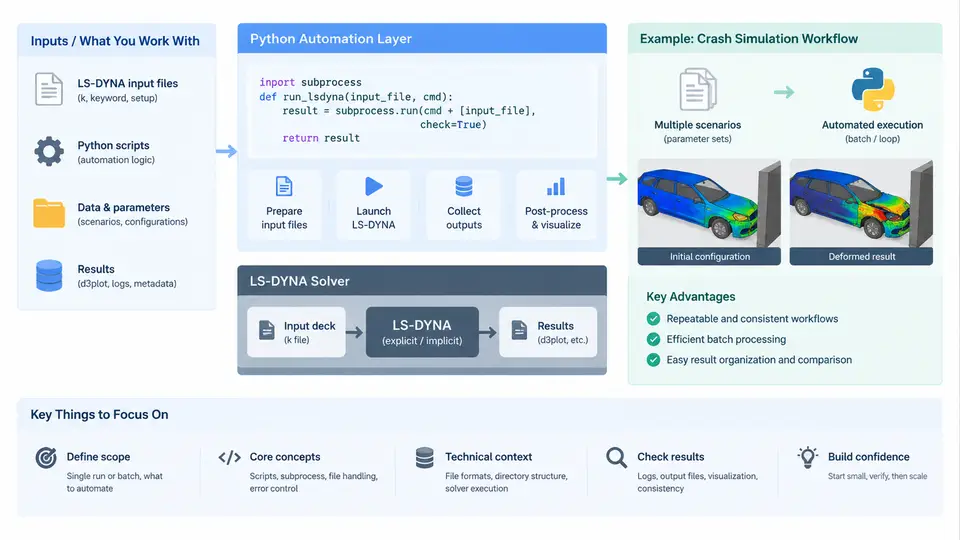
Crash simulation with LS-DYNA is rarely a single run. A typical vehicle development program generates hundreds to thousands of load cases: frontal offset, side pole, rear impact, pedestrian protection, roof crush, and sled tests, each repeated across design iterations, material updates, and mesh revisions. The solver itself is only one link in a long chain that includes model assembly, keyword generation, job submission, queue monitoring, result extraction, and report generation. Python automation targets that entire chain, not just the solver invocation.
This course treats Python as the orchestration layer around LS-DYNA. The goal is not to replace LS-PrePost or the solver, but to make the repetitive, error-prone, and time-consuming parts of the workflow deterministic and reproducible. By the end of the course you should be able to build scripts that assemble keyword decks from parameterized templates, submit and monitor jobs on local workstations or HPC clusters, parse d3plot and binout results, and produce structured reports without manual intervention.
Why Automate Crash Simulation Workflows
Manual crash simulation workflows have three recurring pain points. First, model variants are usually produced by editing keyword files by hand, which introduces transcription errors in *INCLUDE paths, material IDs, or boundary conditions. Second, job submission and monitoring consume engineering time that could be spent on interpretation. Third, post-processing the same set of curves across dozens of runs is tedious and inconsistent between engineers.
Automation addresses each of these. Parameterized templates eliminate manual editing. Submission scripts with queue polling remove idle waiting. Result parsers produce identical metrics for every run, which makes design comparisons meaningful. The table below summarizes the mapping between workflow stages and the Python techniques used in this course.
| Workflow Stage | Typical Manual Task | Python Approach |
|---|---|---|
| Model assembly | Edit keyword files, fix include paths | Template rendering with string.Template or Jinja2 |
| Job submission | Type ls-dyna commands, watch terminal |
subprocess, scheduler wrappers (sbatch, qsub) |
| Monitoring | Check messag and d3hsp files |
Log parsing, status polling loops |
| Result extraction | Open LS-PrePost, export curves | lasso-python, qd-ldyna, or ASCII parsing |
| Reporting | Copy curves into slides | pandas, matplotlib, automated HTML/PDF output |
Technical Context and Toolchain
LS-DYNA reads an input deck composed of keyword cards. The deck is plain text, which makes it directly amenable to programmatic generation. A minimal crash model contains at least the following card families: *CONTROL for termination and time step settings, *DATABASE for output requests, *PART and *SECTION for structural definition, *MAT for material models, *INITIAL_VELOCITY for impact conditions, and *CONTACT for interface definitions. Automation scripts typically manipulate a subset of these cards while leaving the mesh and most material data untouched.
On the execution side, LS-DYNA supports both SMP (shared memory) and MPP (massively parallel) builds. The invocation differs: SMP uses ncpu= on the command line, while MPP requires NCPU= and MEMORY= in the command line or a *CONTROL_MPP card. Automation scripts must know which build is available and construct the correct command. A common pattern is to read a small configuration file that declares the solver path, build type, and core count, then generate the command accordingly.
# Example: constructing an LS-DYNA MPP command
solver = "/opt/lsdyna/ls-dyna_mpp_s_2023"
ncpu = 32
memory = "200m"
jobname = "front_offset_v3"
command = f"{solver} ncpu={ncpu} memory={memory} i={jobname}.k o={jobname}.out"
Result files are equally scriptable. The binout file is a binary container that stores time-history data for nodes, elements, and rigid bodies. The d3plot file stores full-field state data. Both can be read with lasso-python or with LS-DYNA's own lsda library. For lightweight cases, ASCII output requested through *DATABASE_ASCII can be parsed with plain Python, which avoids additional dependencies.
Scope and Boundaries of This Course
This course covers the automation layer, not the physics. It assumes you already understand what a crash model represents and how to set up a baseline simulation in LS-PrePost or a text editor. The focus is on the code that surrounds the solver: how to generate decks, how to launch and track jobs, how to extract and organize results, and how to package everything into a repeatable pipeline.
Topics that are deliberately out of scope include mesh generation algorithms, material model calibration, and solver numerics. Those belong to separate disciplines. Where they intersect with automation, such as parameterizing a material card for a design study, the course addresses the scripting interface rather than the constitutive theory.
subprocess, pathlib, and pandas installed. If you plan to use lasso-python, verify that it can import and read a sample binout file.
How the Workflow Fits Together
The diagram below shows the end-to-end pipeline that this course builds. Each stage is a Python module or script, and data flows between stages through files on disk. The key insight is that every stage can be tested independently: you can generate a deck without submitting it, submit a job without parsing results, and parse results without generating a report.
The pipeline is intentionally modular. In practice, you might replace the reporting stage with a connection to an existing dashboard, or replace the submission stage with a REST call to a job scheduler API. The interfaces between stages are file paths and dictionaries, which keeps the coupling low and makes each component replaceable.
What You Will Build
Across the 30 chapters, you will construct a working automation toolkit. Early chapters focus on reading and writing keyword files safely, including handling *INCLUDE hierarchies and preserving formatting. Middle chapters cover job submission, queue integration, and failure detection. Later chapters address result parsing, metric computation, and report generation. The final chapters tie everything together into a single command-line tool that accepts a parameter file and produces a complete run directory with results and a summary report.
A representative end-to-end invocation might look like this:
python run_crash.py --params cases/front_offset_64kph.yaml --output runs/fo64_v3
After execution, the output directory contains the generated .k deck, solver logs, extracted time-history curves, a metrics table, and an HTML summary. The exact contents depend on the configuration, but the structure is consistent across runs, which is what makes comparison and regression checking possible.
With the scope and pipeline established, the next chapter begins with the practical foundation: reading, modifying, and writing LS-DYNA keyword files programmatically while preserving the structure that the solver expects.