1. Catalyst交换机初始上架与基础配置
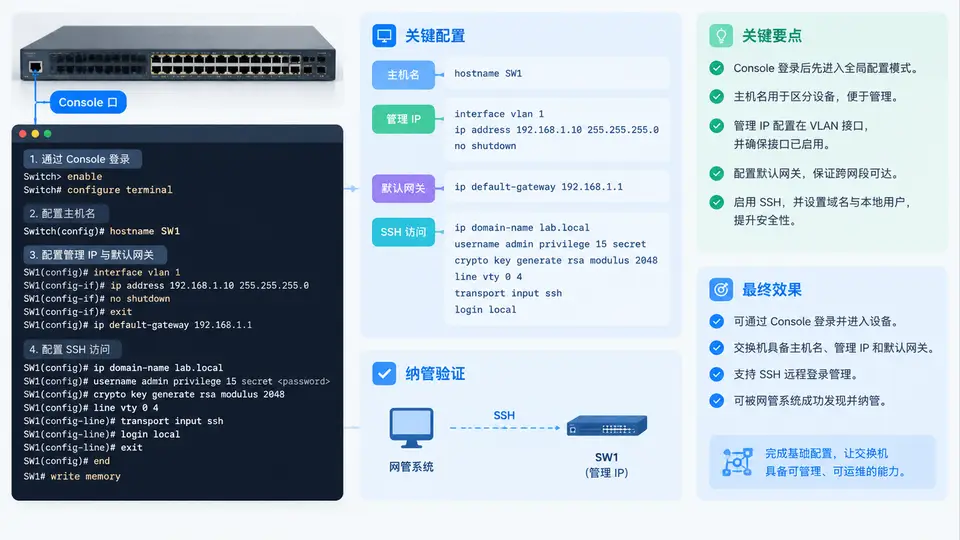
上架前准备与Console接入
新Catalyst交换机开箱后,先完成物理上架与Console接入。需要准备:RJ-45转DB-9/USB Console线、终端软件(PuTTY/SecureCRT/Tera Term)、管理网段信息(IP、掩码、网关)、SSH登录用的本地账号。Catalyst 9000系列默认Console参数为9600-8-N-1,无流控;若终端无回显,先按一次回车,再检查速率是否被改为115200。
加电后交换机进入ROMmon或直接引导IOS,首次启动通常需要2~5分钟。看到Would you like to enter the initial configuration dialog? [yes/no]:时输入no,进入CLI手动配置,避免初始对话框写入不符合规范的默认参数。
基础配置命令序列
以下命令在一台出厂状态的Catalyst 9300上执行,管理网段为10.10.99.0/24,网关10.10.99.1,交换机管理地址10.10.99.21。VLAN 1仅用于过渡,生产环境建议使用独立管理VLAN(本例用VLAN 99)。
Switch> enable
Switch# configure terminal
Switch(config)# hostname CAT9300-ACC-01
CAT9300-ACC-01(config)# enable secret Cisco@12345
CAT9300-ACC-01(config)# username netadmin privilege 15 secret NetAdmin@2024
CAT9300-ACC-01(config)# vlan 99
CAT9300-ACC-01(config-vlan)# name MGMT
CAT9300-ACC-01(config-vlan)# exit
CAT9300-ACC-01(config)# interface vlan 99
CAT9300-ACC-01(config-if)# ip address 10.10.99.21 255.255.255.0
CAT9300-ACC-01(config-if)# no shutdown
CAT9300-ACC-01(config-if)# exit
CAT9300-ACC-01(config)# ip default-gateway 10.10.99.1
CAT9300-ACC-01(config)# ip domain-name corp.local
CAT9300-ACC-01(config)# crypto key generate rsa modulus 2048
CAT9300-ACC-01(config)# ip ssh version 2
CAT9300-ACC-01(config)# line vty 0 15
CAT9300-ACC-01(config-line)# transport input ssh
CAT9300-ACC-01(config-line)# login local
CAT9300-ACC-01(config-line)# exec-timeout 10 0
CAT9300-ACC-01(config-line)# exit
CAT9300-ACC-01(config)# interface GigabitEthernet1/0/1
CAT9300-ACC-01(config-if)# description UPLINK-TO-CORE
CAT9300-ACC-01(config-if)# switchport mode trunk
CAT9300-ACC-01(config-if)# switchport trunk native vlan 99
CAT9300-ACC-01(config-if)# switchport trunk allowed vlan 99,100,200
CAT9300-ACC-01(config-if)# no shutdown
CAT9300-ACC-01(config-if)# end
CAT9300-ACC-01# write memory
上联口必须放行管理VLAN 99,否则管理IP无法被网管系统访问。若上联为Access口,则需将管理VLAN作为该口的Access VLAN。
配置逻辑与关键参数关系
管理可达性依赖三个条件同时成立:管理SVI处于up/up、上联Trunk放行管理VLAN、默认网关指向管理网段的三层接口。SSH可用性依赖RSA密钥已生成、ip ssh version 2已启用、VTY线路transport input ssh且login local已绑定本地账号。任一条件缺失都会导致网管纳管失败。
验证与纳管确认
配置完成后依次执行以下检查,全部通过才可交付网管纳管:
| 检查项 | 命令 | 预期结果 |
|---|---|---|
| 管理SVI状态 | show ip interface brief | include Vlan99 | up / up,IP为10.10.99.21 |
| 默认网关 | show running-config | include default-gateway | ip default-gateway 10.10.99.1 |
| SSH版本 | show ip ssh | SSH Enabled - version 2.0 |
| RSA密钥 | show crypto key mypubkey rsa | 存在2048位密钥 |
| VTY限制 | show running-config | section line vty | transport input ssh,login local |
| 上联Trunk | show interfaces trunk | Gi1/0/1 放行VLAN 99 |
| 远程SSH | 从管理网段PC执行ssh netadmin@10.10.99.21 | 成功登录并进入特权模式 |
若SSH连接被拒绝,优先检查
crypto key generate rsa是否成功、VTY是否误配为transport input telnet、以及管理网段ACL是否放行TCP 22。若管理IP无法ping通,检查上联Trunk是否放行VLAN 99以及SVI是否被shutdown。配置保存与交付清单
确认无误后执行write memory或copy running-config startup-config,并记录以下交付信息供网管系统录入:
- 设备主机名:CAT9300-ACC-01
- 管理IP:10.10.99.21/24,网关10.10.99.1
- SSH账号:netadmin(privilege 15),密码按现场密码策略保管
- 管理VLAN:99(MGMT),上联口Gi1/0/1为Trunk
- SNMP团体字/用户:按网管系统要求后续补充配置