4. IoT设备启动脚本中的不安全配置审计
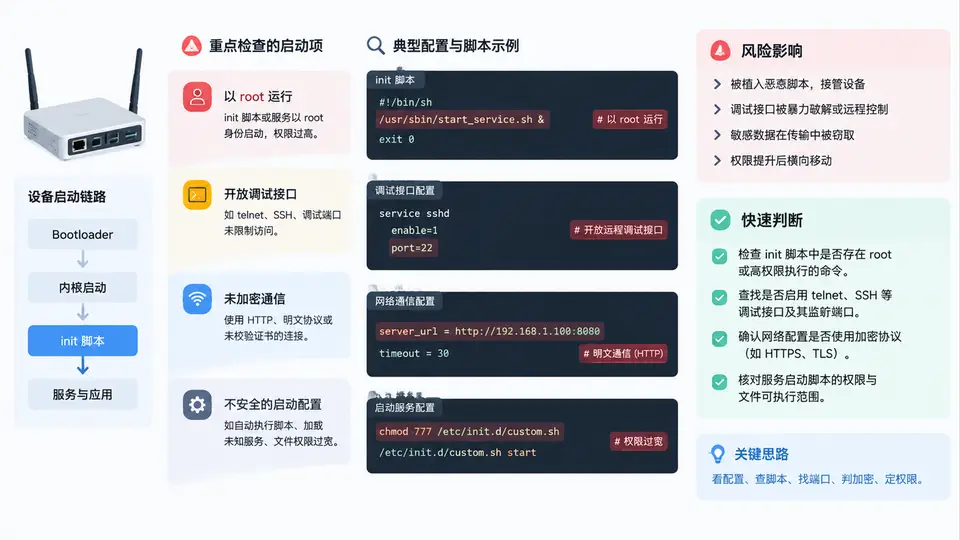
启动脚本审计的对象与风险面
IoT 固件的启动链通常由 /etc/inittab、/etc/init.d/rcS、/etc/rc.local、systemd unit 或 BusyBox init 脚本串联而成。审计目标不是“找出所有脚本”,而是定位那些在启动阶段就获得高权限、暴露网络服务或降低安全基线的配置项。典型风险包括:以 root 身份运行非必要服务、启动 telnetd/adbd/gdbserver 等调试接口、使用明文 HTTP/FTP/TFTP 传输、关闭防火墙或 SELinux、挂载可写文件系统、以及从可写路径加载可执行文件。
审计脚本实现
以下脚本对已提取的固件根文件系统进行遍历,识别启动脚本中的高风险命令模式,并输出带文件路径、行号和风险等级的结构化清单。脚本使用 Python 标准库,不依赖外部工具,可直接在分析主机上运行。
#!/usr/bin/env python3
# boot_audit.py - IoT 启动脚本不安全配置审计
import os, re, sys, json

# 风险模式:正则 + 风险等级 + 说明
RISK_PATTERNS = [
    # 调试接口
    (r'\btelnetd\b', 'HIGH', '启动 telnetd 明文调试服务'),
    (r'\badbd\b', 'HIGH', '启动 adbd 调试桥'),
    (r'\bgdbserver\b', 'HIGH', '启动 gdbserver 远程调试'),
    (r'\bdropbear\b.*-p\s*22', 'MEDIUM', 'SSH 服务监听 22 端口'),
    # 未加密通信
    (r'\bhttpd\b', 'MEDIUM', '启动 HTTP 明文服务'),
    (r'\bftpd\b|\bvsftpd\b', 'HIGH', '启动 FTP 明文服务'),
    (r'\btftp\b', 'HIGH', '使用 TFTP 明文传输'),
    (r'wget\s+http://', 'MEDIUM', '通过 HTTP 下载文件'),
    # 安全机制关闭
    (r'iptables\s+-F', 'HIGH', '清空防火墙规则'),
    (r'setenforce\s+0', 'HIGH', '关闭 SELinux 强制模式'),
    (r'echo\s+0\s*>\s*/proc/sys/kernel/randomize_va_space', 'HIGH', '关闭 ASLR'),
    # 可写路径执行
    (r'(/tmp/|/var/|/mnt/)\S+', 'MEDIUM', '从可写路径加载可执行文件'),
    # root 运行
    (r'^\s*root\s*:', 'LOW', 'inittab 中 root 登录 shell'),
]

# 启动脚本候选路径
BOOT_PATHS = [
    'etc/inittab', 'etc/init.d/rcS', 'etc/rc.local',
    'etc/init.d/', 'lib/systemd/system/', 'etc/systemd/system/',
]

def collect_scripts(rootfs):
    """收集所有启动相关脚本文件"""
    scripts = []
    for rel in BOOT_PATHS:
        p = os.path.join(rootfs, rel)
        if os.path.isfile(p):
            scripts.append(p)
        elif os.path.isdir(p):
            for f in os.listdir(p):
                fp = os.path.join(p, f)
                if os.path.isfile(fp):
                    scripts.append(fp)
    return scripts

def audit_file(path):
    """审计单个脚本文件,返回风险项列表"""
    findings = []
    try:
        with open(path, 'r', errors='ignore') as f:
            for lineno, line in enumerate(f, 1):
                stripped = line.strip()
                if not stripped or stripped.startswith('#'):
                    continue
                for pattern, level, desc in RISK_PATTERNS:
                    if re.search(pattern, stripped, re.IGNORECASE):
                        findings.append({
                            'file': path,
                            'line': lineno,
                            'content': stripped[:120],
                            'risk': level,
                            'desc': desc
                        })
    except Exception as e:
        print(f"[!] 读取失败 {path}: {e}", file=sys.stderr)
    return findings

def main():
    if len(sys.argv) != 2:
        print(f"用法: {sys.argv[0]} <固件根文件系统目录>")
        sys.exit(1)
    rootfs = sys.argv[1]
    if not os.path.isdir(rootfs):
        print(f"[!] 目录不存在: {rootfs}")
        sys.exit(1)

    scripts = collect_scripts(rootfs)
    print(f"[*] 发现 {len(scripts)} 个启动相关脚本\n")

    all_findings = []
    for s in scripts:
        all_findings.extend(audit_file(s))

    # 按风险等级排序输出
    order = {'HIGH': 0, 'MEDIUM': 1, 'LOW': 2}
    all_findings.sort(key=lambda x: order.get(x['risk'], 9))

    if not all_findings:
        print("[+] 未发现明显不安全启动项")
    else:
        print(f"[!] 共发现 {len(all_findings)} 个风险项:\n")
        for f in all_findings:
            print(f"  [{f['risk']}] {f['file']}:{f['line']}")
            print(f"        {f['desc']}")
            print(f"        命令: {f['content']}\n")

    # 输出 JSON 供后续处理
    with open('boot_audit_report.json', 'w') as out:
        json.dump(all_findings, out, indent=2, ensure_ascii=False)
    print("[*] 详细报告已写入 boot_audit_report.json")

if __name__ == '__main__':
    main()
运行与结果判读
假设已通过 binwalk -e firmware.bin 提取出根文件系统到 _firmware.bin.extracted/squashfs-root/,执行审计:
python3 boot_audit.py _firmware.bin.extracted/squashfs-root/
典型输出示例(教学示例数据):
[*] 发现 4 个启动相关脚本

[!] 共发现 3 个风险项:

  [HIGH] .../etc/init.d/rcS:12
        启动 telnetd 明文调试服务
        命令: telnetd -l /bin/sh &

  [HIGH] .../etc/init.d/rcS:15
        清空防火墙规则
        命令: iptables -F

  [MEDIUM] .../etc/rc.local:3
        启动 HTTP 明文服务
        命令: httpd -p 80 -h /www
判读要点:HIGH 风险项应优先修复,尤其是 telnetd 以 root 启动并绑定 shell 的情况,等同于设备无认证远程控制。MEDIUM 风险项需结合网络暴露面判断,若 httpd 仅监听 127.0.0.1 则风险降低。LOW 风险项通常作为加固建议记录。
审计检查清单
| 检查项 | 命令模式 | 风险等级 | 修复方向 |
|---|---|---|---|
| 调试接口 | telnetd / adbd / gdbserver | HIGH | 量产固件移除或禁用 |
| 明文通信 | httpd / ftpd / tftp / wget http:// | HIGH/MEDIUM | 改用 TLS 或本地回环 |
| 防火墙关闭 | iptables -F / setenforce 0 | HIGH | 保留默认拒绝策略 |
| 可写路径执行 | /tmp/ /var/ /mnt/ 下执行 | MEDIUM | 改为只读分区或签名校验 |
| root 登录 shell | inittab 中 root:: | LOW | 限制串口登录或加密码 |
审计完成后,建议将 boot_audit_report.json 与固件版本、设备型号关联存档,便于后续固件更新时做差异比对,快速发现新引入的不安全启动项。