2. Matter设备类型与集群定义解析
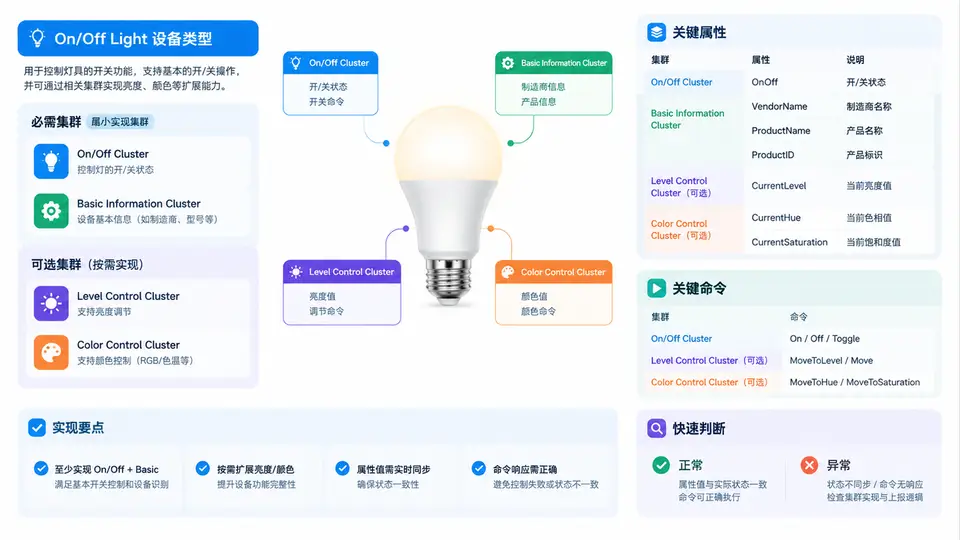
任务说明
本案例目标为:在Linux主机上编译Matter Lighting Example应用(即lighting-app),启动该应用后,使用chip-tool作为Controller发送On/Off命令,验证灯控逻辑(通过日志观察状态切换)。
环境准备
需要一台Ubuntu 22.04(或兼容)主机,已安装git、gn、ninja、clang、g++、pkg-config、libssl-dev、libglib2.0-dev等Matter编译依赖。Matter SDK版本使用v1.2.0.0(或更新release分支)。
获取源码与初始化
git clone https://github.com/project-chip/connectedhomeip.git
cd connectedhomeip
git checkout v1.2.0.0
source scripts/activate.sh
编译Lighting Example
在SDK根目录执行以下命令,生成并编译Linux平台的lighting-app:
gn gen out/lighting-app --args='target_os="linux" target_cpu="x64"'
ninja -C out/lighting-app lighting-app
编译产物位于out/lighting-app/lighting-app。
编译chip-tool
在SDK根目录执行:
gn gen out/chip-tool --args='target_os="linux" target_cpu="x64"'
ninja -C out/chip-tool chip-tool
编译产物位于out/chip-tool/chip-tool。
运行Lighting App
打开终端1,启动lighting-app(使用默认的0x1234作为Fabric ID,监听端口5540):
./out/lighting-app/lighting-app
启动后,应用会打印类似Server listening on port 5540的日志,并显示当前灯状态为On/Off: OFF。
使用chip-tool发送On/Off命令
打开终端2,先执行配对(使用IP网络传输,端口5540):
./out/chip-tool/chip-tool pairing onnetwork 1 20202021 127.0.0.1 5540
配对成功后,发送On命令:
./out/chip-tool/chip-tool onoff on 1 1
发送Off命令:
./out/chip-tool/chip-tool onoff off 1 1
验证方法与判定标准
在终端1的lighting-app日志中观察状态变化:
- 发送On命令后,日志出现
OnOff state set to true或Changed attribute value: OnOff=1,表示灯已打开; - 发送Off命令后,日志出现
OnOff state set to false或Changed attribute value: OnOff=0,表示灯已关闭; - 若日志中同时打印了
Endpoint 1相关的On/Off cluster事件,说明命令已正确路由到Lighting Example的Endpoint 1。
满足以上条件,即可判定本案例验证通过。
关键实现说明
Lighting Example应用内部通过OnOffClusterServer维护布尔状态mOnOff,收到chip-tool的On/Off命令后,会调用SetOnOff()更新状态并触发Attribute Change回调,在控制台打印状态日志。本案例仅验证命令通路与状态切换,不涉及实际LED硬件。