1. 创建Series并查看基本属性
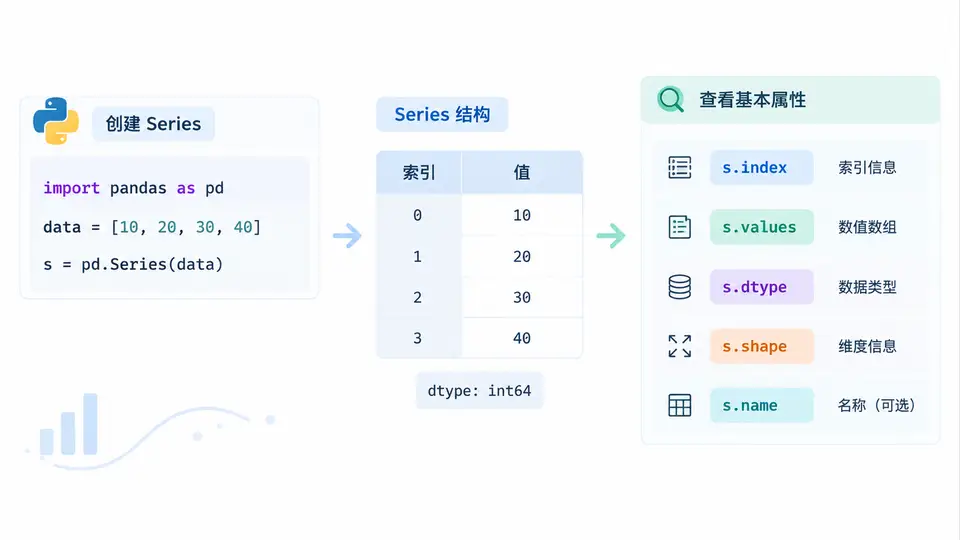
任务说明
本案例使用Pandas创建一个包含学生姓名与对应成绩的Series对象,并查看其基本属性,包括索引、值、数据类型、形状、元素个数以及是否存在缺失值。通过该案例掌握Series的创建与基础属性检查方法。
实现代码
import pandas as pd
import numpy as np

# 创建Series:学生姓名作为索引,成绩作为值
scores = pd.Series(
    data=[88, 92, 79, 85, 90],
    index=['张伟', '李娜', '王强', '赵敏', '刘洋'],
    name='期末成绩',
    dtype=np.int64
)

# 查看基本属性
print("=== 索引 (index) ===")
print(scores.index)

print("\n=== 值 (values) ===")
print(scores.values)

print("\n=== 数据类型 (dtype) ===")
print(scores.dtype)

print("\n=== 形状 (shape) ===")
print(scores.shape)

print("\n=== 元素个数 (size) ===")
print(scores.size)

print("\n=== 是否存在缺失值 (hasnans) ===")
print(scores.hasnans)

print("\n=== 前2个元素 (head) ===")
print(scores.head(2))

print("\n=== 描述统计 (describe) ===")
print(scores.describe())
运行方式
确保已安装Pandas与NumPy库(pip install pandas numpy),将上述代码保存为series_basic.py,在命令行执行python series_basic.py即可。
预期输出
=== 索引 (index) ===
Index(['张伟', '李娜', '王强', '赵敏', '刘洋'], dtype='object')

=== 值 (values) ===
[88 92 79 85 90]

=== 数据类型 (dtype) ===
int64

=== 形状 (shape) ===
(5,)

=== 元素个数 (size) ===
5

=== 是否存在缺失值 (hasnans) ===
False

=== 前2个元素 (head) ===
张伟    88
李娜    92
Name: 期末成绩, dtype: int64

=== 描述统计 (describe) ===
count     5.000000
mean     86.800000
std       5.263079
min      79.000000
25%      85.000000
50%      88.000000
75%      90.000000
max      92.000000
Name: 期末成绩, dtype: float64
验证方法
运行代码后,逐项核对输出:
- 索引应包含5个中文姓名,类型为object;
- 值数组为
[88 92 79 85 90],数据类型为int64; - 形状为
(5,),元素个数为5; - 因所有成绩均为有效数字,
hasnans应为False; head(2)显示前两个姓名与成绩;describe()中count为5,mean为86.8,min为79,max为92,与输入数据完全一致。
若以上输出与预期相符,则说明Series创建成功且基本属性查看正确。