3. 自动化仪器初始化序列
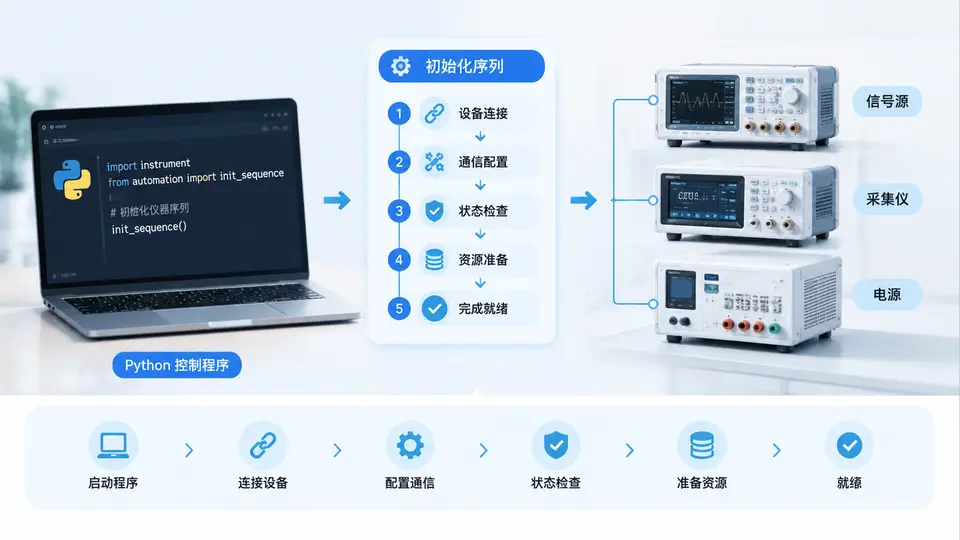
任务说明
在自动化测试系统中,仪器初始化是测试开始前的关键步骤。本案例要求实现一个通用的仪器初始化序列管理器,能够按预定义顺序执行多台仪器的初始化操作,并在任一步骤失败时立即停止后续初始化,同时提供清晰的错误定位信息。初始化序列需支持:SCPI命令发送、延时等待、状态查询三种操作类型,且序列配置与执行逻辑分离,便于后续扩展新仪器。
实现方案
采用Python实现一个轻量级初始化序列引擎,核心设计如下:
- 操作抽象:将初始化步骤抽象为
send(发送SCPI命令)、delay(延时等待)、query(查询并校验返回)三种原语; - 序列配置:使用JSON文件描述初始化步骤,与执行引擎解耦;
- 失败即停:任一步骤抛出异常即终止整个序列,并报告失败步骤编号与原因;
- 仪器通信:通过VISA库(pyvisa)与真实仪器通信,同时提供模拟模式用于无硬件环境下的逻辑验证。
代码实现
import json
import time
from typing import Dict, List, Any, Callable, Optional

class InitStepError(Exception):
    """初始化步骤执行失败异常"""
    def __init__(self, step_index: int, step_desc: str, reason: str):
        self.step_index = step_index
        self.step_desc = step_desc
        self.reason = reason
        super().__init__(f"步骤{step_index}失败 [{step_desc}]: {reason}")

class InstrumentInitSequence:
    """仪器初始化序列执行器"""

    def __init__(self, device: Any, config_path: str):
        """
        :param device: 仪器设备对象,需实现 write()/query()/close() 方法
        :param config_path: 初始化序列JSON配置文件路径
        """
        self.device = device
        with open(config_path, 'r', encoding='utf-8') as f:
            self.sequence = json.load(f)
        self._handlers: Dict[str, Callable] = {
            'send': self._handle_send,
            'delay': self._handle_delay,
            'query': self._handle_query,
        }

    def _handle_send(self, step: Dict[str, Any]) -> None:
        """发送SCPI命令,不校验返回"""
        cmd = step['command']
        self.device.write(cmd)

    def _handle_delay(self, step: Dict[str, Any]) -> None:
        """延时等待,单位秒"""
        seconds = float(step['seconds'])
        time.sleep(seconds)

    def _handle_query(self, step: Dict[str, Any]) -> None:
        """发送查询命令并校验返回内容"""
        cmd = step['command']
        expected = step['expected']
        resp = self.device.query(cmd).strip()
        if expected not in resp:
            raise ValueError(f"查询返回 '{resp}' 不包含期望值 '{expected}'")

    def run(self) -> None:
        """按顺序执行全部初始化步骤,失败即终止"""
        steps = self.sequence['steps']
        for idx, step in enumerate(steps, start=1):
            op_type = step['type']
            handler = self._handlers.get(op_type)
            if handler is None:
                raise InitStepError(idx, step.get('desc', ''), f"未知操作类型: {op_type}")
            try:
                handler(step)
                print(f"[OK] 步骤{idx}: {step.get('desc', op_type)}")
            except Exception as e:
                raise InitStepError(idx, step.get('desc', op_type), str(e)) from e
        print("初始化序列全部完成")

class MockInstrument:
    """模拟仪器设备,用于无硬件环境验证"""
    def __init__(self):
        self.buffer = []

    def write(self, cmd: str) -> None:
        self.buffer.append(("WRITE", cmd))
        # 模拟:若发送 *RST 则重置状态
        if cmd == "*RST":
            self.buffer.append(("STATE", "RESET"))

    def query(self, cmd: str) -> str:
        self.buffer.append(("QUERY", cmd))
        # 模拟 *IDN? 返回仪器标识
        if cmd == "*IDN?":
            return "MOCK_INSTRUMENT_V1.0"
        # 模拟 SYST:ERR? 返回无错误
        if cmd == "SYST:ERR?":
            return '0,"No error"'
        return "UNKNOWN_RESPONSE"

    def close(self) -> None:
        pass

def main():
    """演示入口:使用模拟仪器执行初始化序列"""
    import os

    # 初始化序列配置(实际使用时建议独立JSON文件)
    config = {
        "instrument": "MockInstrument",
        "steps": [
            {"type": "send", "command": "*RST", "desc": "复位仪器"},
            {"type": "delay", "seconds": 0.5, "desc": "等待复位完成"},
            {"type": "query", "command": "*IDN?", "expected": "MOCK", "desc": "查询仪器标识"},
            {"type": "send", "command": "SYST:REM", "desc": "切换到远程控制模式"},
            {"type": "query", "command": "SYST:ERR?", "expected": "No error", "desc": "确认无错误"}
        ]
    }

    # 将配置写入临时文件
    config_path = "init_sequence.json"
    with open(config_path, 'w', encoding='utf-8') as f:
        json.dump(config, f, ensure_ascii=False, indent=2)

    # 创建模拟仪器并执行初始化
    mock = MockInstrument()
    seq = InstrumentInitSequence(mock, config_path)

    try:
        seq.run()
        print("\n=== 初始化成功 ===")
    except InitStepError as e:
        print(f"\n=== 初始化失败: {e} ===")
    finally:
        mock.close()
        os.remove(config_path)  # 清理临时配置

if __name__ == "__main__":
    main()
落地与验证
依赖安装:若需连接真实仪器,执行 pip install pyvisa pyvisa-py,并通过USB/GPIB/LAN连接仪器;若仅验证逻辑,直接运行上述代码即可(使用内置MockInstrument)。
运行方式:将代码保存为 init_sequence.py,执行 python init_sequence.py。
验证方法:
- 正常路径:观察控制台依次输出5个步骤的
[OK]标记,最后输出“初始化序列全部完成”; - 失败路径:修改配置中某步骤的
expected为错误值(如将"No error"改为"Error"),重新运行,程序应在该步骤抛出InitStepError并终止,不再执行后续步骤; - 判定标准:步骤执行顺序与JSON配置完全一致;失败时错误信息包含步骤编号、描述和具体原因;模拟模式下MockInstrument的buffer记录了所有写入/查询命令,可据此核对实际发送的SCPI指令。