3. 使用AudioTrack播放PCM数据
任务说明
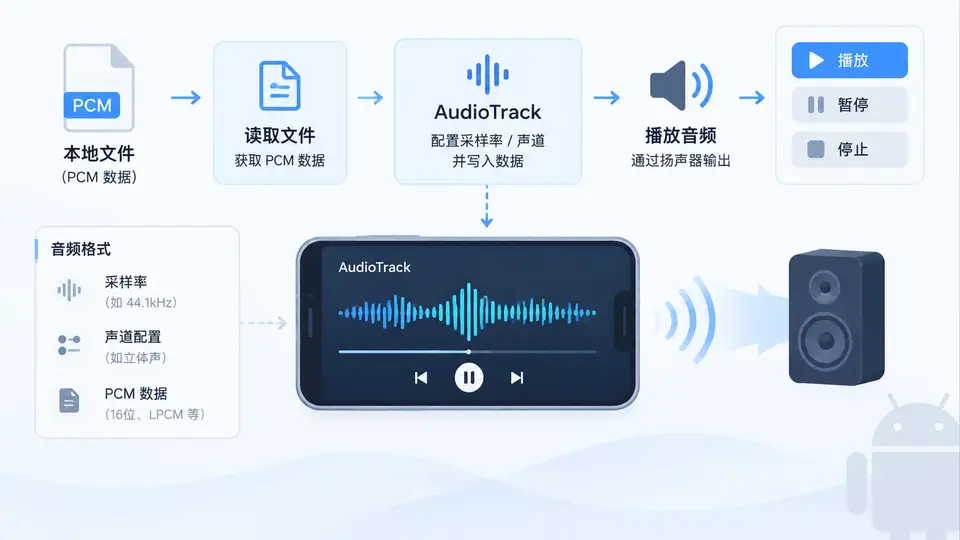
本案例实现一个最小可用的Android音频播放器:从应用私有目录读取16位单声道PCM文件,通过AudioTrack以44.1kHz采样率播放,并支持播放、暂停与停止操作。核心目标是验证AudioTrack从初始化、写入数据到状态控制的全流程正确性。
实现方案
创建PcmPlayer类封装AudioTrack生命周期。播放线程循环从文件读取数据块并调用write()阻塞写入;暂停时通过pause()挂起线程,停止时调用stop()并释放资源。界面提供三个按钮触发对应操作,播放进度通过Handler更新到TextView。
代码实现
// PcmPlayer.java
public class PcmPlayer {
    private static final int SAMPLE_RATE = 44100;
    private static final int CHANNEL_CONFIG = AudioFormat.CHANNEL_OUT_MONO;
    private static final int AUDIO_FORMAT = AudioFormat.ENCODING_PCM_16BIT;
    private static final int BUFFER_SIZE = AudioTrack.getMinBufferSize(
            SAMPLE_RATE, CHANNEL_CONFIG, AUDIO_FORMAT) * 2;

    private AudioTrack audioTrack;
    private FileInputStream fis;
    private Thread playThread;
    private volatile boolean isPlaying;
    private volatile boolean isPaused;
    private volatile int totalBytes;
    private volatile int playedBytes;

    public boolean prepare(String filePath) {
        try {
            fis = new FileInputStream(filePath);
            totalBytes = fis.available();
            audioTrack = new AudioTrack.Builder()
                    .setAudioAttributes(new AudioAttributes.Builder()
                            .setUsage(AudioAttributes.USAGE_MEDIA)
                            .setContentType(AudioAttributes.CONTENT_TYPE_MUSIC)
                            .build())
                    .setAudioFormat(new AudioFormat.Builder()
                            .setSampleRate(SAMPLE_RATE)
                            .setChannelMask(CHANNEL_CONFIG)
                            .setEncoding(AUDIO_FORMAT)
                            .build())
                    .setBufferSizeInBytes(BUFFER_SIZE)
                            .setTransferMode(AudioTrack.MODE_STREAM)
                    .build();
            return audioTrack.getState() == AudioTrack.STATE_INITIALIZED;
        } catch (IOException e) {
            return false;
        }
    }

    public void play() {
        if (audioTrack == null || isPlaying) return;
        isPlaying = true;
        isPaused = false;
        audioTrack.play();
        playThread = new Thread(() -> {
            byte[] buffer = new byte[BUFFER_SIZE];
            int read;
            try {
                while (isPlaying && (read = fis.read(buffer)) != -1) {
                    while (isPaused && isPlaying) {
                        Thread.sleep(50);
                    }
                    if (!isPlaying) break;
                    audioTrack.write(buffer, 0, read);
                    playedBytes += read;
                }
            } catch (IOException | InterruptedException e) {
                // 线程中断或IO异常时退出
            } finally {
                if (isPlaying) {
                    isPlaying = false;
                    audioTrack.stop();
                }
            }
        });
        playThread.start();
    }

    public void pause() {
        if (isPlaying && !isPaused) {
            isPaused = true;
            audioTrack.pause();
        }
    }

    public void resume() {
        if (isPlaying && isPaused) {
            isPaused = false;
            audioTrack.play();
        }
    }

    public void stop() {
        isPlaying = false;
        isPaused = false;
        if (playThread != null) {
            playThread.interrupt();
            try {
                playThread.join(500);
            } catch (InterruptedException ignored) {}
        }
        if (audioTrack != null) {
            audioTrack.stop();
            audioTrack.release();
            audioTrack = null;
        }
        try {
            if (fis != null) fis.close();
        } catch (IOException ignored) {}
    }

    public int getProgress() {
        if (totalBytes == 0) return 0;
        return (int) ((long) playedBytes * 100 / totalBytes);
    }
}
// MainActivity.java 关键部分
public class MainActivity extends AppCompatActivity {
private PcmPlayer player;
private TextView progressView;
private Handler handler = new Handler(Looper.getMainLooper());
@Override
protected void onCreate(Bundle savedInstanceState) {
super.onCreate(savedInstanceState);
setContentView(R.layout.activity_main);
progressView = findViewById(R.id.progress);
player = new PcmPlayer();
// 将测试PCM文件复制到私有目录
String pcmPath = new File(getFilesDir(), "test.pcm").getAbsolutePath();
copyAssetToInternal("test.pcm", pcmPath);
findViewById(R.id.btn_play).setOnClickListener(v -> {
if (player.prepare(pcmPath)) {
player.play();
handler.post(updateProgress);
}
});
findViewById(R.id.btn_pause).setOnClickListener(v -> {
if (player != null) player.pause();
});
findViewById(R.id.btn_resume).setOnClickListener(v -> {
if (player != null) player.resume();
});
findViewById(R.id.btn_stop).setOnClickListener(v -> {
if (player != null) {
player.stop();
handler.removeCallbacks(updateProgress);
progressView.setText("进度: 0%");
}
});
}
private Runnable updateProgress = new Runnable() {
@Override
public void run() {
if (player != null) {
progressView.setText("进度: " + player.getProgress() + "%");
handler.postDelayed(this, 200);
}
}
};
private void copyAssetToInternal(String asset, String dest) {
try (InputStream in = getAssets().open(asset);
OutputStream out = new FileOutputStream(dest)) {
byte[] buf = new byte[4096];
int len;
while ((len = in.read(buf)) != -1) out.write(buf, 0, len);
} catch (IOException e) {
Log.e("MainActivity", "复制失败", e);
}
}
@Override
protected void onDestroy() {
super.onDestroy();
if (player != null) player.stop();
handler.removeCallbacks(updateProgress);
}
}布局与资源
<!-- activity_main.xml -->
<LinearLayout xmlns:android="http://schemas.android.com/apk/res/android"
    android:layout_width="match_parent"
    android:layout_height="match_parent"
    android:orientation="vertical"
    android:gravity="center">
    <TextView android:id="@+id/progress"
        android:layout_width="wrap_content"
        android:layout_height="wrap_content"
        android:text="进度: 0%"
        android:textSize="18sp"/>
    <LinearLayout
        android:layout_width="wrap_content"
        android:layout_height="wrap_content"
        android:orientation="horizontal">
        <Button android:id="@+id/btn_play"
            android:layout_width="wrap_content"
            android:layout_height="wrap_content"
            android:text="播放"/>
        <Button android:id="@+id/btn_pause"
            android:layout_width="wrap_content"
            android:layout_height="wrap_content"
            android:text="暂停"/>
        <Button android:id="@+id/btn_resume"
            android:layout_width="wrap_content"
            android:layout_height="wrap_content"
            android:text="继续"/>
        <Button android:id="@+id/btn_stop"
            android:layout_width="wrap_content"
            android:layout_height="wrap_content"
            android:text="停止"/>
    </LinearLayout>
</LinearLayout>
验证方法
准备一段44.1kHz、16位单声道的PCM测试音频(如用Audacity导出),命名为test.pcm放入assets目录。运行应用后依次验证:
- 点击“播放”能听到声音,进度百分比递增;
- 点击“暂停”声音停止且进度不再变化;
- 点击“继续”声音从暂停处恢复,进度继续递增;
- 点击“停止”声音立即终止,进度归零,再次点击“播放”可从头开始。
判定标准:以上四项操作均符合预期,且无崩溃或异常日志,即视为通过。