3. 使用OpenCL事件进行性能计时
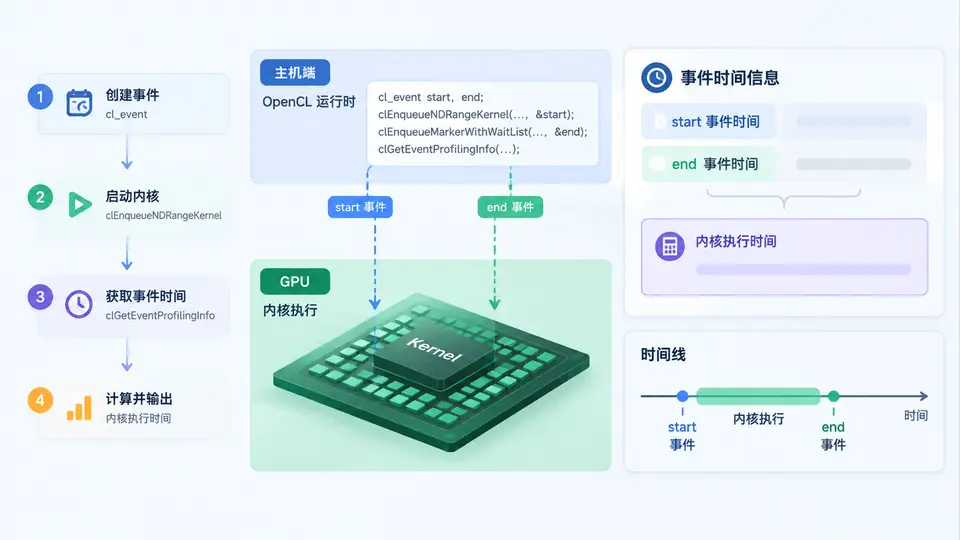
任务说明
本案例目标是在ARM Mali GPU上使用OpenCL事件机制测量内核执行时间。你将编写一个完整的OpenCL C主机程序,该程序创建一个简单的向量加法内核,通过cl_event记录内核执行起止时间,并输出以毫秒为单位的执行耗时。该程序不依赖任何未展示的前序代码,可直接编译运行。
实现方案
程序流程如下:获取平台与设备(优先选择GPU设备)→ 创建上下文与命令队列 → 编译内嵌的内核源码 → 创建输入/输出缓冲区并填充数据 → 执行内核并绑定事件 → 调用clWaitForEvents等待完成 → 使用clGetEventProfilingInfo读取时间戳 → 计算并打印耗时。计时精度由设备侧profiling定时器决定,Mali GPU通常支持纳秒级分辨率。
完整代码
#include <CL/cl.h>
#include <stdio.h>
#include <stdlib.h>

#define VEC_SIZE 4096

const char *kernel_src =
"__kernel void vec_add(__global const float *a,"
"                      __global const float *b,"
"                      __global float *c) {"
"    int i = get_global_id(0);"
"    c[i] = a[i] + b[i];"
"}";

int main(void) {
    cl_platform_id platform;
    cl_device_id device;
    cl_context context;
    cl_command_queue queue;
    cl_program program;
    cl_kernel kernel;
    cl_mem buf_a, buf_b, buf_c;
    cl_event event;
    cl_int err;

    // 1. 获取平台与GPU设备
    err = clGetPlatformIDs(1, &platform, NULL);
    err |= clGetDeviceIDs(platform, CL_DEVICE_TYPE_GPU, 1, &device, NULL);
    if (err != CL_SUCCESS) {
        fprintf(stderr, "Failed to get GPU device\n");
        return -1;
    }

    // 2. 创建上下文与命令队列(启用profiling)
    context = clCreateContext(NULL, 1, &device, NULL, NULL, &err);
    queue = clCreateCommandQueue(context, device,
                                 CL_QUEUE_PROFILING_ENABLE, &err);

    // 3. 编译内核
    program = clCreateProgramWithSource(context, 1, &kernel_src,
                                        NULL, &err);
    err = clBuildProgram(program, 1, &device, NULL, NULL, NULL);
    if (err != CL_SUCCESS) {
        fprintf(stderr, "Kernel build failed\n");
        return -1;
    }
    kernel = clCreateKernel(program, "vec_add", &err);

    // 4. 创建缓冲区并填充输入数据
    buf_a = clCreateBuffer(context, CL_MEM_READ_ONLY,
                           VEC_SIZE * sizeof(float), NULL, &err);
    buf_b = clCreateBuffer(context, CL_MEM_READ_ONLY,
                           VEC_SIZE * sizeof(float), NULL, &err);
    buf_c = clCreateBuffer(context, CL_MEM_WRITE_ONLY,
                           VEC_SIZE * sizeof(float), NULL, &err);

    float *a = malloc(VEC_SIZE * sizeof(float));
    float *b = malloc(VEC_SIZE * sizeof(float));
    for (int i = 0; i < VEC_SIZE; i++) {
        a[i] = (float)i;
        b[i] = (float)(i * 2);
    }
    clEnqueueWriteBuffer(queue, buf_a, CL_TRUE, 0,
                         VEC_SIZE * sizeof(float), a, 0, NULL, NULL);
    clEnqueueWriteBuffer(queue, buf_b, CL_TRUE, 0,
                         VEC_SIZE * sizeof(float), b, 0, NULL, NULL);

    // 5. 设置内核参数并执行
    clSetKernelArg(kernel, 0, sizeof(cl_mem), &buf_a);
    clSetKernelArg(kernel, 1, sizeof(cl_mem), &buf_b);
    clSetKernelArg(kernel, 2, sizeof(cl_mem), &buf_c);

    size_t global = VEC_SIZE;
    err = clEnqueueNDRangeKernel(queue, kernel, 1, NULL,
                                 &global, NULL, 0, NULL, &event);
    if (err != CL_SUCCESS) {
        fprintf(stderr, "Kernel enqueue failed\n");
        return -1;
    }

    // 6. 等待内核执行完成
    clWaitForEvents(1, &event);

    // 7. 读取profiling时间戳
    cl_ulong start, end;
    clGetEventProfilingInfo(event, CL_PROFILING_COMMAND_START,
                            sizeof(cl_ulong), &start, NULL);
    clGetEventProfilingInfo(event, CL_PROFILING_COMMAND_END,
                            sizeof(cl_ulong), &end, NULL);

    // 8. 计算并输出耗时(纳秒转毫秒)
    double ms = (double)(end - start) / 1e6;
    printf("Kernel execution time: %.3f ms\n", ms);

    // 清理资源
    clReleaseEvent(event);
    clReleaseMemObject(buf_a);
    clReleaseMemObject(buf_b);
    clReleaseMemObject(buf_c);
    clReleaseKernel(kernel);
    clReleaseProgram(program);
    clReleaseCommandQueue(queue);
    clReleaseContext(context);
    free(a);
    free(b);
    return 0;
}
编译与运行
在Mali GPU开发板上使用OpenCL ICD驱动编译运行:
gcc -o event_timer event_timer.c -lOpenCL
./event_timer
若开发环境使用交叉编译器,请链接对应的OpenCL库。运行前确认设备支持CL_QUEUE_PROFILING_ENABLE(Mali GPU均支持)。
验证方法
程序执行后观察终端输出。若输出形如Kernel execution time: 0.123 ms的正数耗时,且程序退出码为0,则计时功能正常。可通过修改VEC_SIZE(如增大至65536)观察耗时随之增加,以验证计时确实反映内核执行时间。若输出Kernel build failed或Failed to get GPU device,请检查OpenCL驱动安装与设备权限。