3. 实现面部表情动画
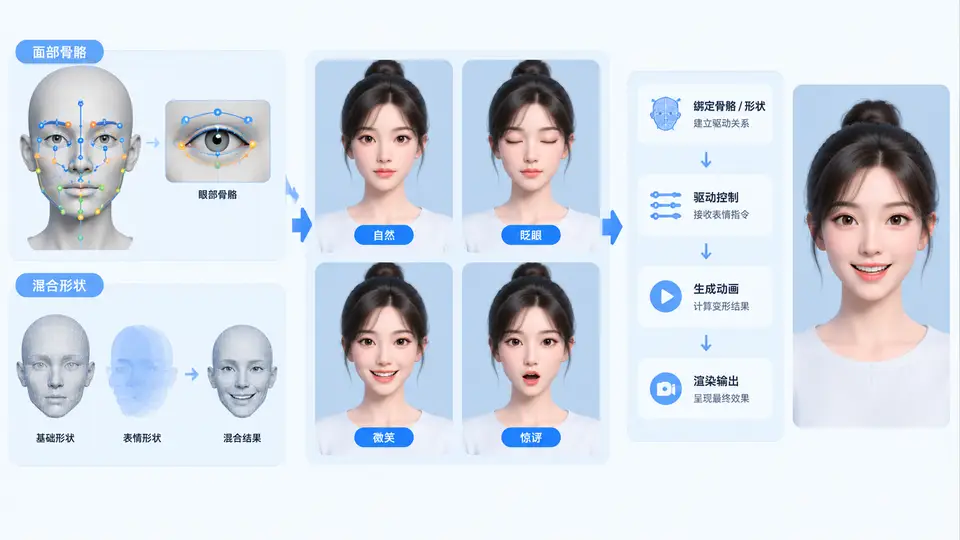
任务说明
本案例为AI数字人虚拟形象构建面部表情动画系统。目标是为一个2D虚拟形象创建基于混合形状(Blend Shape)的面部表情动画,实现眨眼与微笑两种基本表情,并支持两种表情的独立控制与组合叠加。最终交付一个可直接运行的HTML页面,通过滑块实时调节表情强度,并显示当前表情参数。
实现方案
采用SVG绘制虚拟形象面部,使用path元素的d属性定义混合形状。每个表情对应一组控制点偏移量,通过JavaScript动态计算中间状态的路径数据,实现平滑动画。眨眼通过上下眼睑控制点靠近实现,微笑通过嘴角控制点上扬实现。两种表情使用独立的强度参数(0~1),可同时生效并线性叠加。
核心代码
<!DOCTYPE html>
<html lang="zh-CN">
<head>
<meta charset="UTF-8">
<title>虚拟形象表情动画</title>
<style>
  body { font-family: Arial, sans-serif; display: flex; flex-direction: column; align-items: center; background: #f5f5f5; }
  .controls { margin: 15px; display: flex; gap: 30px; align-items: center; }
  .slider-group { display: flex; align-items: center; gap: 8px; }
  label { font-weight: bold; min-width: 40px; }
  input[type="range"] { width: 150px; }
  #params { font-family: monospace; background: #fff; padding: 8px 15px; border-radius: 5px; border: 1px solid #ccc; }
</style>
</head>
<body>
<h3>面部表情混合形状演示</h3>
<svg id="face" width="300" height="240" viewBox="0 0 300 240">
  <ellipse cx="150" cy="120" rx="75" ry="95" fill="#ffe0bd" stroke="#d4a373" stroke-width="2"/>
  <path id="left-eye" d="M110 105 Q125 90 140 105 Q125 120 110 105Z" fill="#fff" stroke="#333" stroke-width="2"/>
  <circle cx="125" cy="105" r="7" fill="#3a2e2e"/>
  <circle cx="127" cy="103" r="2.5" fill="#fff"/>
  <path id="right-eye" d="M160 105 Q175 90 190 105 Q175 120 160 105Z" fill="#fff" stroke="#333" stroke-width="2"/>
  <circle cx="175" cy="105" r="7" fill="#3a2e2e"/>
  <circle cx="177" cy="103" r="2.5" fill="#fff"/>
  <path id="mouth" d="M130 160 Q150 150 170 160" fill="none" stroke="#c1440e" stroke-width="3" stroke-linecap="round"/>
  <path d="M105 80 Q120 72 135 78" fill="none" stroke="#8b5a2b" stroke-width="2.5" stroke-linecap="round"/>
  <path d="M165 78 Q180 72 195 80" fill="none" stroke="#8b5a2b" stroke-width="2.5" stroke-linecap="round"/>
  <path d="M150 120 Q146 132 150 136 Q154 132 150 120" fill="#f0c8a0" stroke="#d4a373" stroke-width="1"/>
</svg>

<div class="controls">
  <div class="slider-group">
    <label>眨眼</label>
    <input type="range" id="blink" min="0" max="1" step="0.01" value="0">
  </div>
  <div class="slider-group">
    <label>微笑</label>
    <input type="range" id="smile" min="0" max="1" step="0.01" value="0">
  </div>
</div>
<div id="params">blink: 0.00 | smile: 0.00</div>

<script>
// 混合形状基础数据
const eyeBase = {
  left: { top: 90, bottom: 120, cx: 125 },
  right: { top: 90, bottom: 120, cx: 175 }
};
const mouthBase = { left: 130, right: 170, centerY: 155 };

function updateFace() {
  const blinkVal = parseFloat(document.getElementById('blink').value);
  const smileVal = parseFloat(document.getElementById('smile').value);

  // 眨眼:眼睑上下闭合,闭合程度由blinkVal控制
  const eyeOffset = blinkVal * 12; // 最大闭合偏移12px
  const leftEye = document.getElementById('left-eye');
  const rightEye = document.getElementById('right-eye');

  // 左眼路径:上眼睑下移,下眼睑上移
  const lTop = eyeBase.left.top + eyeOffset;
  const lBottom = eyeBase.left.bottom - eyeOffset;
  leftEye.setAttribute('d', `M110 ${105 - (eyeBase.left.top - 90) * 0} Q125 ${lTop} 140 ${105} Q125 ${lBottom} 110 105Z`);

  // 右眼路径
  const rTop = eyeBase.right.top + eyeOffset;
  const rBottom = eyeBase.right.bottom - eyeOffset;
  rightEye.setAttribute('d', `M160 ${105} Q175 ${rTop} 190 ${105} Q175 ${rBottom} 160 105Z`);

  // 微笑:嘴角上翘,弯曲度增加
  const smileOffset = smileVal * 15; // 嘴角最大上移15px
  const mouth = document.getElementById('mouth');
  const leftX = mouthBase.left;
  const rightX = mouthBase.right;
  const centerY = mouthBase.centerY - smileVal * 8; // 中部略上提
  const leftY = mouthBase.centerY + 5 - smileOffset;
  const rightY = mouthBase.centerY + 5 - smileOffset;
  mouth.setAttribute('d', `M${leftX} ${leftY} Q150 ${centerY} ${rightX} ${rightY}`);

  // 更新参数显示
  document.getElementById('params').textContent =
    `blink: ${blinkVal.toFixed(2)} | smile: ${smileVal.toFixed(2)}`;
}

// 绑定事件
document.getElementById('blink').addEventListener('input', updateFace);
document.getElementById('smile').addEventListener('input', updateFace);

// 初始化
updateFace();
</script>
</body>
</html>
运行与验证
运行方式:将上述代码保存为face_animation.html,使用现代浏览器(Chrome/Firefox/Edge)直接打开即可。
验证步骤:
- 页面加载后,面部显示为中性表情(眼睛睁开,嘴巴平直)。
- 向右拖动“眨眼”滑块至1.0,观察双眼眼睑逐渐闭合,形成闭眼状态;滑块归零后恢复睁眼。
- 向右拖动“微笑”滑块至1.0,观察嘴角明显上翘,嘴巴呈向上弯曲的弧形;滑块归零后恢复平直。
- 同时将两个滑块调至0.5,观察闭眼与微笑同时呈现,验证表情叠加效果。
- 观察页面下方参数显示,数值与滑块位置一致(精确到小数点后两位)。
判定标准:滑块连续调节时表情平滑过渡无跳变;眨眼滑块为1时眼睑完全闭合(上下眼睑接触);微笑滑块为1时嘴角上翘幅度明显(至少上移10px);两滑块同时非零时两种表情同时生效且互不干扰。