1. 开放银行API基础架构设计
任务说明
本案例要求为一家数字银行设计开放银行API的基础架构,使第三方合作伙伴能够通过标准化接口安全地访问账户信息、发起支付并查询交易记录。需要完成的任务包括:定义API网关入口、设计统一报文格式、实现OAuth 2.0客户端凭证授权、提供三个核心接口(账户查询、支付发起、交易查询),并给出可运行的代码骨架与验证方法。
基础架构设计
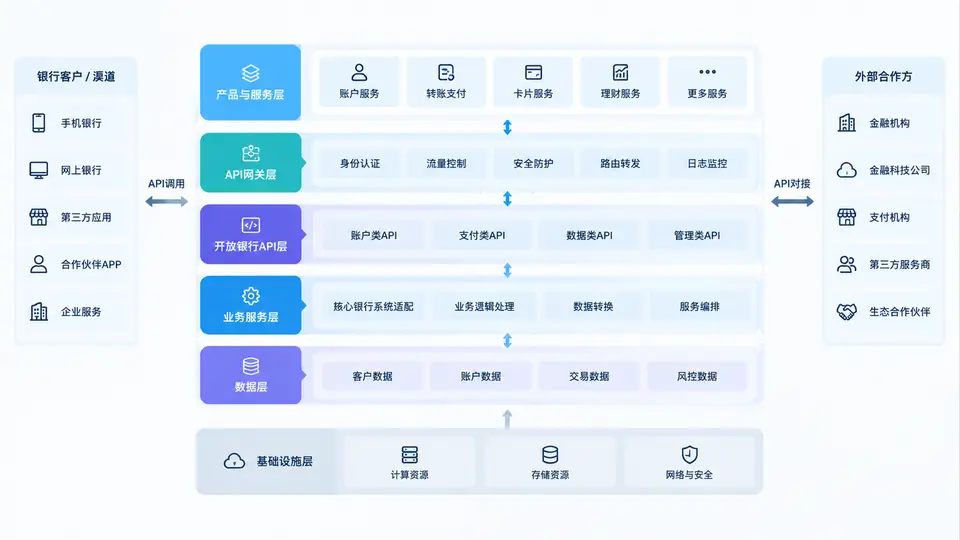
开放银行API采用分层架构,自上而下依次为:接入层(API Gateway)、授权层(OAuth 2.0服务)、业务服务层(账户/支付/交易服务)。所有外部请求必须经过API网关进行TLS终止、请求签名校验与速率限制,随后由网关调用授权服务完成令牌校验,再将请求路由至对应业务服务。报文格式统一采用JSON over HTTPS,所有时间字段使用ISO 8601标准,金额字段以分为单位的整数表示以避免浮点误差。
核心代码实现
以下代码使用Python Flask框架实现最小可复现的开放银行API骨架,包含OAuth 2.0客户端凭证模式的令牌签发与校验、账户查询接口、支付发起接口和交易查询接口。所有接口均要求携带Bearer令牌访问,令牌中包含合作伙伴ID与权限范围。
# app.py
from flask import Flask, request, jsonify
from functools import wraps
import hmac, hashlib, base64, json, time, uuid

app = Flask(__name__)

# 模拟存储:合作伙伴凭证与令牌
PARTNERS = {
    "partner_001": {"secret": "secret_key_001", "scopes": ["accounts:read", "payments:write", "transactions:read"]}
}
VALID_TOKENS = {}  #  -> {partner_id, exp, scopes}

def generate_(partner_id):
    """生成简单令牌(生产环境应使用JWT)"""
     = base64.urlsafe_b64encode(uuid.uuid4().bytes).rstrip(b'=').decode()
    VALID_TOKENS[] = {
        "partner_id": partner_id,
        "exp": time.time() + 3600,
        "scopes": PARTNERS[partner_id]["scopes"]
    }
    return

def require_auth(required_scope=None):
    """令牌校验装饰器"""
    def decorator(f):
        @wraps(f)
        def wrapper(*args, **kwargs):
            auth_header = request.headers.get("Authorization", "")
            if not auth_header.startswith("Bearer "):
                return jsonify({"error": "missing_"}), 401
             = auth_header[7:]
            _info = VALID_TOKENS.get()
            if not _info or _info["exp"] < time.time():
                return jsonify({"error": "invalid_"}), 401
            if required_scope and required_scope not in _info["scopes"]:
                return jsonify({"error": "insufficient_scope"}), 403
            request.partner_id = _info["partner_id"]
            return f(*args, **kwargs)
        return wrapper
    return decorator

# 模拟数据
ACCOUNTS = {
    "acc_001": {"id": "acc_001", "name": "张三", "balance": 500000, "currency": "CNY"},
    "acc_002": {"id": "acc_002", "name": "李四", "balance": 1200000, "currency": "CNY"}
}
TRANSACTIONS = [
    {"id": "txn_001", "account_id": "acc_001", "amount": -50000, "type": "消费", "time": "2025-01-10T10:30:00Z"},
    {"id": "txn_002", "account_id": "acc_001", "amount": 200000, "type": "工资", "time": "2025-01-15T09:00:00Z"}
]

@app.route("/oauth/", methods=["POST"])
def issue_():
    """客户端凭证模式签发令牌"""
    data = request.get_json()
    partner_id = data.get("client_id")
    client_secret = data.get("client_secret")
    grant_type = data.get("grant_type")
    if grant_type != "client_credentials":
        return jsonify({"error": "unsupported_grant_type"}), 400
    if partner_id not in PARTNERS or PARTNERS[partner_id]["secret"] != client_secret:
        return jsonify({"error": "invalid_client"}), 401
     = generate_(partner_id)
    return jsonify({"access_": , "_type": "Bearer", "expires_in": 3600})

@app.route("/v1/accounts", methods=["GET"])
@require_auth(required_scope="accounts:read")
def list_accounts():
    """账户查询接口"""
    return jsonify({"accounts": list(ACCOUNTS.values())})

@app.route("/v1/payments", methods=["POST"])
@require_auth(required_scope="payments:write")
def create_payment():
    """支付发起接口"""
    data = request.get_json()
    required_fields = ["from_account", "to_account", "amount"]
    if not all(field in data for field in required_fields):
        return jsonify({"error": "missing_fields"}), 400
    if data["from_account"] not in ACCOUNTS:
        return jsonify({"error": "invalid_from_account"}), 404
    if data["amount"] <= 0:
        return jsonify({"error": "invalid_amount"}), 400
    # 模拟支付处理
    payment_id = f"pay_{uuid.uuid4().hex[:8]}"
    return jsonify({"payment_id": payment_id, "status": "processing"}), 202

@app.route("/v1/transactions", methods=["GET"])
@require_auth(required_scope="transactions:read")
def get_transactions():
    """交易查询接口"""
    account_id = request.args.get("account_id")
    if not account_id:
        return jsonify({"error": "missing_account_id"}), 400
    result = [txn for txn in TRANSACTIONS if txn["account_id"] == account_id]
    return jsonify({"transactions": result})

if __name__ == "__main__":
    app.run(host="0.0.0.0", port=8000, debug=False)
落地与验证
运行方式:将上述代码保存为app.py,安装依赖pip install flask,执行python app.py启动服务。
验证步骤:
- 获取令牌:
curl -X POST http://localhost:8000/oauth/ -H "Content-Type: application/json" -d '{"client_id":"partner_001","client_secret":"secret_key_001","grant_type":"client_credentials"}',预期返回包含access_的JSON。 - 查询账户:使用上一步返回的令牌,执行
curl http://localhost:8000/v1/accounts -H "Authorization: Bearer <>",预期返回两个账户的JSON数组。 - 发起支付:
curl -X POST http://localhost:8000/v1/payments -H "Authorization: Bearer <>" -H "Content-Type: application/json" -d '{"from_account":"acc_001","to_account":"acc_002","amount":10000}',预期返回202状态与payment_id。 - 查询交易:
curl "http://localhost:8000/v1/transactions?account_id=acc_001" -H "Authorization: Bearer <>",预期返回该账户的两笔交易记录。
判定标准:上述四个步骤均返回预期JSON结构且HTTP状态码正确,即视为通过。若未携带令牌访问任一接口,应返回401;若携带无权限令牌访问支付接口,应返回403。