3. 交叉编译工具链的搭建与验证
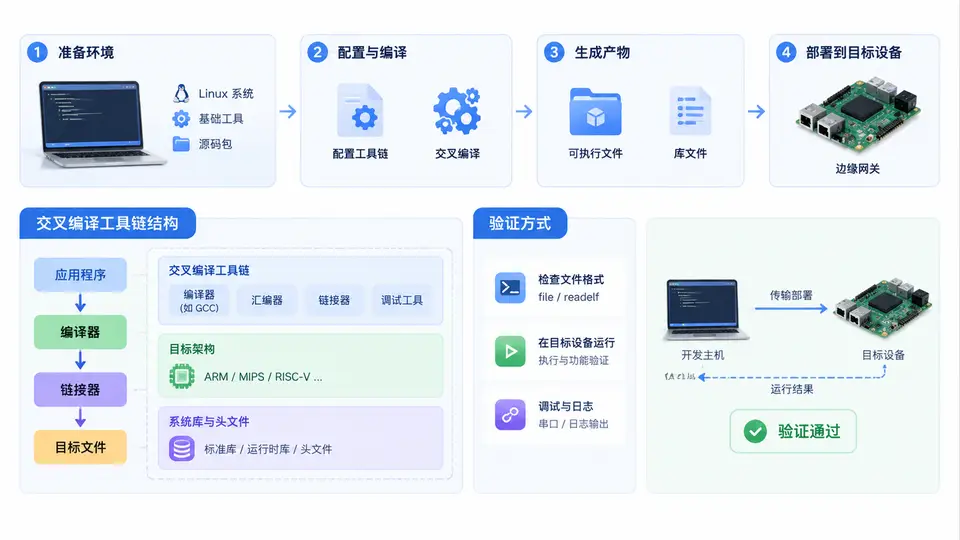
任务说明
本案例面向工业IoT边缘网关的ARM目标板(以Cortex-A7为例),在x86_64开发主机上搭建交叉编译工具链,并验证其能够生成可在目标板上运行的二进制程序。完成目标后,你将拥有一个可重复使用的交叉编译环境,并掌握验证工具链正确性的标准方法。
工具链选择与安装
采用Linaro提供的GCC交叉编译工具链(gcc-arm-linux-gnueabihf),版本7.5-2019.12,适用于ARMv7-A架构(Cortex-A7兼容)。该工具链基于glibc,支持硬浮点(hard-float),与工业网关常见的Debian/Ubuntu根文件系统匹配。
# 在开发主机(x86_64 Ubuntu 20.04/22.04)执行
# 下载并解压工具链到 /opt 目录
cd /opt
sudo wget https://releases.linaro.org/components/toolchain/binaries/7.5-2019.12/arm-linux-gnueabihf/gcc-linaro-7.5.0-2019.12-x86_64_arm-linux-gnueabihf.tar.xz
sudo tar -xf gcc-linaro-7.5.0-2019.12-x86_64_arm-linux-gnueabihf.tar.xz
sudo mv gcc-linaro-7.5.0-2019.12-x86_64_arm-linux-gnueabihf /opt/gcc-arm-linux-gnueabihf

# 添加环境变量(写入 ~/.bashrc 永久生效)
export PATH=/opt/gcc-arm-linux-gnueabihf/bin:$PATH
source ~/.bashrc

# 验证安装
arm-linux-gnueabihf-gcc --version
预期输出第一行包含 gcc version 7.5.0 及 arm-linux-gnueabihf 目标描述。若命令未找到,请检查PATH路径是否正确。
最小交叉编译验证
创建以下C源文件,用于验证工具链的基本编译、链接能力以及目标架构正确性:
// hello_gateway.c
#include <stdio.h>

int main(void) {
    printf("Edge Gateway ARM OK\n");
    return 0;
}
执行交叉编译:
arm-linux-gnueabihf-gcc -o hello_gateway hello_gateway.c
编译完成后,使用file命令检查生成文件的架构信息:
file hello_gateway
预期输出关键字段:ELF 32-bit LSB executable, ARM, EABI5 version 1 (SYSV)。若显示x86-64,则说明调用了本机gcc而非交叉编译器,需检查PATH顺序。
动态链接依赖检查
工业网关通常运行精简根文件系统,需确认二进制文件的动态库依赖在目标板上可用:
arm-linux-gnueabihf-readelf -d hello_gateway | grep NEEDED
预期输出包含libc.so.6和ld-linux-armhf.so.3。若出现其他非标准库依赖,说明代码或编译选项引入了额外库,需调整。
验证方法
完成上述步骤后,按以下标准判定工具链搭建成功:
arm-linux-gnueabihf-gcc --version能正常输出版本信息;file hello_gateway显示ARM架构而非x86;readelf显示的动态库依赖均为ARMhf标准库;- 将
hello_gateway拷贝至目标板(通过NFS、scp或SD卡),在目标板执行./hello_gateway,输出Edge Gateway ARM OK且无No such file or directory(该错误通常表示动态链接器路径不匹配)。
常见问题排查
若file命令显示架构正确但目标板执行报错,优先检查动态链接器路径:
arm-linux-gnueabihf-readelf -l hello_gateway | grep interpreter
预期输出[Requesting program interpreter: /lib/ld-linux-armhf.so.3]。若目标板根文件系统的动态链接器不在该路径,需在编译时使用-Wl,--dynamic-linker=/实际路径指定,或调整根文件系统。