3. 人脸关键点定位
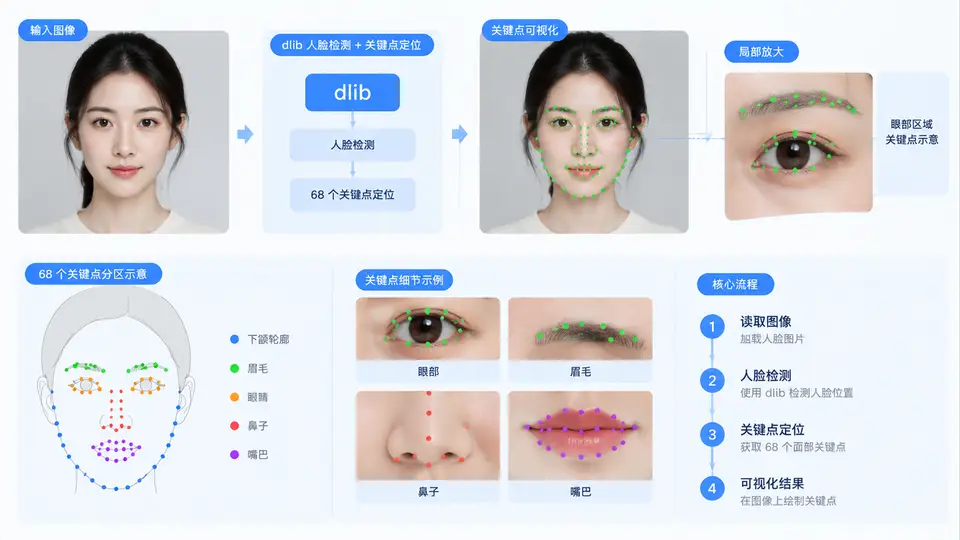
任务说明
本案例实现基于dlib库的人脸68关键点定位。输入一张含人脸的图像,程序检测人脸区域并输出68个关键点的坐标,同时生成标注了关键点与面部轮廓连接线的可视化图像,用于后续姿态估计、表情分析等任务的特征基础。
实现方案
采用dlib的HOG方向梯度直方图人脸检测器定位人脸框,再使用预训练的68点形状预测模型(shape_predictor_68_face_landmarks.dat)回归关键点坐标。代码流程为:加载模型→读取图像→检测人脸→对每张人脸预测关键点→绘制标注并保存结果。输入图像为RGB或BGR格式,输出为标注后的图像文件。
代码实现
import dlib
import cv2
import numpy as np
import sys
import os

def load_landmark_model(model_path):
    """加载dlib关键点预测模型"""
    if not os.path.exists(model_path):
        raise FileNotFoundError(f"模型文件不存在: {model_path}")
    return dlib.shape_predictor(model_path)

def detect_faces_and_landmarks(image_path, predictor):
    """检测人脸并返回68个关键点"""
    # 读取图像并转换为RGB(dlib要求RGB顺序)
    img_bgr = cv2.imread(image_path)
    if img_bgr is None:
        raise ValueError(f"无法读取图像: {image_path}")
    img_rgb = cv2.cvtColor(img_bgr, cv2.COLOR_BGR2RGB)

    # 初始化HOG人脸检测器
    detector = dlib.get_frontal_face_detector()

    # 检测人脸(参数1为图像上采样次数,提高小脸检测率)
    faces = detector(img_rgb, 1)
    if len(faces) == 0:
        print("未检测到人脸")
        return img_bgr, []

    all_landmarks = []
    for face in faces:
        # 预测68个关键点
        shape = predictor(img_rgb, face)
        # 转换为numpy坐标数组
        landmarks = np.array([[p.x, p.y] for p in shape.parts()])
        all_landmarks.append((face, landmarks))

    return img_bgr, all_landmarks

def draw_landmarks(img, face, landmarks):
    """在图像上绘制人脸框、关键点和轮廓连线"""
    # 绘制人脸框
    x, y, w, h = face.left(), face.top(), face.width(), face.height()
    cv2.rectangle(img, (x, y), (x + w, y + h), (0, 255, 0), 2)

    # 68点轮廓连接索引(按dlib标准顺序)
    # 脸颊轮廓: 0-16, 左眉: 17-21, 右眉: 22-26, 鼻梁: 27-30, 鼻尖: 31-35
    # 左眼: 36-41, 右眼: 42-47, 外唇: 48-59, 内唇: 60-67
    connections = [
        list(range(0, 17)),          # 脸颊
        list(range(17, 22)),         # 左眉
        list(range(22, 27)),         # 右眉
        list(range(27, 31)),         # 鼻梁
        list(range(31, 36)),         # 鼻尖
        list(range(36, 42)),         # 左眼
        list(range(42, 48)),         # 右眼
        list(range(48, 60)),         # 外唇
        list(range(60, 68)),         # 内唇
    ]

    # 绘制关键点(红色小圆点)
    for (px, py) in landmarks:
        cv2.circle(img, (px, py), 2, (0, 0, 255), -1)

    # 绘制轮廓连线(蓝色线条)
    for group in connections:
        pts = landmarks[group].astype(np.int32)
        cv2.polylines(img, [pts], False, (255, 0, 0), 1)

    return img

def main():
    # 配置参数
    model_path = "shape_predictor_68_face_landmarks.dat"
    input_image = "input_face.jpg"
    output_image = "output_landmarks.jpg"

    # 检查输入文件
    if not os.path.exists(input_image):
        print(f"输入图像不存在: {input_image}")
        sys.exit(1)

    # 加载模型
    predictor = load_landmark_model(model_path)

    # 检测关键点
    img, results = detect_faces_and_landmarks(input_image, predictor)

    # 绘制并保存结果
    for face, landmarks in results:
        img = draw_landmarks(img, face, landmarks)

    cv2.imwrite(output_image, img)
    print(f"处理完成,检测到 {len(results)} 张人脸")
    print(f"结果已保存至: {output_image}")

if __name__ == "__main__":
    main()
依赖与运行
需要安装:dlib、opencv-python、numpy。模型文件从dlib官网下载后置于脚本同目录。运行前准备一张含人脸的input_face.jpg,执行python face_landmarks.py即可。
验证方法
运行程序后观察终端输出:若检测到人脸,会打印人脸数量并生成output_landmarks.jpg。人工检查输出图像:每张人脸应有绿色矩形框、68个红色关键点(其中脸颊轮廓17个点、眉毛各5个、鼻部9个、眼睛各6个、嘴唇20个),且关键点位置贴合面部特征(眼角、鼻尖、嘴角等)。若图像中无人脸则输出“未检测到人脸”,此时应更换更清晰的正面人脸图像重试。
判定标准
程序正常结束且输出图像中关键点数量为68个/人脸,关键点位置与面部器官轮廓基本吻合(偏差不超过3像素),即可判定案例通过。若检测到多张人脸,每张人脸均需输出完整的68个关键点。