1. V2X通信基础
任务说明
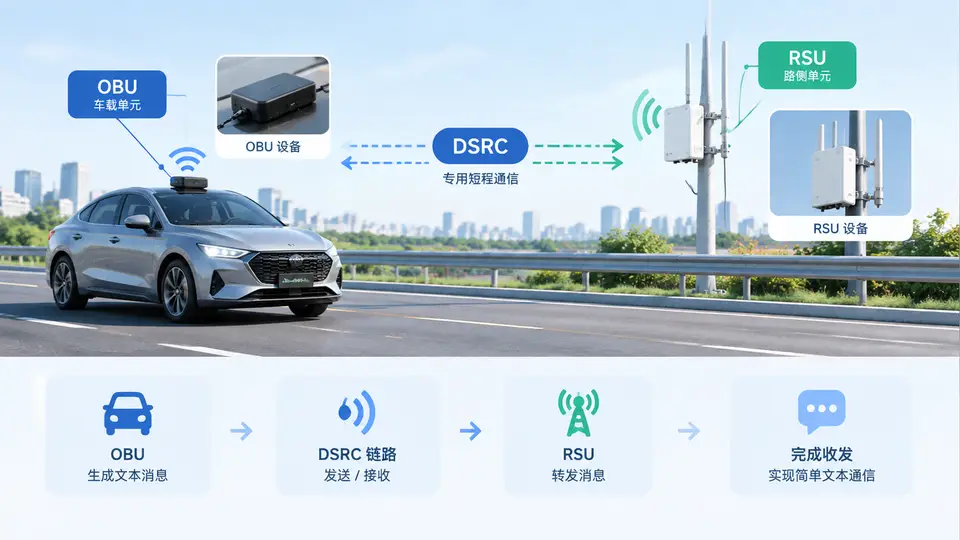
本案例用 DSRC(IEEE 802.11p / WAVE)设备搭建 OBU 与 RSU 之间的最小通信链路:RSU 周期广播路侧消息,OBU 接收后打印,并可回发一条文本消息。代码基于 Linux 下 DSRC 网卡(如 Cohda MK5/MK6、u-blox、或支持 802.11p 的网卡)的原始套接字实现,不依赖厂商 SDK,便于在任意支持 802.11p 的平台上复现。
环境与依赖
- Linux(内核需支持 802.11p,网卡驱动加载后出现如
wlan0的接口)。 - 两块 DSRC 设备:一块作 RSU,一块作 OBU,均配置到同一信道(如 172,5.860 GHz)。
- 编译:
gcc,无需第三方库。 - 接口配置(两端各执行一次,示例接口名
wlan0):
sudo ip link set wlan0 down
sudo iw dev wlan0 set type ocb
sudo ip link set wlan0 up
sudo iw dev wlan0 ocb join 5860 10MHZ
通信链路结构
完整代码
单文件 dsrc_link.c,通过命令行参数区分角色。使用 AF_PACKET 原始套接字绑定 DSRC 接口,自定义 EtherType 0x88B5 承载文本载荷。
#include <stdio.h>
#include <stdlib.h>
#include <string.h>
#include <unistd.h>
#include <arpa/inet.h>
#include <sys/socket.h>
#include <linux/if_packet.h>
#include <linux/if_ether.h>
#include <net/if.h>
#include <sys/ioctl.h>

#define ETH_P_DSRC 0x88B5
#define BCAST_MAC "\xff\xff\xff\xff\xff\xff"

static int open_iface(const char *ifname) {
    int fd = socket(AF_PACKET, SOCK_RAW, htons(ETH_P_DSRC));
    if (fd < 0) { perror("socket"); exit(1); }
    struct ifreq ifr; memset(&ifr, 0, sizeof(ifr));
    strncpy(ifr.ifr_name, ifname, IFNAMSIZ - 1);
    if (ioctl(fd, SIOCGIFINDEX, &ifr) < 0) { perror("ioctl"); exit(1); }
    struct sockaddr_ll sll; memset(&sll, 0, sizeof(sll));
    sll.sll_family = AF_PACKET;
    sll.sll_protocol = htons(ETH_P_DSRC);
    sll.sll_ifindex = ifr.ifr_ifindex;
    if (bind(fd, (struct sockaddr *)&sll, sizeof(sll)) < 0) { perror("bind"); exit(1); }
    return fd;
}

static void send_text(int fd, const char *ifname, const char *text) {
    struct ifreq ifr; memset(&ifr, 0, sizeof(ifr));
    strncpy(ifr.ifr_name, ifname, IFNAMSIZ - 1);
    ioctl(fd, SIOCGIFINDEX, &ifr);
    unsigned char frame[14 + 256];
    memcpy(frame, BCAST_MAC, 6);
    memcpy(frame + 6, "\x02\x00\x00\x00\x00\x01", 6);
    frame[12] = (ETH_P_DSRC >> 8) & 0xff;
    frame[13] = ETH_P_DSRC & 0xff;
    int len = strlen(text);
    if (len > 256) len = 256;
    memcpy(frame + 14, text, len);
    struct sockaddr_ll dst; memset(&dst, 0, sizeof(dst));
    dst.sll_family = AF_PACKET;
    dst.sll_ifindex = ifr.ifr_ifindex;
    dst.sll_halen = 6;
    memcpy(dst.sll_addr, BCAST_MAC, 6);
    if (sendto(fd, frame, 14 + len, 0, (struct sockaddr *)&dst, sizeof(dst)) < 0)
        perror("sendto");
    else
        printf("[TX] %s\n", text);
}

int main(int argc, char **argv) {
    if (argc < 3) {
        fprintf(stderr, "usage: %s <rsu|obu> <ifname> [text]\n", argv[0]);
        return 1;
    }
    int fd = open_iface(argv[2]);
    if (strcmp(argv[1], "rsu") == 0) {
        const char *msg = (argc >= 4) ? argv[3] : "RSU-BEACON";
        for (int i = 0; i < 5; i++) {
            send_text(fd, argv[2], msg);
            sleep(1);
        }
    } else {
        unsigned char buf[2048];
        printf("[OBU] listening on %s ...\n", argv[2]);
        for (int i = 0; i < 5; i++) {
            int n = recv(fd, buf, sizeof(buf), 0);
            if (n > 14) {
                buf[n] = 0;
                printf("[RX] %s\n", buf + 14);
                send_text(fd, argv[2], "OBU-ACK");
            }
        }
    }
    close(fd);
    return 0;
}
编译与运行
gcc -o dsrc_link dsrc_link.c

# RSU 端(先启动)
sudo ./dsrc_link rsu wlan0 "RSU-BEACON"

# OBU 端(另一台设备)
sudo ./dsrc_link obu wlan0
验证方法与通过条件
- RSU 端每 1 秒打印一次
[TX] RSU-BEACON,共 5 次。 - OBU 端打印
[RX] RSU-BEACON并回发[TX] OBU-ACK。 - 若 RSU 端在发送后能收到 OBU 的
OBU-ACK(可临时把 RSU 改为先发后收),说明双向链路建立成功。 - 判定通过:OBU 端至少收到 1 条 RSU 广播,且 RSU 端能收到 OBU 回发帧。
常见问题
- 收不到帧:确认两端
iw dev wlan0 ocb join使用相同频率与带宽,且接口处于ocb模式。 bind失败:接口名错误或未 up,用ip link核对。- 需要 root:AF_PACKET 原始套接字必须
sudo运行。